Category: Uncategorized

What is a Data Center Architecture and how to design one?
data center architecture


What is a Data Center Architecture, and how to design one?

As businesses scale and data demands increase, the structure and strategy behind your data center architecture become more critical than ever. Traditional data centers—characterized by rows of servers housed in physical racks—were complex to manage, costly to maintain, and prone to inefficiencies. These systems required constant attention, from patching and updates to power management and cooling—leading to growing investments in data center infrastructure and optimization efforts.

Today, modern organizations are shifting towards more agile and scalable solutions. Enter cloud data center architecture, modular data center design, and edge data center design—innovative models that are transforming the way data is processed and delivered. These modern approaches focus on flexibility, energy efficiency, and proximity to the user, improving performance and reducing latency.

This blog will guide you through the essentials of data center layout and design, exploring how virtualization and cloud integration reshape traditional data center planning. Whether you’re building from scratch or optimizing an existing setup, understanding how to balance physical infrastructure with cloud scalability is key. By leveraging modular and edge designs, businesses can create a resilient and future-ready data center that meets evolving demands.


Types of Data Center Architecture

There are four primary types of data center architecture, each tailored to different needs: super spine mesh, mesh point of delivery (PoD), three-tier or multi-tier model, and meshwork.

  1. Mesh Network System: The mesh network system facilitates data exchange among interconnected switches, forming a network fabric. It’s a cost-effective option with distributed designs, ideal for cloud services due to predictable capacity and reduced latency.
  2. Three-Tier or Multi-Tier Model: This architecture features core, aggregation, and access layers, facilitating packet movement, integration of service modules, and connection to server resources. It’s widely used in enterprise data centers for its scalability and versatility.
  3. Mesh Point of Delivery: The PoD design comprises leaf switches interconnected within PoDs, promoting modularity and scalability. It efficiently connects multiple PoDs and super-spine tiers, enhancing data flow for cloud applications.
  4. Super Spine Mesh: Popular in hyperscale data centers, the super spine mesh includes an additional super spine layer to accommodate more spine switches. This enhances resilience and performance, making it suitable for handling massive data volumes.


Fundamentals of a Data Center Architecture

Understanding the fundamentals of data center architecture is crucial for businesses aiming to optimize their IT infrastructure. At the heart of this architecture lies the colocation data center, offering a shared facility for housing servers and networking equipment. Effective data center management is essential for ensuring seamless operations and maximizing resource utilization.

When designing a data center architecture, several factors must be considered to meet the organization’s requirements for reliability, scalability, and security. Robust data center services and solutions are key components, encompassing power and cooling systems, network connectivity, and security measures.

A data center design and architecture involves careful planning to achieve optimal layout and efficient resource allocation. This includes determining the right balance between space utilization and equipment density while ensuring adequate airflow and cooling capacity.

By leveraging advanced data center solutions and best practices in data center management, organizations can design architectures that deliver high performance, reliability, and scalability to support their evolving business needs.


What is a data center architecture?

In simple terms, it describes how computer resources (CPUs, storage, networking, and software) are organized or arranged in a data center. As you may expect, there are almost infinite architectures. The only constraint is the number of resources a company can afford to include. Still, we usually don’t discuss data center network architecture in terms of their various permutations but rather in terms of their essential functionality.

A data center is a physical facility where data and computing equipment are stored, enabling central processing, storage, and exchange of data. Modern data center architecture involves planning how switches and servers will connect, typically during the planning and construction phases. This blueprint guides the design and construction of the building, specifying the placement of servers, storage, networking, racks, and resources. It outlines the data center networking architecture, detailing how these components will connect. Additionally, it encompasses the data center security architecture, ensuring secure operations and safeguarding data. Overall, it provides a comprehensive framework for efficient data center operations.

Today’s data centers are becoming much larger and more complex. Because of their size, the hardware requirements vary from workload to workload and even day to day. In addition, some workloads may require more memory capacity or faster processing speed than others so data center optimization becomes necessary.

In such cases, leveraging high-end devices will ensure that the TCO (total cost of ownership) is lower. But because the management and operations staff are so large, this strategy can be costly and ineffective. For this reason, it’s important to choose the right architecture for your organization.

While all data centers use virtualized servers, there are other important considerations for designing a data center. The building’s design must take into account the facilities and premises. The choice of technologies and interactions between the various hardware and software layers will ultimately affect the data center’s performance and efficiency.

For instance, a data center design may need sophisticated fire suppression systems and a control center where staff can monitor server performance and the physical plant. Additionally, a data center should be designed to provide the highest levels of security and privacy.


How to Design a Data Center Architecture

The question of how to design the architecture of data center has a number of answers. Before implementing any new data center technology, owners should first define the performance parameters and establish a financial model. The design of the architecture must satisfy the performance requirements of the business.

Several considerations are necessary before starting the data center construction. First, the data center premises and facility should be considered. Then, the design should be based on the technology selection.  There should be an emphasis on availability. This is often reflected by an operational or Service Level Agreement (SLA). And, of course, the design should be cost-effective.

Another important aspect of data center design is the size of the data center itself. While the number of servers and racks may not be significant, the infrastructure components will require a significant amount of space.

For example, the mechanical and electrical equipment required by a data center will require significant space. Additionally, many organizations will need office space, an equipment yard, and IT equipment staging areas. The design must address these needs before creating a space plan.

When selecting the technology for a data center, the architect should understand the tradeoffs between cost, reliability, and scalability. It should also be flexible enough to allow for the fast deployment and support of new services or applications. Flexibility can provide a competitive advantage in the long run, so careful planning is required. A flexible data center with an advanced architecture that allows for scalability is likely to be more successful.

Considering availability is also essential it should also be secure, which means that it should be able to withstand any attacks and not be vulnerable to malicious attacks.

By using the technologies like ACL (access control list) and IDS (intrusion detection system), the data center architecture should support the business’s mission and the business objectives. The right architecture will not only increase the company’s revenue but will also be more productive.
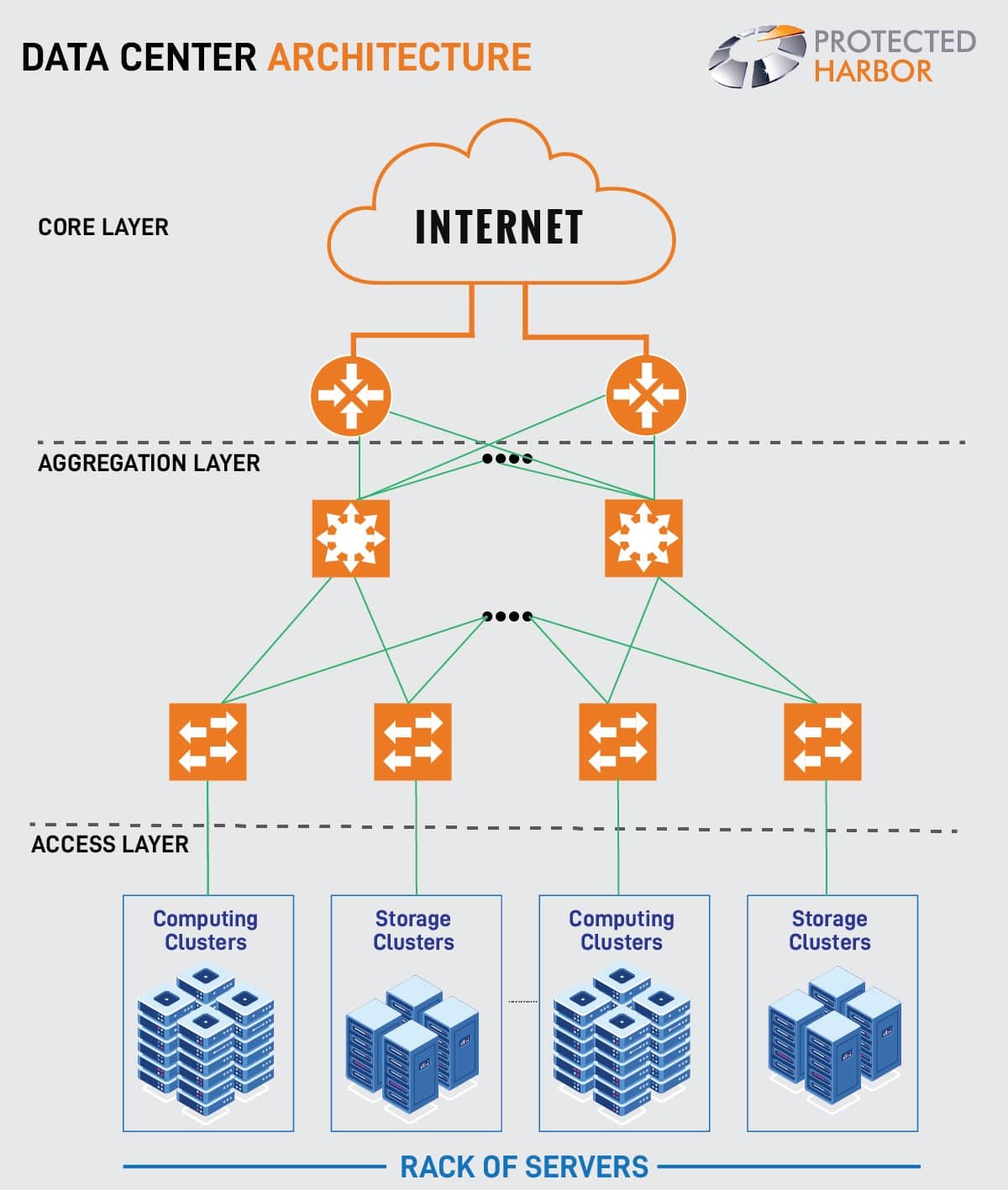
data center archietecture.


Data center tiers:

Data centers are rated by tier to indicate expected uptime and dependability:

Tier 1 data centers have a single power and cooling line, as well as few if any, redundancy and backup components. It has a 99.671 percent projected uptime (28.8 hours of downtime annually).

Tier 2 data centers have a single power and cooling channel, as well as some redundant and backup components. It has a 99.741 percent projected uptime (22 hours of downtime annually).

Tier 3 data centers include numerous power and cooling paths, as well as procedures in place to update and maintain them without bringing them offline. It has a 99.982 percent anticipated uptime (1.6 hours of downtime annually).

Tier 4 data centers are designed to be totally fault-tolerant, with redundancy in every component. It has a 99.995 percent predicted uptime (26.3 minutes of downtime annually).

Your service level agreement (SLAs) and other variables will determine which data center tier you require.

In a data center architecture, core infrastructure services should be the priority. The latter should include data storage and network services. Traditional data centers utilize physical components for these functions. In contrast, Platform as a Service (PaaS) does not require a physical component layer.

Nevertheless, both types of technologies need a strong core infrastructure. The latter is the primary concern of most organizations, as it provides the platform for the business. DCaaS and DCIM are also a popular choice among the organizations.

Data Center as a Service (DCaaS) is a hosting service providing physical data center infrastructure and facilities to clients. DCaaS allows clients remote access to the provider’s storage, server and networking resources through a Wide-Area Network (WAN).

The convergence of IT and building facilities functions inside an enterprise is known as data center infrastructure management (DCIM). A DCIM initiative aims to give managers a comprehensive perspective of a data center’s performance so that energy, equipment, and floor space are all used as efficiently as possible.


Data Center Requirements

To achieve operational efficiency, reliability, and scalability, a data center setup must meet stringent requirements. The following are critical considerations:

1. Reliability and Redundancy– Ensuring high performance and uninterrupted services necessitates robust data center redundancy. This includes having redundant power sources, networking infrastructure, and cooling systems. Data center redundancy is crucial to mitigate the risk of downtime and maintain continuous operations.

2. Scalability– With data volumes growing exponentially, data centers must be scalable to accommodate future growth without compromising performance. Scalable infrastructure allows for seamless expansion and adaptation to increasing demands, ensuring long-term operational effectiveness.

3. Security– Data center security is paramount due to the sensitive information stored within these facilities. To protect data integrity and privacy, stringent security measures such as access controls, continuous monitoring, and encryption are essential. Robust data center security protocols help safeguard against breaches and unauthorized access.

4. Efficiency– Optimizing data center efficiency is essential for reducing operational expenses and minimizing environmental impact. Efficient energy use in data centers lowers costs and promotes sustainability. Implementing energy-efficient technologies and practices enhances overall data center efficiency, contributing to a greener operation.

By focusing on data center security, efficiency, and redundancy, organizations can ensure their data centers are well-equipped to handle current and future demands while maintaining high performance and reliability.


Conclusion

Data centers have seen significant transformations in recent years. Data center infrastructure has transitioned from on-premises servers to virtualized infrastructure that supports workloads across pools of physical infrastructure and multi-cloud environments as enterprise IT demands to continue to migrate toward on-demand services.

Two key questions remain the same regardless of which current design strategy is chosen.

  • How do you manage computation, storage, and networks that are differentiated and geographically dispersed?
  • How do you go about doing it safely?

Because the expense of running your own data center is too expensive and you receive no assistance, add in the cost of your on-site IT personnel once more. DCaaS and DCIM have grown in popularity.

Most organizations will benefit from DCaaS and DCIM, but keep in mind that with DCaaS, you are responsible for providing your own hardware and stack maintenance. As a result, you may require additional assistance in maintaining those.

You get the team to manage your stacks for you with DCIM. The team is responsible for the system’s overall performance, uptime, and needs, as well as its safety and security. You will receive greater support and peace of mind if you partner with the proper solution providers who understand your business and requirements.

If you’re seeking to create your data center and want to maximize uptime and efficiency, The Protected Harbor data center is a secure, hardened DCIM that offers unmatched uptime and reliability for your applications and data. This facility can operate as the brain of your data center, offering unheard-of data center stability and durability.

In addition to preventing outages, it enables your growth while providing superior security against ransomware and other attacks. For more information on how we can help create your data center while staying protected, contact us today.


How we spent New Year 2022


How we spent New Year 2022


How we spent New Year 2022

While the world was busy welcoming the new year, Protected Harbor ensured that our customers were still up and running, regardless of date and time. Shortly after midnight on January 1st, 2022, our monitoring system raised an unusual condition, as emails suddenly stopped being transmitted for a client and instead started to build up. A build-up of outbound emails triggered the Application Outage Avoidance alert. Our team started the new year off doing what we love: helping businesses stay protected and productive.

What happened?

The email server was experiencing an error, stopping outbound emails from being delivered.

The Manager on duty, Fasif VP, immediately responded and found the problem was something we hadn’t experienced before. Fasif followed Protected Harbor protocols by restarting services, troubleshooting, and rebooting cluster nodes. Regardless of what he did, emails were still not being sent. Nick Solimando, our Director of Technology, was dispatched to investigate.

Nick confirmed Fasif’s concern. We had never encountered this error before. Nick walked through the standard procedure, reviewing the steps Fasif had taken to confirm the issue. Nick could not find a solution despite bypassing our reputation filter and moving emails from one node to another. Upon further investigation, Nick found other people over the internet are experiencing the same issue, indicating that there was a problem in the programming code of the server. His experience and intuition led him to disable the internal email filter, and emails began to flow again.

Eventually, he found a REDDIT thread – Exchange 2019 Anti-Malware – Bad Update? : sysadmin (reddit.com) covering the issue. One thing about the people at Protected Harbor, they are eager to learn. Technology is constantly changing, and our team needs to stay up to date. We are never egotistical enough to believe we know it all and enjoy working with the IT support and MSP community to stay on top of new trends and issues.

From beginning to end, the event took 40 minutes. Our customers were unaware of this event, nor did we receive a single support call or ticket regarding missing emails.

It’s just another day at Protected Harbor – where we solve problems others cannot.

Protected Harbor celebrated this new year by standing true to its name, protecting and delivering the customers at any cost, no matter the day and time. Customer satisfaction is the utmost priority, and this is what we strive to do.

“This is an example of events that customers are unaware of occurring but are the hallmark of the difference between other MSPs and us.  As CEO of a technical architecture company, there are the events I am most proud of.”     -Richard Luna, CEO, Protected Harbor

Closing thoughts and future plans!

We’ve all heard the saying, “Know thy customer.” It’s a simple concept that’s been around for ages. But it is also one of the most critical factors in creating a successful brand. If you know your customers—their struggles, their needs, and what they expect from you—you’ll be able to create a brand that resonates with them.

Having complete control and management of all our internal technology is our core philosophy to deliver better customer uptime, experience, durability, and responsiveness.
We refer to ourselves as the Anti-MSP since we take an opposite approach to most Managed Service Providers (MSPs). The majority of MSPs are now just reselling cloud services; they have no control over, or understanding of, the technology they are managing.
A more extreme example of this was the Office 365 attacks from 2021 when thousands of company emails were compromised due to the MSP that managed the accounts.
As the ANTI-MSP, your responsibilities are more significant.  We must respond 24 hours per day, 365 days per year, including on New Year’s Day 2022, since we control and manage our technology.

We plan to protect the customers and deliver at all costs in the future. The customer is interested in how we can help them with their IT needs, not what we offer. We need to articulate that value proposition and then deliver on it.

The good thing is that the new year brings a fresh start, and we are all ready to start something new. Switch from a reseller MSP to the experts who understand your needs. We at Protected Harbor are excited about the industry’s future and are looking forward to delighting our customers with unmatched services and solutions. Let’s get started with the new year 2022! Learn how we do this.[/vc_column_text][/vc_column][/vc_row]

Data Center Risk Assessments

Data Center Risk Assessments


Data Center Risk Assessments

Data Center Risk Assessment is designed to provide IT executives and staff a deep evaluation of all of the risks associated with delivering IT service. We need IT infrastructure risk management and monitoring system to monitor everything on datacenter for better performance.

Risk assessments include following:

Datacenter Heat monitoring

Datacenter have racks of high specification servers and those will produce high level of heat. This is one of a physical security risks as server room must be equipped with cooling system with humidity sensors for monitoring. If the cooling system fail, high temperature will cause system failure and that will cause our clients.

Electricity

All electrical equipment’s needs power, UPS will help us to protect Servers and networking devices from power failure but Cooling system will not work when power lost, that will cause high temperature in server room and that will cause server failure. To avoid this we must need to use automatic backup generator so it will help cooling system work all the time while we face any power lost.

Door access

Unauthorized entry to datacenter is major concern, we must conduct a data center vulnerability analysis and monitor data center security as who all entering to our datacenter. Biometric operated door will help us protect unauthorized entry.

Operations Review

We will make sure all the necessary items are monitoring and will make sure all devices are updated. We will conduct maintenance for all devices in our datacenter to provide 100% uptime for our clients. Risk mitigation strategies and a high quality maintenance program keeps operational risks away and equipment in like new condition and maximize reliability performance.

Capacity management Review

Capacity management determines whether your infrastructure and services are capable of meeting your targets for capacity and performance for growth. We will assess your space, power and cooling capacity management processes.

Change Management

A robust change management system should be put in place for any activity.  The change management system should include a format review process based on well-defined and capture all activities that can occur at the datacenter. Basically any activity with real potential for impact on the data center must be formally scheduled and then approved by accountable persons.


Best Practices for Data Center Risk Assessment

Effective data center risk management is crucial for maintaining uptime, security, and performance. A comprehensive risk assessment for data centers should include the following best practices:

  1. Identify Potential Data Center Vulnerabilities:
    Start by evaluating physical security risks, power systems, cooling mechanisms, and network infrastructure for weak points. With data center vulnerability analysis, assess risks related to natural disasters, cyberattacks, and human error.
  2. Evaluate Disaster Recovery Plans:
    A robust data center disaster recovery strategy is essential. Test your risk mitigation strategies and recovery plans regularly to ensure minimal downtime and data integrity in case of emergencies.
  3. Perform Regular Audits and Testing:
    Periodic assessments of systems, policies, and procedures help uncover hidden risks including operational risks. Use tools like vulnerability scanners and conduct simulated disaster drills to identify gaps.
  4. Implement Redundancy and Failover Systems:
    IT infrastructure risk management reduces data center security risks by having backup power supplies, redundant cooling, and failover networks. This ensures continuity even during disruptions.

Proactively addressing data center vulnerabilities ensures your organization is prepared for potential threats, minimizing downtime and safeguarding critical operations.

What security risks exist when working from home?

Security Threats of Work from Home


What are the Security Threats of Work from Home?


With COVID-19 changing the way we work, employees using personal devices at home expose themselves to greater security risks.  Rest assured hackers and malware programs are working overtime to exploit gaps and security oversights.

So what should employers do to ensure their systems remain free of hacks, ransomware attacks, and viruses?

Some employees may think their home is secure and private, however, they most likely will still be less secure than any corporate infrastructures.  Employees’ home offices probably don’t have hardware firewalls in place, multifactor authentications, or VPN’s.   These should all be considered and implemented by someone who is well versed in IT.

One of the most prevalent problems facing employees working at home is email scams.  Yes, they have been around forever but are problematic and sophisticated.  Today’s “scammers” are getting smarter and some phishing scams are created to take advantage of the current work from home scenarios.  These scams can include names of company personnel and may send users to a fake login portal or ask workers to forward login information.

In today’s climate, companies are faced with making things up as they go along because often, they don’t have the time or resources to dedicate to the growing number of work from home offices.  It would be prudent to educate employees on current cyber-crimes and offer training to ensure best practices are adhered to. Multifactor authentication is a key component to prevent attacks.

It is important to provide the necessary steps to in keeping your systems secure and this should never come at the cost of security.  Remote work policies should be monitored and updated often.  Security is never complete because the latest generation of cyber-criminals are bolder and can adapt to endless scenarios.

This is where a company like Protected Harbor can help.  Protected Harbor helps businesses across the US address their current IT needs by building custom, cost-effective solutions.  Our unique technology experts evaluate current systems, determine the needs then design cost-effective solutions. On average, we are able to save clients up to 30% on IT costs while increasing their security, productivity, and durability.  We work with many internal IT departments, freeing them up to concentrate on daily workloads while we do the heavy lifting.  www.protectedharbor.com

Why Virtualization Should Be Considered?

Why Virtualization Should Be Considered


Why Virtualization Should Be Considered?

Changing your IT environment to one that is Virtual allows you to instantly access nearly endless system resources that make for all-around optimal performance for your business. Virtualization also gets rid of potentially hazardous server rooms, cables, and bulky hardware; reducing overall IT costs as well as management expenditures.

First, let’s take a look at what Virtualization actually is.  Virtualization is the process of migrating physical systems into a virtual environment. Essentially, it is the creation of a virtual device, resource, or operating system. By providing a virtual view of your systems, this allows you to turn one server into a host for a group of servers that all share the same resources.

By concentrating your storage and systems on servers and installing virtual machines (VMs) to end-users, costs of your systems/infrastructure will be reduced while, management, security, uptime and control, will all be optimized and faster.

Often, many think of virtualization as the actual cloud, however, the cloud is just a piece of virtualization.  The most vital function of virtualization is the ability to run multiple operating systems and or applications on a single server.  In doing this, productivity can be achieved by fewer servers.  Overall, application performance will typically improve as a result of technology that balances resources and delivers what the end-user needs.

Virtualization is a solution for many organizations, however, it’s not for every business.  So how do you determine if this application is right for your environment?

  1. If your company relies on multiple servers and is using laptops and networks, virtualizing the environment will immediately reduce capital costs since there will no longer be the need to pay upfront for hardware.
  2. Virtual environments enable you to run multiple operating systems on the same hardware, hence increasing the flexibility of your infrastructure. Many businesses spend a ton of money on an extra room to store large server racks, wires and pay IT personnel to maintain everything. In this scenario, virtualization will help reduce hardware costs while freeing up room space that can be utilized for other things.
  3. Infrastructure environments that are virtualized allow for rapid and simple scaling – up or down. If your server needs more processing or memory, resources can be easily added.  The days of needing to physically add CPUs or RAM would be over because this concept is done with physical servers.
  4. Most maintenance tasks can be managed easily off-site and don’t require sending techs on site (another cost-saving feature). Also, the maintenance tasks can also be set up to run themselves across a variety of scenarios.

Why would you NOT virtualize?

If you run a very small business or a simple server scenario you might not need virtualization.  While virtualization will save you money, there are set up costs involved. Perhaps you are not prepared for those expenditures at your current juncture.  There is no point in virtualizing your systems if you can’t afford the tools and management systems required to support the technology.

Another reason would be if your software license does not allow you to run on virtual machines. It is always best to avoid anything that could breach your software license agreement, so be sure to check this before moving forward with virtualizing.

Protected Harbor delivers end to end IT solutions ranging from custom-designed systems, data center management, disaster recovery, ransomware protection, cloud services and more.  On average, we save clients up to 30% on IT costs while increasing their productivity, durability and sustainability.  Let our unique technology experts evaluate your current systems and design cost-effective, secure options.

If you are looking to learn more about virtualization solutions, contact Protected Harbor.  www.protectedharbor.com  845-573-1098

The S. Hekemian Group Success Story

The S. Hekemian Group Success Stories

Protected Harbor Helps Hekemian Group Overcome Server & ISP Challenges

Protected Harbor was hired to manage servers, ISP and more for nationwide real estate developer, The S. Hekemian Group.

PROTECTED HARBOR QUICKLY JUMPED IN TO PROVIDE 24/7 MONITORING

Protected Harbor Helps Real Estate Developer Overcome Server & ISP Challenges

Nationwide real estate developer, The S. Hekemian Group, contracted Protected Harbor to take over the management of its servers and ISP.

Sharon McGuire is an executive administrator at The S. Hekemian Group, and while she understands the company’s servers and software, she needed an IT team to help her set up and monitor both on a full-time basis. The S. Hekemian Group is one of the country’s most stable property owners and developers, with a highly selective portfolio of luxury residential, office, and mixed-use properties throughout the United States. While the real estate group has certainly built its reputation, they were lacking in their IT department.

Once McGuire contracted Protected Harbor, after being referred from another trusted vendor, she began to see the expertise of their staff with the de-installation and new installation for their main office relocation as well as the build, upgrade and maintenance of servers in other satellite offices.

Protected Harbor was also able to set-up server access for all of the S. Hekemian Group’s employees. Employees have access to servers via other means, including laptops, and if ever there is a problem, a ticket is placed to the Protected Harbor help desk and someone contacts them immediately.

McGuire also noted the ease of the Protected Harbor ticketing system for everyone in the company to use directly from their computer or laptop.


Another big problem identified when they began working with Protected Harbor, was the group’s lack of a reliable Internet Service Provider. Protected Harbor quickly jumped in to provide 24/7 monitoring of the fluctuating service provided by Hekemian’s ISP.

“Protected Harbor knows when I am down before I even know. I get a notification as soon as we are down, and another one as soon as they have us back up, so a lot of stuff is taken care of before we know it’s even a problem,” said McGuire.

Being a nationwide real estate developer, McGuire said the company has to keep its various software, from accounting to construction, up to date. The company relies on the expertise of Protected Harbor technicians and the company leadership to make sure they have the back-end capacity to house any new software they are considering.

“Protected Harbor handles a lot of stuff that other tech companies won’t or are not capable of,” said McGuire. “They ask all the right questions on our behalf to make sure we make the right choices when purchasing new software, which saves me an incredible amount of work and time so I can focus on other things for the company.”

Protected Harbor runs a daily back up of the company’s servers and makes sure the server is compatible with their software.

McGuire counts on Protected Harbor at all times – day or night – and remembers being in close contact with them during a major storm affecting their main office.

“If you surround yourself with good people, it makes your job a lot easier,” said McGuire. “Protected Harbor is tremendous; they really are tremendous.”

Ashar Success Story

Ashar Success Stories


Ashar Success Stories

PROTECTED HARBOR IMPLEMENTED BETTER TECH SECURITY & SOFTWARE
Since ASHAR started working with Protected Harbor, the school has grown from 300 to over 500 students.

With the Help of Protected Harbor, Private School Grows Student Base

New York K-8 private school, ASHAR, grew their student base from 300 to 500+ by implementing better tech security and easy to manage software for staff and students.

David Katznelson is the Executive Director at ASHAR, a K-8 private school in New York. The school needed to update its entire structure from their school’s WIFI network to the individual devices students were using during lessons, and Protected Harbor was the right fit.

With Protected Harbor on board, the school updated from tablets to wireless Chromebooks so students could access their work more securely and easily.

Protected Harbor integrated the new technology with the school’s system seamlessly.

“Every day, a teacher comes in, picks up a rack of Chromebooks and takes them to his or her classroom for the lesson. This would not have been possible without the help of Protected Harbor who manages all users and the Google domain,” said Katznelson. “They can turn on any features we’re are not familiar with and help us make each student’s experience the best.”

This helped the school improve engagement and scoring for their existing students and served as a perk for new student recruitment and enrollment.

“Because they work with other schools, they are able to guide us and tell us to do what’s best for the students which is invaluable.”

In just a short time after working with Protected Harbor, ASHAR’s entire IT infrastructure was updated.

Protected Harbor rebuilt the school’s subnet. The way the infrastructure was laid out prior prevented ASHAR from scaling seamlessly in line with the growth of student admission.

So Protected Harbor figured out and implemented a way to solve all these problems.

Protected Harbor reconfigured all WIFI hot spots throughout the campus and worked on all four of the school’s main servers, correcting all identified problems. Prior to this, there were lots of slowdowns and limited WIFI access in some areas of campus. Now, there are hot spots in every classroom, no dead zones or service interruption when traveling throughout the campus.

“This is a company that will do whatever it takes so your bottom line can improve,” said Katznelson. To get us up to par and to straighten out our issues, Protected Harbor technicians spent almost 72 hours here!”

Now, ASHAR’s servers are even faster and with much less downtime.

Protected Harbor updated ASHAR to virtual machines as doing so fit their model, and now with proper backups, server down time is limited.

ASHAR keeps Protected Harbor on staff 24/7 with their ongoing tech support. They have remote support available to all office and teaching staff and continue to find the best and safest technology for ASHAR’s students.

“Protected Harbor stays on top of the IT industry and remains knowledgeable as the world progresses,” said Katznelson. They have helped us function more efficiently in servicing our customers, which are students.”

HARC Success Story

HARC Success stories

PROTECTED HARBOR ENSURES HARC’S 500+ EMPLOYEES ARE ALWAYS UP & RUNNING
Protected Harbor Helps Strengthen & Grow Company that Serves Individuals with Intellectual Disabilities

Non-profit organization, HARC, Inc. contracted Protected Harbor and saw its IT challenges dwindle as Protected Harbor started taking a more proactive approach to keeping the company’s systems up to date.

Gregory is the COO at HARC, a non-profit that serves individuals with intellectual disabilities. He recently inherited the task of overseeing the company’s IT department and needed a partner like Protected Harbor to be successful.

Prior to working with Protected Harbor, HARC’s IT department was reactive in dealing with any IT issues. The company’s system was failing; with down email and Internet problems. After starting their working relationship with Protected Harbor, HARC quickly saw that having an IT service provider with a team who is constantly monitoring and available through an on-call system and call center, made their day-to-day operations much more effective.

CONTEXTUAL TECHNOLOGY: WHAT IS IT?

WHAT IS CONTEXTUAL TECHNOLOGY


WHAT IS CONTEXTUAL TECHNOLOGY?


Many of you who’ve heard me speak about our services hear me use the term “Contextual Technology”. I stress to my team that we provide a Contextual Technology environment for our clients.


But what is Contextual Technology?

In short, it means technology from the end-users point of view. The dictionary definition of Contextual is; of, pertaining to, or depending on the context. When applied to technology, the context is how useful the technology is to the end-user, and use does not mean the latest bleeding-edge technology. No, it means technology that significantly improves user productivity and business performance.  Given the new technology we bring to bear, is the user able to work less and do more, or is the user confused by new menus, functions or screens and has no idea how to work?

Contextual information technology starts with an understanding of the end-user and understanding the end-user starts with communication.

Good communication is the bedrock or foundation of a good relationship and understanding how much technology the end-user needs or wants, communication makes it possible to understand the end-users’ technology “context”.


Business Issue

Our communication process starts with the initial contact. When we first meet a prospect, we always ask “What is the business issue?”, “What are your technical challenges?”, “What would you like technology to do for the organization?”, and “What would you like to accomplish with technology?”. These questions are key to establishing the prospect’s “context”. These questions also allow us to define the solution plan that will accomplish the prospect’s goals.

Some prospects have significant challenges. Take the following example. Recently, a prospect who became a client was using a 25+-year-old software configuration. The client’s main software, the core of their operation, is a product that uses Foxbase. Key reports were written in Microsoft Access for the client. The access was interconnected to the Foxbase data. As a technology company, our initial reaction was why would anyone be using 25+ software? To the 70+-year-old client, this configuration worked and was very efficient. The client had evaluated other software packages and found none that were as efficient as the current combination.


Contextual Factors

We started with communication, understanding that the goals for this client were first, to upgrade their technology environment without impacting the productivity of their entire workforce, and second, to protect them from hacker attacks (as the old software had security holes). That was their context.

We addressed their context by redesigning their six-server configuration into two, and eliminating permission and security holes that were created by years of poor understanding by other IT “professionals”. Now they are a happy client. Initially protected from malware and ransomware and we monitor their technology keeping it safe. Second, they now operate in a modern, managed network cluster, but the core of the operation has not changed, and NO employee retraining was required.

In the end, we protected the client by understanding the client’s context forming a mutually beneficial relationship that will last years, that is the Protected Harbor Way!