
The First 72 Hours After A Ransomware Attack
The First 72 Hours After a Ransomware Attack:
What Organizations Get Wrong When Every Minute Counts
A single ransomware attack can destroy your organization if you’re not prepared —
Downtime.
Financial loss.
Reputation damage.
Customer impact.
The effects spread far beyond the initial attack.
Some businesses never fully recover, and severe attacks can even lead to insolvency or permanent closure. However, most ransomware attacks do not become catastrophic because of the initial compromise. They become catastrophic because of design decisions made long before the attack, along with what happens in the hours that follow.
The First 72 Hours After a Cyberattack Are Chaotic:
- Systems go offline
- Employees panic
- Leadership demands answers
- Customers get frustrated
- Attackers may still have active access
- Critical business operations stop unexpectedly
In these moments, organizations face intense pressure to restore systems quickly, communicate confidently, and make high-stakes decisions with incomplete information.
In our previous blogs, we looked at how risk factors such as mixed-use servers, flat networks, and data protection and recovery gaps increase your vulnerability. At Protected Harbor, we advise organizations to prepare for when a cyberattack occurs, not if. So, what actually happens when the day comes that you’re under attack?
Hours 0—24: Stop the Spread
Containment Comes Before Recovery
When ransomware is discovered, the instinct often to immediately prioritize restoration.
Can we restore backups?
Can we get systems back online?
How fast can we recover?
But restoring too early can reinfect systems and worsen the damage. Before recovery begins, organizations must understand whether attackers still have access, credentials, or persistence mechanisms in place. If they do, recovery without containment simply recreates the same vulnerable environment.
Immediate Priorities:
Isolate Infected Systems
Affected machines must be identified and isolated from the network immediately to slow lateral movement. Depending on the situation, this includes:
- Disconnecting devices from the network
- Disabling VPN access
- Restricting internal communication between systems
- Quickly segmenting critical infrastructure
The goal is to prevent ransomware from spreading further while preserving critical evidence.
Disable Compromised Accounts
If credentials are compromised, it is crucial that you disable suspicious accounts, rotate privileged credentials, and force password resets where necessary. This is especially important for administrative accounts, service accounts, and remote access accounts. Attackers frequently maintain multiple footholds after initial access.
Preserve Evidence
One of the biggest mistakes organizations make is wiping or rebuilding systems too early. Logs, memory data, and forensic artifacts may reveal:
- Initial entry point
- Scope of compromise
- Persistence methods
- Data exfiltration activity
Without evidence preservation, organizations may never fully understand how the attack occurred — or how to prevent the next one.
Understand the Emotional Pressure
The first 24 hours are often driven by urgency and fear —
Executives want timelines.
Employees want systems restored.
Customers begin noticing disruptions.
This pressure can push organizations into rushed decisions. It’s important to remember that speed without coordination creates additional risk.
Hours 24—48: Understand the Scope
You Cannot Recover What You Don’t Understand
Once you’ve slowed the spread, the next priority becomes visibility. Organizations need to determine:
- How attackers entered
- Which systems were affected
- Whether data was stolen
- If attackers still maintain access
This stage is investigative as much as it is operational.
Identify the Entry Point
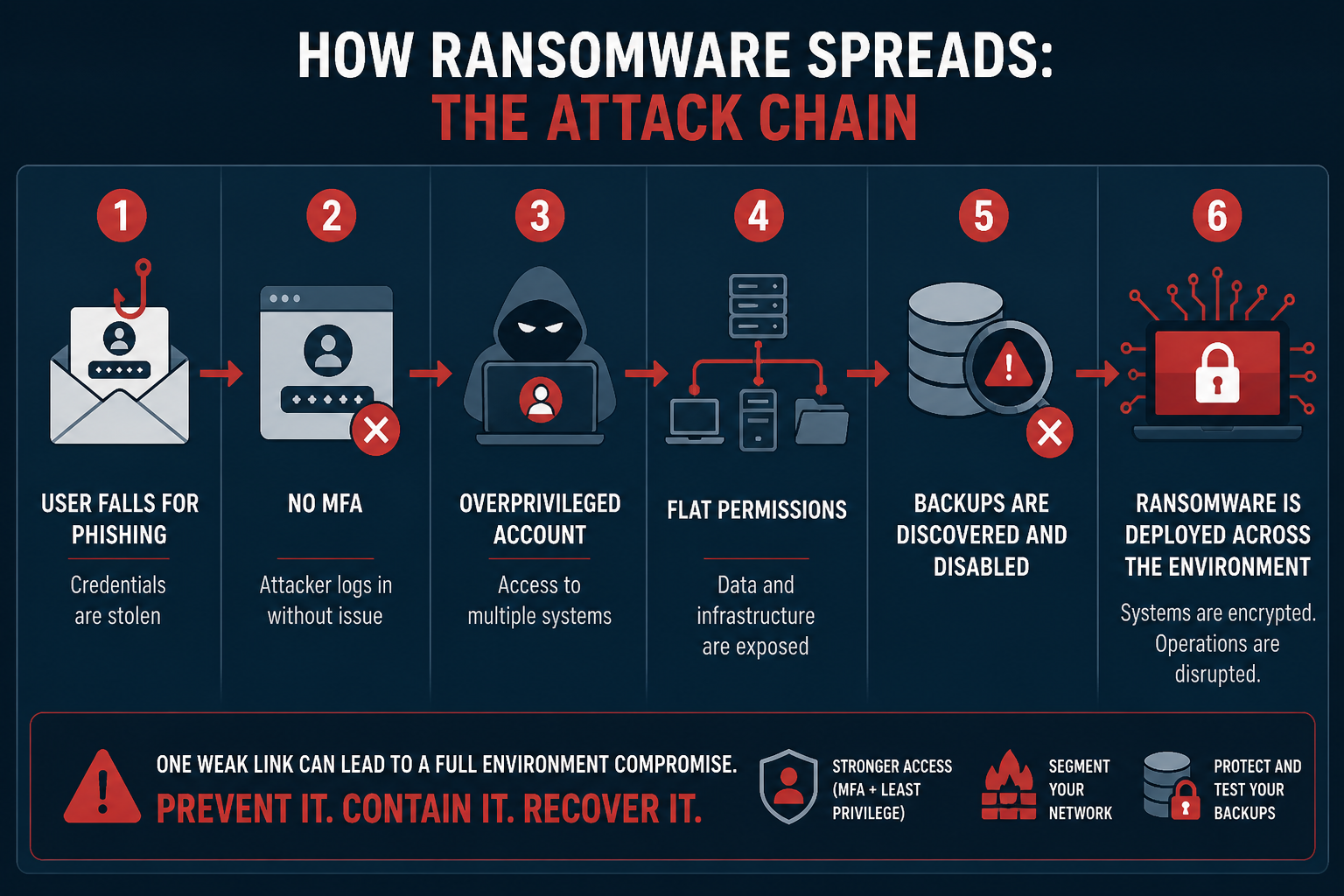
Most ransomware attacks begin through predictable paths:
- Phishing emails
- Stolen credentials
- Weak or missing MFA
- Exposed remote access services
- Unpatched vulnerabilities
Understanding the entry point is critical because unresolved entry vectors allow attackers to return.
Determine the Extent of Compromise
At this stage, organizations should begin identifying:
- Encrypted systems
- Impacted business functions
- Compromised accounts
- Affected servers and endpoints
- Potential lateral movement pathways
Many organizations underestimate how broadly attackers moved before deployment. Modern ransomware groups often spend days to weeks inside environments before detonating ransomware.
Investigate Data Exfiltration
Today’s cyberattacks rarely just encrypt data. Many groups use double extortion tactics — encrypting systems, stealing sensitive data, and threatening public release if payment is refused. Organizations must determine whether sensitive data was accessed, what may have been exfiltrated, and whether regulatory reporting obligations exist. This shifts the incident from purely operational to legal and reputational.
Bring in the Right Teams
Ransomware response is not just an IT problem. By this stage, organizations may need incident response specialists, legal counsel, cyber insurance providers, executive leadership, and/or public relations guidance. Strong coordination becomes critical.
Hour 48—72: High Stakes Decisions Begin
Recovery Decisions Become Business Decisions
By the third day, organizations face difficult questions:
Can systems be restored safely?
Are backups intact?
How long will recovery take?
Is the environment truly clean?
Should communication to customers expand?
Should we consider paying the ransom?
These decisions affect operations, finances, legal exposure, customer trust, and long-term business continuity.
Evaluate Backup Integrity
Many organizations discover too late that their backups were accessible from the same environment, encrypted alongside production systems, never tested properly, or are incomplete or corrupted. This is why isolated and immutable backups are so critical. A backup strategy only works if recovery is possible under real-world attack conditions.
Avoid Premature Restoration
One of the most common mistakes is restoring systems before credential resets are complete, persistence mechanisms are removed, vulnerabilities are addressed, or segmentation controls are implemented. Without remediation, reinfection can happen quickly.
Communication Matters
Poor communication during ransomware incidents leads to confusion and mistrust. Organizations need coordinated messaging for:
- Employees
- Customers
- Partners
- Regulators
- Media inquiries
Premature or inaccurate statements can create additional legal and reputational problems later.
Common Mistakes That Make Ransomware Worse
- Restoring too quickly: Recovery without containment often leads to reinfection.
- Ignoring persistence mechanisms: Attackers frequently maintain secondary accounts, remote access tools, scheduled tasks, and hidden administrative pathways. Removing ransomware does not always remove the attacker.
- Failing to rotate credentials: If credentials remain unchanged, attackers are able to regain access immediately.
- Assuming backups are safe: Organizations must operate in line with Zero Trust security principles: never assume, always verify.
- Treating an attack like only an IT incident: Cyberattacks quickly become legal, business continuity, communication, and customer trust issues.
- Failing to create documentation: Documenting actions taken will help your organization stay informed on what happened so you can be better prepared in the future.
The Hidden Risk Factor: Attackers Are Still Watching
One of the most overlooked aspects of ransomware recovery is that attackers often continue to monitor the environment after deployment. Organizations often assume encryption means the attack is complete. In reality, attackers may still:
- Monitor recovery activity
- Retain stolen credentials
- Maintain persistence
- Prepare for secondary attacks
This is why visibility, monitoring, and validation are so important throughout recovery.
Responding to a Real-Word Attack
One of our clients faced a zero-day exploit: a critical vulnerability with no current remediation because the attack is unknown to the software vendor (zero days have passed to create a fix). This attack focused on using a compromised user account to gain access to local admin and extending that access to the entire department. This is known as escalation of privilege.
Protected Harbor’s Response
At Protected Harbor, we know every client is different, which is why we utilize custom monitoring dashboards. This allows us to track behavior that is normal for each organization’s workflows, better enabling us to catch abnormal behavior. Suspicious activity caused our monitoring system to alert technicians to a possible infection. Once the alarm was raised, our incident response plan was set into motion.
Our team shut down all services and isolated every VM to contain the potential attack. We then began reviewing logs to find which user was being used to change passwords, so we could disable the compromised account. Our engineers then split off. One team conducted research to better understand the type of attack we were dealing with, while the other team prioritized investigatory work to determine the extent of the attack and outline next steps.
Once we were confident that the attack was contained and data had not been exfiltrated, systems were safely restored. While those restores were going, each VM was scanned offline to confirm there was no lingering infection, corrupted files, or compromised data.
Every single user or service account in the domain was updated to ensure they were all using a new, randomized, SOC2 password. As VMs were certified as ‘clean’, internal connectivity was restored but external connectivity was not as an extra step of precaution. The deployment was brought online with only internal traffic, allowing us to test authentication, look for lingering signs of an issue, and ensure servers were responding as expected. Then external connectivity was enabled and users were able to sign back in with their updated credentials.
The Protected Harbor Difference
You can’t prevent every attack, but you can prevent an incident from becoming a disaster. The organizations that recover the fastest are not necessarily the ones who can avoid attacks entirely. They are the ones who:
- Slow the spread quickly
- Maintain visibility
- Protect recovery pathways
- Communicate clearly
- Avoid rushed decisions under pressure
Ransomware response isn’t just about restoring systems — it’s about regaining control of the environment before the attacker controls the outcome. What happens in the first 72 hours shapes what recovery will look like down the line, but preparing for an attack ensures you will be ready in those first 72 hours.
Flat networks = faster spread
Weak or missing MFA = easier initial access
Mixed-use servers = all of the data they want is in one place
Poor backups = limited recovery options
The security decisions you make before an attack occurs actively shape how vulnerable you will be — and how effectively you can respond in the first 72 hours.
Application-Aware Infrastructure: Designing for Outcomes
Protected Harbor engineers Application-Aware environments in line with Zero Trust principles. This means the infrastructure we build is designed, operated, and optimized with a deep understanding of the application’s needs. This includes building in layers of protection at the start, instead of bolting them on later. We provide:
- 24/7 deep monitoring and custom dashboards
- Network segmentation
- Isolated, immutable, and tested backups
- Elevated disaster recovery options
- MFA/ role-based access
- SOC 2 Type 2 certification
- Battle-tested incident response plans
The First 72 Hours: Quick-Action Checklist
Immediately:
- Isolate affected systems
- Disable compromised accounts
- Activate your incident response plan
Within 24 hours:
- Begin forensic investigation
- Identify ransomware strain (if possible)
- Secure backups
Within 72 hours:
- Assess recovery options
- Notify required parties
- Establish clean environment for restoration
Are you concerned about your vulnerability to an attack? Contact Protected Harbor for a complimentary Infrastructure Risk Assessment. Our engineers will evaluate your environment and identify:
- Excessive permissions
- Weak or nonexistent segmentation
- Areas where MFA/ role-based access should be implemented
- Backup vulnerabilities
- Ransomware blast radius risk
- Performance bottlenecks tied to infrastructure design
- Additional areas of vulnerability
No obligation — just clarity on where you stand.