
Ransomware Risk Is Designed

Ransomware Risk is Designed

Ransomware Risk Isn’t Random — It’s Designed by Your Environment


Most cyberattacks don’t need to rely on advanced exploits. Many successful incidents rely on exploiting predictable, preventable internal weaknesses. Attackers don’t need to outsmart your defenses — they can just look for:

  • Weak or missing authentication controls
  • Excessive access once inside
  • The ability to destroy recovery options


These are not edge cases — they’re common operational gaps. Ransomware success isn’t about how advanced the attacker is — it’s about how exposed your environment is. Ransomware doesn’t succeed because an attacker got lucky. It succeeds because the environment allowed it to succeed. Ransomware follows the path you’ve already built. Attackers don’t need to create complexity when they can just exploit what’s already there.


In our previous blogs, we looked at how mixed-use servers and flat networks increase your vulnerability to ransomware. In this blog, we are going to focus on common identity/ access weaknesses, and why protecting your backups is one of the most crucial ways to save your business.


The Keys to the Kingdom


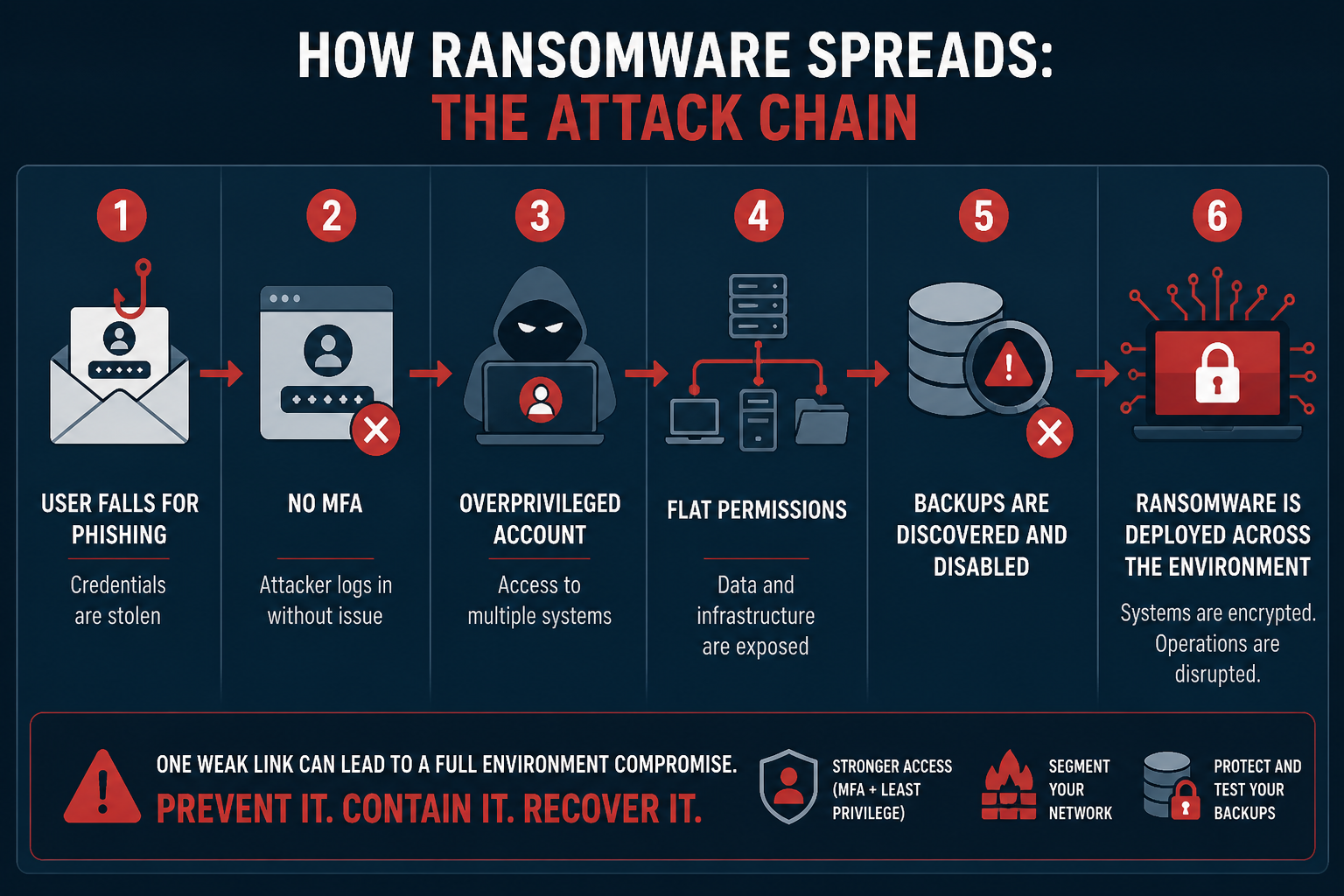
Organizations must properly manage user accounts and be mindful of excessive permissions. If one account can access everything, one compromise can destroy everything. Mismanaged accounts and permissions can look like:

  • Users with access far beyond their job function
  • Service accounts with domain-level privileges
  • Shared admin credentials across teams
  • Wide-open file shares
  • Dormant accounts still active


Many environments evolve over time without governance, which can lead to permission creep, forgotten accounts, and inconsistent access policies. These issues also occur when an organization is coordinating multiple vendors and there is no clear ownership. Once an attacker gains any valid credentials, they can blend in as a legitimate user, avoid detection by security tools, and move faster than traditional defenses can react.


If an attacker obtains access to an ‘overprivileged’ account, you’re essentially giving them the keys to the kingdom. This broad access means attackers don’t need to hack your systems to wreak havoc — all they need to do is log in.

Once in, attackers will:

  • Use stolen credentials to access multiple systems
  • Escalate privileges using misconfigurations
  • Move laterally without triggering alarms
  • Quickly access sensitive data and critical systems


Authentication = trust. If identity controls are weak, attackers can inherit that trust.


Hidden Risks & How to Prevent Them


Hidden risks include:

  • Dormant accounts: Old employees, contractors, test accounts.
  • Shadow IT: Accounts created outside of IT oversight.
  • Lack of access reviews: Permissions are never reevaluated.
  • Flat directory structures: No separation of privilege tiers.
  • Wide-open share permissions: “Everyone” or “Domain Users” can access critical shares.


All of these risk factors create an easy staging ground for ransomware encryption.


What to do instead:

  • Enforce least privilege (only what’s needed, nothing more)
  • Conduct regular access reviews
  • Automate processes for employees who join, move, or leave
  • Segment administrative roles
  • Lock down shared resources with clear ownership


Ransomware Doesn’t Need to Break In — It Logs In & Spreads


Let’s see an example. An organization tends to be lax with their permissions, but their security is otherwise strong. A user unknowingly clicks on a malicious link, introducing malware into the environment. Once inside the environment, the attackers focus on getting access to local admin so they can extend that access to the entire deployment. This is known as escalation of privilege. If the organization does not utilize deep monitoring, they might not be alerted to suspicious activity in their environment. By the time they realize, it may already be too late. Once an organization is locked out of their deployment, an attacker may deploy ransomware or scan the deployment for sensitive information (e.g., social security numbers, payment information, files that contain keywords like ‘password’ in the name).


Attackers always target data because data is currency. Once your data is within their grasp, they can steal it, sell it, hold it for ransom — your entire organization will be jeopardized.

The Open Door Problem


Passwords alone are not enough. This is because passwords are often reused across systems, easily phished, and frequently exposed in breaches. Attackers heavily rely on phishing campaigns, credential stuffing, and password spraying because these methods require minimal effort with a high success rate.


Multi-factor authentication (MFA) introduces a second factor, creating a barrier than can block most automated attacks. Even if credentials are compromised, attackers can’t log in without the second factor (for example, validating a log-in attempt with an authenticator app). Without MFA, stolen credentials are often all attackers need: you’re leaving the door open for hackers to walk right in.


MFA isn’t a silver bullet, but it can stop the vast majority of opportunistic attacks. Using MFA isn’t about being unbreakable, it’s about:

  • Increasing effort for attackers
  • Reducing attack success rates
  • Creating additional detection opportunities


Roll out MFA for email systems, remote access (VPNs), and administrative accounts. App-based authenticators should be used over SMS when possible. Risk-based/ adaptive MFA takes this a step further by evaluating the circumstances around a login attempt (device posture, location, IP reputation, login behavior, etc.) before granting access. It’s also key to educate your users so that they know to never approve unexpected prompts.


The Final Line of Defense


The harsh reality is that modern ransomware doesn’t just encrypt data, it targets backups first, disables recovery mechanisms, and exfiltrates data for double extortion. Common backup mistakes include:

  • Backups connected to the same domain
  • Always-online backup systems
  • Shared credentials between production and backup environments
  • No immutability


Backups are your last line of defense — these mistakes make backups discoverable, accessible, and destroyable.


When backups fail, downtime increases dramatically, ransomware pressure rises, and recovery becomes slow, partial, or impossible. A strong backup strategy looks like:

  • Immutable backups: Cannot be altered or deleted.
  • Offline/ air-gapped copies: Not accessible from the production network.
  • Separate credentials/ domains: Limits an attacker’s access.
  • Multiple backup tiers: Onsite + offsite.
  • Testing: Many organizations perform backups regularly, but never test restores.


Testing is one of the most skipped, and arguably most critical, steps. Testing is key for verifying data integrity, ensuring systems can actually be rebuilt, identifying gaps in the recovery process, and reducing panic during real incidents. A backup that hasn’t been tested is an assumption — not a solution.


From One Login to Total Shutdown


The critical business reality is that organizations who cannot recover quickly lose significant revenue, lose customer trust, and if the attack is bad enough, have to shut down entirely. This is why a multi-layered approach is crucial for protecting yourself against cyber threats. You want to ensure that if one layer of protection goes down, the others will be there to hold the line of defense. If not, you’re completely exposed. Organizations must understand that implementing layers of defense doesn’t happen randomly, it has to be designed.


Flat networks, mixed-use servers, mismanaged permissions, missing MFA, backup mistakes — these failures don’t happen by accident. Implementing layers of protection takes conscious thought, planning, and effort.  That is why it is so important to have infrastructure that is application-aware and built with security top of mind. Individually, each of these failures are risky. Combined, they create a near-guaranteed path to full business disruption.

No single failure causes the breach, but the damage can be catastrophic when you lack:

  • Layered defenses
  • Containment
  • Recovery capabilities


How Ransomware Spreads

The Protected Harbor Difference

Application-Aware Infrastructure: Designing for Outcomes


Security decisions aren’t neutral — they actively shape your risk. You’re not simply defending, you’re designing outcomes. All of the weaknesses we have discussed are predictable and preventable. Your environment determines the outcome before the attack starts. Treating security as an afterthought won’t put the odds in your favor in the face of an attack.


At Protected Harbor, we know security isn’t just about stopping attacks, it’s about controlling what happens when an attack occurs, not if.

Your environment determines:

  • How far an attacker can go
  • How fast they can move
  • Whether you can recover


Ransomware isn’t unpredictable. It’s opportunistic. The opportunities it finds are the ones built into your environment through decisions made long before the attack.


Protected Harbor provides Application-Aware Infrastructure in line with Zero Trust principles. Application-Aware Infrastructure is designed, operated, and optimized with a deep understanding of the application’s needs by one accountable partner. This includes:

  • 24/7 deep monitoring and custom dashboards
  • Isolated, immutable, and tested backups
  • Elevated disaster recovery options
  • MFA/ role-based access everywhere it matters
  • SOC Type 2 certification
  • Battle-tested incident response plans


Security failures happen when no one plans for outcomes and owns the infrastructure end to end. We design the infrastructure, proactively manage environments, and own the outcome. One partner. Complete accountability. Total confidence.


Framework: Is Your Organization at Risk?


Ransomware attacks feel sudden — but their success is usually the result of long-standing gaps. Weak identity controls, missing authentication layers, fragile recovery strategies — these are small gaps that compound into big risk. Environments with multiple weaknesses are not the result of bad luck, they are systems designed for failure. Organizations don’t need perfect security, but every control you add slows attackers down, limits access, and reduces the impact.


Application-Aware Infrastructure ensures your infrastructure is built around the specific needs of your application, including and especially in regard to security. The difference between disruption and disaster is rarely the attack — it’s the preparation. Building infrastructure with intentionality is the best preparation you can get.

Consider:

  • Do all privileged accounts and critical systems require MFA?
  • Are any user accounts ‘overprivileged’?
  • Are dormant accounts regularly removed?
  • Are backups isolated from your primary network?
  • Have you tested recovery in the last 6-12 months?


Contact our team for a complimentary Infrastructure Risk Assessment where we will evaluate your environment and identify:

  • Lax permissions
  • Weak or missing MFA
  • Backup vulnerabilities
  • Ransomware blast radius risk
  • Performance bottlenecks tied to infrastructure design
  • Additional areas of vulnerability


No obligation — just clarity on where you stand.
Architecting AI Isn’t About Models

AI, application-aware infrastructure

Architecting AI Isn’t About Models:

It’s About Owning the Infrastructure That Runs Them


There has been a significant AI boom across industries. AI used to be expensive, experimental, and limited to large applications, but things have changed, making AI much more accessible than it once was. Organizations no longer need to build AI from scratch to integrate it directly into their workflows. Because of this, many companies are eagerly looking to incorporate this technology into their applications to give them a competitive advantage. AI allows you to:

  • Respond faster
  • Personalize better
  • Operate more efficiently


The question is no longer “Should we adopt AI?”. The question is now “How do we run AI reliably, securely, and at scale?”.

Most companies are still answering that question the wrong way because they’re focusing on models. AI doesn’t fail at the model layer — it fails at the infrastructure layer.


The more AI is adopted, the more it depends on:

  • Reliable compute (especially GPUs)
  • Fast data access
  • Low-latency environments
  • Secure, governed pipelines

This is why many AI initiatives stall after early success: not because the models aren’t good enough, but because the systems running them aren’t designed for scale.


The Hidden Problem: AI as an Overlay


Most organizations have a custom application and/or workflow that is composed of either legacy or proprietary code. These kinds of applications can be difficult and slow to improve and iterate on because of the institutional knowledge required, which may no longer be available. This issue becomes even more apparent when AI is added to the mix.


Many enterprises are still approaching AI like an add-on. Models are being bolted onto fragmented environments made up of public cloud services, internal teams, and disconnected platforms. This may work in a demo, but it fails in production. This is because AI isn’t a feature you deploy, it’s an operational system you have to run.


When that system spans public cloud, private infrastructure, internal IT teams, and third-party services — fragmentation becomes the default.


This is where performance breaks down.

Costs spiral.

Accountability disappears.


Scaling AI isn’t about deploying more models — it’s about orchestrating entire ecosystems:

  • AI embedded across business operations, customer workflows, and decision systems
  • Data, identify, and policy flowing across distributed pipelines and agents
  • Workloads spanning GPUs, private cloud, edge, and hybrid environments


This is no longer a “stack”. This is a system of systems that only works when there is total ownership. If multiple vendors, platforms, and teams share responsibility, no one truly owns the outcome. This is when instability creeps in. This is also where disorganization makes it difficult to establish and document key institutional knowledge and processes.

Infrastructure Awareness Is Now Non-Negotiable


AI workloads introduce a new reality:

  • Compute is expensive and constrained
  • Latency directly impacts user experience and outcomes, not just performance metrics
  • Costs are volatile and unpredictable, particularly in shared, consumption-based environments


Yet most architectures still don’t consider infrastructure a top priority. Treating infrastructure as abstract doesn’t work anymore because AI scaling now happens across three distinct phases:

  • Pre-training scaling: Centralized, high-intensity compute
  • Post-training scaling: Distributed, data-driven adaption
  • Test-time scaling: Real-time, dynamic compute allocation


While the industry obsesses over models, the real complexity lies in where those models run, how they behave, and what happens when conditions change.

If AI is an infrastructure problem, then the solution isn’t more tools. The solution is smarter infrastructure.


Application-Aware Infrastructure: What It Means in Practice


Application-Aware Infrastructure (AAI) is built on a simple principle:

Infrastructure should understand the application — and adapt to it. Not the other way around. This shows up in five critical ways:


1.      Compute-Aware Execution

Workloads are intelligently aligned to the right resources — GPU, CPU, latency zones —across private and hybrid environments. No guesswork. No over-provisioning.

2.    Model Flexibility Without Disruption

Applications can shift between models based on performance, cost, or availability — without breaking workflows or requiring re-architecture.

3.    Built-In Retrieval & Data Awareness

RAG pipelines and data flows aren’t treated as an afterthought. They are engineered into the infrastructure and governed by performance requirements and Zero Trust security from the start.

4.    Graceful Degradation (Instead of Failure)

When constraints hit (compute limits, latency spikes, cost thresholds) systems adapt in real time:

  • Smaller models
  • Optimized queries
  • Prioritized workloads

The experience is undisturbed. The system doesn’t break.

5.    Orchestrated, Not Fragmented Systems

AI services, agents, and enterprise systems operate as a coordinated platform instead of a collection of disconnected tools competing for resources.


Real-World Examples: Application-Aware Engineering & AI


Protected Harbor is able to leverage AI from an application-aware perspective in many ways. Each of our clients has a unique application, meaning they all have unique needs. This allows us to implement AI in a range of ways that best serve our customers.

Automated Interventions

One of our clients has an application that occasionally encounters an unexpected fault due to a bespoke function. Before Protected Harbor, the client was forced to manually restart services, during which time their application would go offline. Using AI, Protected Harbor has been able to implement a ‘watchdog’ to autonomously monitor for system issues and take corrective action without requiring human intervention. This results in an immediate resolution, no perceptible impact to the client, and automated notifications to keep the team informed. This has improved uptime for the organization and reduced strain from unexpected downtime and manual intervention.

Metric Reporting & Access Requirements

Another client of ours has a very large deployment and requires frequent and accurate metric reports specific to their workflows. Protected Harbor developed automated reporting to collect specific metrics for the client’s review and decision making. Automated reporting ensures both our team and the client are working with accurate, consistent data that can be generated on demand, without needing to wait on a person.

During their migration, we also leveraged AI to automate the manipulation of users, permissions, and roles at a rapid pace to deliver on the client’s updated access requirements. This was a change that would have taken an engineer several days to complete, but was instead executed over the course of an afternoon AND had audit logging to prove its efficacy to the customer.

Common Vulnerabilities & Exposures (CVEs)

Protected Harbor’s 24/7 deep monitoring allowed us to discover a critical CVE impacting multiple customers and deployments. Protected Harbor leveraged AI to engage in a rapid response and patch all affected systems within a matter of hours. This patch included validation, reporting, and documentation to ensure minimal disruption for clients, but guaranteed application security. This allowed us to patch 6,000 endpoints in less than 30 minutes.

What Enterprises Actually Gain


When infrastructure is application-aware and fully owned, AI becomes scalable in the ways that actually matter:

  • Predictable costs: No runaway cloud spend or surprise compute spikes.
  • Performance stability: Infrastructure tuned to application behavior, not shared tenancy.
  • Resilience by design: Built-in failover, recovery, and intelligent fallback.
  • Security and governance: Zero Trust and policy enforcement at every layer.
  • Speed to Market: No friction between development, operations, and infrastructure teams.


The biggest misconception in AI architecture is that more compute equals better outcomes. The reality is that more compute without accountability creates more instability, more cost, and more risk.


Using Application-Aware Infrastructure to architect AI bridges the gap between application behavior and infrastructure execution, resulting in optimal performance, lower costs, and guaranteed long-term reliability.


Protected Harbor: The AAI Perspective


Protected Harbor designs, hosts, secures, and operates infrastructure with a deep understanding of the applications and workloads running on it — eliminating the fragmentation that causes outages, latency issues, and cost overruns.


The industry is stuck focusing on models. At Protected Harbor, we focus on where those models run, how they behave, and who is accountable when they don’t. This is because we know the most important layer is no longer the models, it’s the infrastructure decisions happening in real time.


The future of AI isn’t about infinite resources. It’s about engineering intelligent systems — and clear ownership of how they run. That requires infrastructure that is:

  • Application-aware
  • Performance tuned
  • Cost controlled
  • Fully accountable

That is what Protected Harbor delivers.


We don’t just run your infrastructure.

We understand it.

We operate.

We own the outcome.


Framework: How Well Does Your AI Run?


AI adoption is no longer optional, it’s defensive as much as it is strategic. AI is becoming popular across organizations because it now delivers:

  • Immediate productivity gains
  • Measurable cost savings
  • Competitive differentiation

But the real shift is deeper: AI is moving from experimentation to operation.

As that happens, success is less about what AI you use and more about how well you run it.


Consider:

  • Is your application being forced to adapt to generic environments?
  • Who is ultimately accountable for application and AI performance?
  • Are your costs predictable or are you dealing with frequent surprises?
  • How do your AI models perform under real-world conditions?
  • Are AI workloads tightly integrated with infrastructure or layered on top as an afterthought?


Contact the Protected Harbor team for a free AI Infrastructure Audit. No obligation — just clarity on where you stand.
From Incidents to Outages: The Cost of Getting It Wrong

Why One Compromised Machine Can Take Down Your Entire Organization


Most organizations know cyberattacks are a serious threat, but they don’t fully understand why. Attackers keep evolving and finding new ways to target businesses, so we must always be on alert for new ways to protect ourselves. There is no single cause of a ransomware attack, which is why organizations must use a multi-layered approach to protect themselves. Most organizations think ransomware is a security failure. In actuality, it’s an infrastructure design failure. In our last blog, we looked at how mixed-use servers increase your vulnerability to ransomware. Today, we’re going to look at how flat networks don’t just allow attacks to happen — they accelerate them.


What Are Flat Networks?


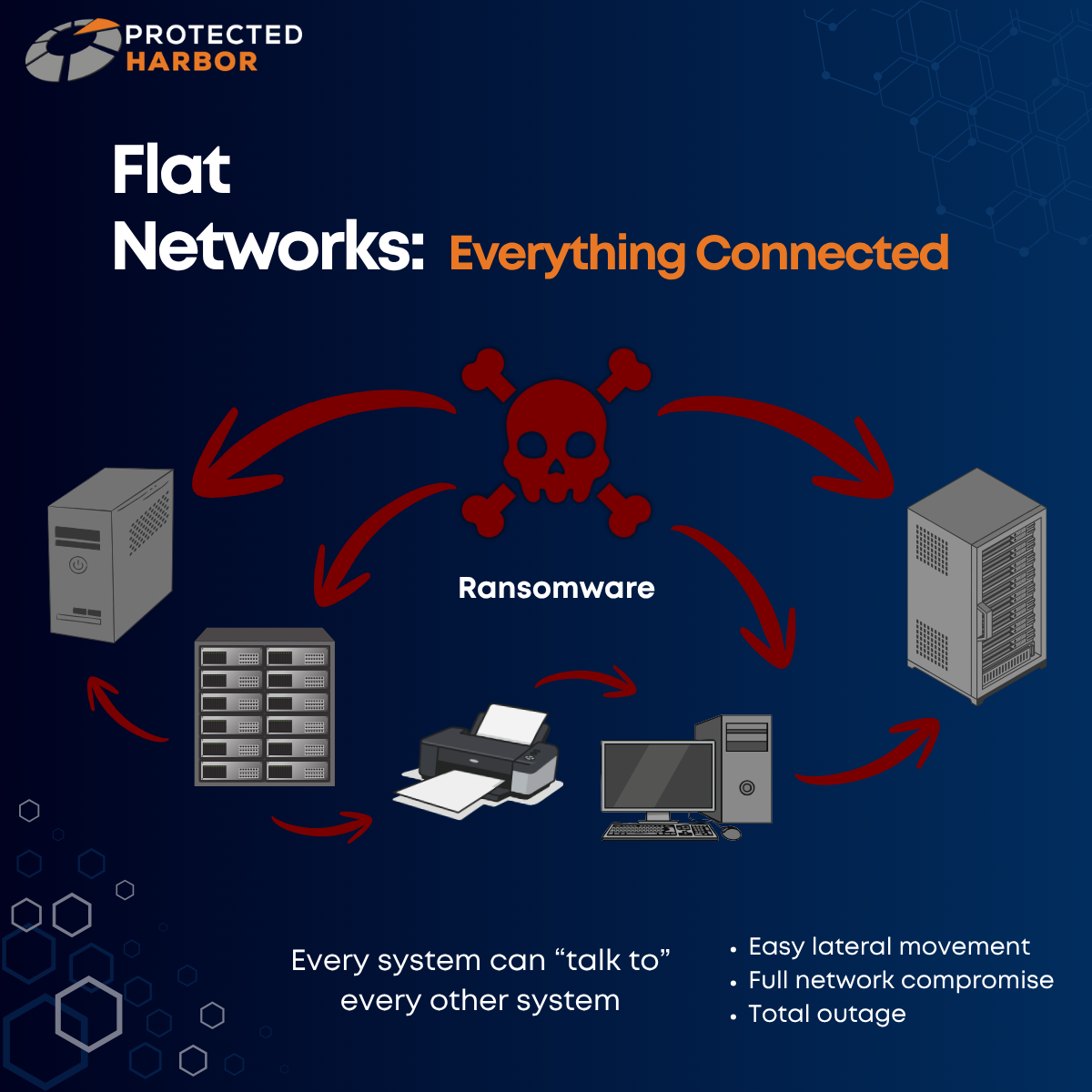
A flat network is one with minimal internal boundaries between systems. Think of flat networks as an open office with no doors.

In these environments:

  • Every system can talk to every other system
  • Application layers are not isolated
  • Data flows are not controlled
  • Dependencies are not understood


From the outside, everything may look operational, but underneath? There’s no structure. No boundaries. No awareness.

Just connectivity.


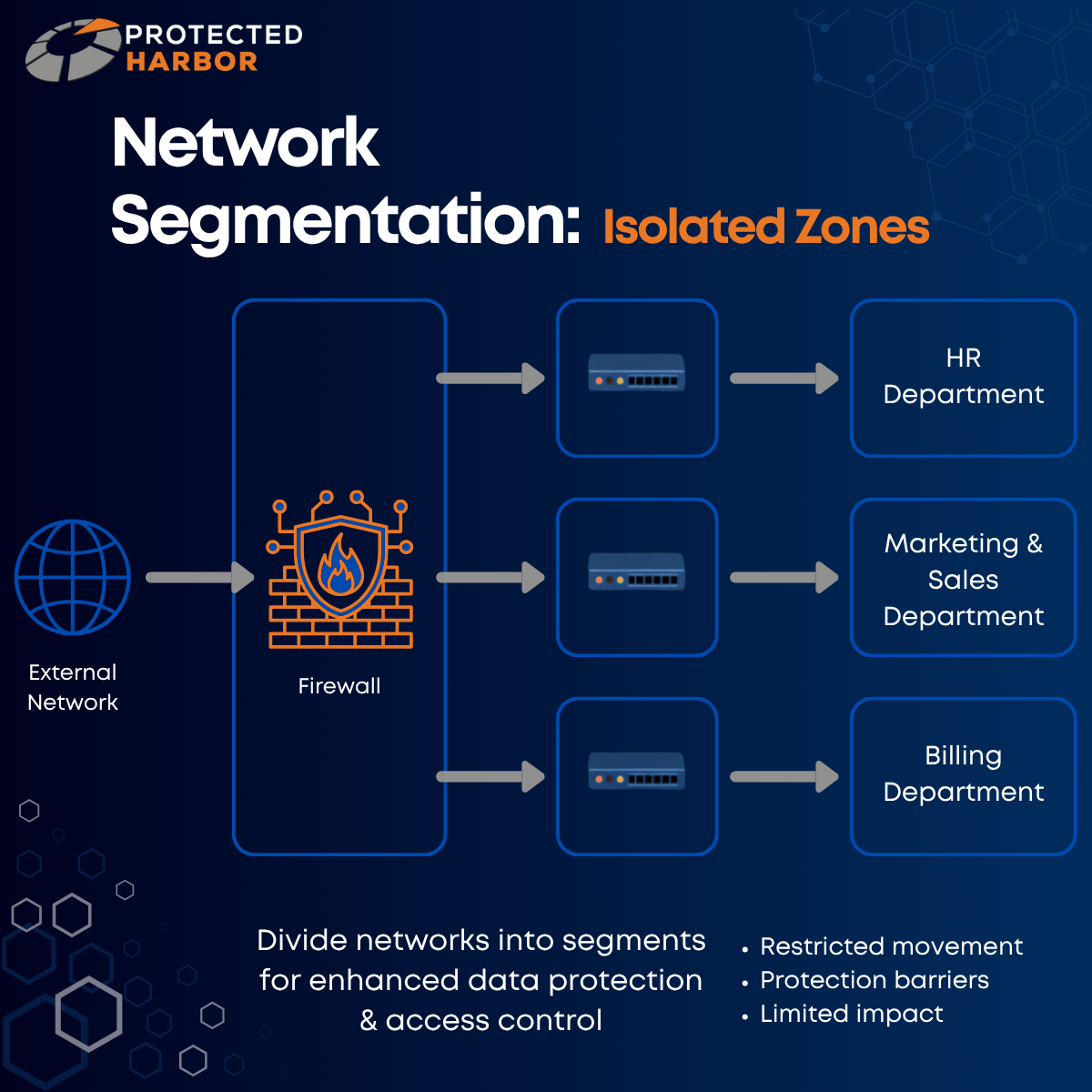
To avoid a flat network, you need network segmentation. Network segmentation divides a single network into different segments to enhance data protection and control access. Segmented networks can be thought of as a secured office building with badge-controlled rooms.

From Incidents to Outages: The Cost of Getting It Wrong


One of the hardest parts for an attacker is actually getting into your system:

Crafting an email that looks legitimate to trick someone into clicking a malicious download link.

Finding their way into exposed remote desktop access.

Exploiting a public Wi-Fi network.


But once they’re in? It’s go time. When a single compromised machine can take down your entire organization, the real issue isn’t how the attacker got in — it’s how far they were allowed to go once they did. During an attack, minutes and hours matter more than almost anything else. Slowing the spread of malware increases your chances of early detection, isolating key systems, and preventing the full deployment from being impacted.


If a fire breaks out in a dense forest, the entire forest will burn quickly and uncontrollably. If an attacker gains access to a network with little to no segmentation, there is no barrier to movement. The consequence?

Ransomware will spread in minutes, not hours.


Not only can the ransomware spread quicker, but it’s easier for attackers to access high-value systems like your file servers, backups, and domain controllers. The issue here is lateral movement. The initial breach is often small, but the damage becomes massive due to internal spread. In this context, segmentation would be firebreaks (strips of land where trees and vegetation are removed in order to stop or slow the spread of a fire). They won’t prevent fires from starting, but they contain the damage.


Why Segmentation Failures Lead to Total Outages


When ransomware hits a flat network, your entire environment will be encrypted simultaneously and you’ll have a full outage on your hands within hours. This means a full operational shutdown, longer recovery timelines, and a higher pressure to pay the ransom.


When an attacker breaches a flat network, they don’t need to break in again. They can freely move from:

  • User device to application server
  • Application server to database
  • Database to backups
  • Backups to domain control

Your infrastructure is allowing unrestricted traversal across systems that were never meant to be exposed to each other.


Segmentation often determines whether a ransomware attack means one department is down, or the entire company goes offline. Every minute of downtime caused by an attack hurts your organization.

Frustrated customers.

Idle staff.

Missed transactions.

Lost revenue.

Reputational damage.

Increased risk of lawsuits and fines.


When one system goes down? That’s manageable.

When everything goes down? The fate of your entire organization is on the line.


The worse the spread, the longer you’ll be offline. The longer your operations are shut down or you’re without access to your data, the higher the chances are that you’ll never recover. Organizations experiencing data loss for more than 10 days face a 93% bankruptcy rate within a year of a cyberattack. Ransomware can cripple your business if you’re not actively taking steps to ensure you’re protected. Segmentation slows attacks down, limits the blast radius, and buys time for detection and response. In the aftermath, it also makes recovery faster, more contained, and less costly.


How Do Flat Networks Occur?


Flat networks are the result of:

  • Organic growth without architectural oversight
  • Multiple vendors with no single point of accountability
  • “Get it working” decisions that are never revisited
  • A lack of understanding of application behavior


No one designs bad infrastructure on purpose, but flat networks aren’t accidental. Segmentation is an architectural decision. It doesn’t require specialized hardware, you just need to be thinking about it. Flat networks happen when infrastructure is built generically, often due to a lack of expertise. Many organizations end up with a flat network simply because they, or their IT team, don’t know any better.


Segmentation is how you define the boundaries of your application. Common segmentation mistakes include:

  • Overly permissive firewall rules
  • Backup systems on the same network as production
  • Not restricting admin pathways
  • Shared credentials between systems
  • Leaving default accounts enabled
  • Allowing users to install and manage software


As attackers continue to develop new and increasingly advanced methods, this has led to Zero Trust becoming a focus in the industry when it comes to security principles. Zero Trust operates on the idea that you never blindly trust anything in an environment. You must always authenticate and verify every single action and/or change. Zero Trust means that IT teams can no longer operate on implicit trust — they must operate on explicit trust.

How Segmentation Can Save Your Business

In well-engineered environments, segmentation isn’t a feature — it’s built into how the application is structured, accessed, and operated.


The difference between an incident and a disaster is often just a few barriers.


Segmentation works by dividing your systems into isolated zones, adding control, visibility, and security together. Barriers, such as firewalls, access control lists (ACLs), or role-based access control (RBAC), are used to restrict movement so in the event of a cyberattack, attackers can’t freely jump between systems.


Let’s go back to our forest fire example. If a fire begins to spread in one section (such as a compromised laptop), it will spread locally until it hits a barrier. During a cyberattack, this means the ransomware can’t easily cross into server environments, backup systems, or critical infrastructure. The result? Only a portion of the “forest” burns, but the rest remains intact while the firefighters (your security team) have time to respond and mitigate further damage.


You can’t prevent every attack, but you can prevent total destruction. Segmentation isn’t about perfection; it’s about having layers of protection to:

  • Reduce the blast radius
  • Keep incidents manageable
  • Avoid catastrophic outcomes


A lack of segmentation isn’t just a security gap — it’s a fatal design flaw.


The Protected Harbor Difference

Application-Aware Infrastructure: Designing for Outcomes


At Protected Harbor, every time we onboard a new client, our team takes the time to evaluate every aspect their environment so we can identify areas of improvement. Flat networks are a common issue we see, but they’re not the only security concern organizations should focus on. In line with Zero Trust, one of our philosophies is to always prepare for an attack instead of simply hoping it’ll never happen. When you operate under the assumption that you will be attacked eventually, the best way to defend yourself is to implement numerous layers of protection.

These include:


That way, when an attack happens, if one layer is compromised, the others can take over. Taking a multi-layered approach and actually testing your disaster recovery methods is key to protecting yourself from cyber threats.


Flat networks happen when no one owns the infrastructure end-to-end. At Protected Harbor, we design, host, and operate infrastructure as a single accountable system. This means protections such as segmentation, access control, and backup isolation are built in from day one, not bolted on after a breach.


We design infrastructure that understands the application it supports — and owns the outcome.

That means:

  • Mapping how the application operates
  • Designing infrastructure boundaries around that behavior
  • Engineering performance, security, and uptime together
  • Operating as one accountable partner


In an Application-Aware Infrastructure model:

  • Application tiers are isolated intentionally
  • Data access paths are explicitly defined
  • Identity and permissions align to function
  • Critical systems are architected as separate trust zones


Framework: Is Your Network Too Flat?

Flat networks aren’t just risky; they’re a signal that infrastructure was never designed with intent. Infrastructure can’t just exist. It has to understand.

In a flat network:

  • A small breach becomes a full-system event
  • A single compromised device becomes a company-wide outage
  • Recovery becomes slow, expensive, and uncertain

But in a properly architected environment:

  • Incidents stay contained
  • Critical systems remain isolated
  • Recovery is targeted and fast


In a flat network, speed favors the attacker. In a segmented, application-aware environment, time favors you.


Consider:

  • Can a standard user device reach servers directly? Backup systems? Domain controllers?
  • Are there internal firewall rules restricting traffic?
  • Can credentials from one machine be reused broadly?


If you’re not sure whether your environment is segmented, we’ll show you. Contact our team for a complimentary Infrastructure Risk Assessment where we will evaluate your environment and identify:

  • Weak or nonexistent segmentation
  • Ransomware blast radius risk
  • Performance bottlenecks tied to infrastructure design
  • Additional areas of vulnerability


No obligation — just clarity on where you stand.

The Hidden Ransomware Risk Inside Your Server

The Hidden Risk Inside Your Server:

Why ‘Do-It-All’ Environments Invite Ransomware


Ransomware is a type of malware that interferes with a system or server. It does this by limiting or completely cutting off access to your data until a ransom is paid. Ransomware seems like an ominous threat, but companies never expect themselves to be targeted — until they are.


  • Why do attacks happen?
  • What makes you vulnerable?
  • How can you protect yourself?
  • What happens if you are attacked?

These are all important questions to be asking yourself.


Most ransomware attacks don’t start with sophisticated exploits — they succeed because of poor infrastructure design. Ransomware is really good at taking advantage of flaws in mainstream software. Every technology that is wonderful can be used in a harmful way. There is no one single cause of an attack, which means there is no one single solution for preventing a cyberattack. However, there are things to be mindful of and steps you can take to protect yourself and your organization.


Why Is Ransomware So Dangerous?

The target of a ransomware attack is always data because data is valuable. It’s a form of currency, so any location holding data is at risk of being a target. This is why industries such as the financial sector, healthcare/ medical organizations, transportation companies, and law firms are at the highest risk. These institutions have data attackers want — credit card information, social security numbers, phone numbers, addresses. This information is worth a lot of money to people with bad intentions.


Ransomware attacks can cause:

  • Extended downtime
  • Data loss
  • Revenue loss
  • Noncompliance
  • Having to pay large ransoms with no guarantee you’ll actually get your data back
  • Reputation damage
  • Risk of lawsuits
  • Potential fines and law enforcement involvement


Let’s look at the data:

One study found that 25% of organizations are forced to close after a ransomware attack and 80% of companies who paid the ransom suffered a second attack. Another study found that after a ransomware attack, 57% of businesses shut down operations temporarily, 40% lost significant revenue, and only 13% fully recovered their data. Companies experiencing data loss lasting more than 10 days also face a 93% bankruptcy rate within one year. The risk for small businesses is even greater, with 60% of small businesses shutting down within 6 months of a cyberattack.


These are scary statistics, but it’s important for organizations to understand how dangerous ransomware can be. At Protected Harbor, we are constantly looking for new causes of ransomware and ways we can protect our clients and ourselves from an attack. In this blog, we are specifically going to focus on how mixed-use servers can make organizations more vulnerable.

What Are Mixed-Use Servers?

As we mentioned, there is no single cause of a ransomware attack, which means organizations need a multi-layered approach to protect themselves. Many organizations often don’t understand the factors that put them at risk, so making yourself aware of the things that increase your vulnerability and addressing those issues is one of the best ways to protect your business.


During a recent new client assessment, we encountered mixed-use servers, which are servers that have multiple different roles/ workloads. For example, one server that hosts websites as well as databases, or a server that hosts file storage and VPN storage. Using a single server to provide one or multiple key services may seem more convenient for your business, but this is like hitting the jackpot for attackers.


No one intentionally designs bad infrastructure, so how does this happen?

The most common reason mixed-use servers occur is because of cost pressure. Organizations fear the high cost of licensing and adding new servers, so they may try to save money by enabling as many network rolls as possible. Another cause is developer-led builds that prioritize getting you set up fast, without prioritizing the long-term. We have seen many SaaS vendors enable programmers to directly install the programs they’re creating. This is an issue because programmers are excellent at solving code problems, but they usually have little to no training on infrastructure. This means they are not building your environment for scale, which will create friction down the line as your organization tries to grow.


This not only increases your vulnerability to an attack, but also impacts performance. Problems develop as multiple applications stored on a single server become more active.  For example, if a server is both a web server and database server, this can create performance problems when the database server is running complex queries. These queries begin using more and more of the server’s resources, which reduces the server’s ability to respond to web requests.


When performance is threatened, everything is on the line.


How Mixed-Use Servers Make You Vulnerable to An Attack

Mixed-use servers hurt performance because multiple key services are competing for resources, which means none of them can perform optimally. When hit with a cyberattack, mixed-use servers also make you more vulnerable in the following ways:

  • Increased blast radius: It’s easier for attackers to find and steal important data if it’s all stored in one place. Separating workloads makes it more difficult for attackers to find the valuable data they’re looking for because it’s spread out.
  • Damage happens faster: Mixed-use servers allow ransomware to spread within minutes — not hours. This means a cyberattack can do more damage to your organization in a shorter amount of time. By the time you realize something is wrong, it may already be too late.
  • Multiple workloads impacted: If you have multiple workloads on one server, multiple services will go down if that server is targeted by ransomware. Separating workloads helps to prevent multiple key services from being impacted during an attack, which reduces the chances of an attack crippling your business.


Can Maintenance Save You?

An added problem with mixed-use servers is that they are typically poorly maintained and often enabled with open security, both of which create fertile ground for ransomware attacks. Installing updates and security patches are crucial, but they require downtime. For some organizations, it can be hard to prioritize these updates and patches when even an hour of downtime can mean missed transactions, lost revenue, and idle staff. For businesses that use mixed-use servers, these maintenance windows are significantly longer, making the decision to prioritize maintenance and security even more difficult.


Maintenance downtime expands on mixed-use servers because each use will have its own updates that need to be installed. For example, if you have a server that acts as both a web server and a database server, installing all of the updates for the database, web server, and core operating system can result in hours of downtime. A maintenance window that large may cause a business to prioritize uptime and skip maintenance and security patches entirely. However, a system that is not properly maintained or adequately protected is extremely vulnerable to ransomware.


A cyberattack will cost you much more than a few hours of downtime.

The Protected Harbor Difference

Protected Harbor designs and operates infrastructure differently:

we don’t just address symptoms — we fix core issues.


We design environments around the application itself — separating workloads, isolating risk, and ensuring that no single failure can take down your entire business. Our engineers take the time to learn each client’s application inside and out so we can design infrastructure tailored the unique needs and workloads of their organization. This is what we call Application-Aware Infrastructure: where performance, security, and accountability are engineered together, not bolted on later.


Our team understands how dangerous ransomware can be because we’ve seen the havoc it wreaks firsthand. This is why we prioritize security as one of the most important features when designing your environment, instead of treating it like an afterthought. This allows us to deploy an improved and resilient security platform that will help to keep your organization safe from ransomware attacks.


If you’re not sure whether your business relies on mixed-use servers, we’ll show you.


Contact our team for a complimentary Infrastructure Risk Assessment where we will evaluate your environment and identify:

  • Mixed-use server exposure
  • Ransomware blast radius risk
  • Performance bottlenecks tied to infrastructure design


No obligation — just clarity on where you stand.

 

Your ‘Efficient’ Server Setup Might Be a Security Nightmare

Many organizations using mixed-use servers end up here because infrastructure decisions are made around cost or convenience — not how the application actually behaves in production. While cost and convenience are important things to think about, you can’t risk your entire business being crippled by a cyberattack.


Consider:

  • Do you have servers running multiple roles?
  • Do maintenance windows keep getting delayed?
  • Are you noticing performance issues during peak usage?
  • Are your backups completely isolated?
  • Can developers or vendors deploy directly to production servers?


If you want help protecting your organization from ransomware, contact Protected Harbor today

The Real Cloud Decision

The Real Cloud Decision: Who Owns Performance, Security, & Cost?

Elasticity is Easy to Buy. Predictability, Security, & Accountability Are Not.


It’s time we rethink the cloud conversation. Most organizations prioritize convenience and elasticity when choosing their cloud environment. Both of these factors are important, but they’re not the only factors that matter. The real differences between cloud models show up over time, when performance, security, and cost become an issue. All modern cloud environments are elastic to varying degrees. The differentiator is who owns the work required to make that elasticity reliable, secure, and cost-effective.


To get the full picture, we seek to compare the different options that are out there — self-hosting, public cloud environments, and privately managed cloud environments.

What Does Self-Hosting Actually Require?


The choice between private cloud infrastructure and self-hosting is less about technology and more about risk, cost-predictability, staffing, and operational focus.


High availability

Redundant connectivity

Ransomware-protected and isolated backups

Clustered systems

Continuous monitoring

Security

Patching

Seamless updates


These features are not easy to maintain nor are they cost-effective when you self-host. In traditional on-premise environments, each of these capabilities is added piecemeal — driving up cost, complexity, and risk.


When organizations account for the full reality of on-prem infrastructure, costs escalate quickly and unpredictably. Hosting an environment requires:

  • Hardware
  • Licenses
  • Backup and security platforms
  • High-availability architecture

Along with 24/7 staff to deploy, monitor, and manage it all.


Self-Hosting vs. Private Cloud


The operating costs of a private cloud environment, such as Protected Cloud, are more predictable and don’t require upfront hardware purchases. Self-hosting, however, requires significant capital investment and recurring refresh cycles every 3-5 years. Not to mention unexpected costs related to power, cooling, maintenance, downtime, emergency replacements, and more. Sure, having total ownership seems great, but that means you have to deal with the total cost of ownership. Self-hosting also requires internal engineers and on-call coverage, meaning it comes with staffing and operational burdens that introduce key-person dependency risk.


Another thing to consider is the worst-case scenario. Certain private clouds have redundancy and disaster recovery built in, but in self-hosted environments, these features must be separately designed, funded, and maintained. Self-hosted environments also rely heavily on internal discipline and additional tooling to meet security and compliance requirements.


Not to mention the difficulties you’ll face as your companies tries to grow. Self-hosting requires purchasing and installing new hardware, often leading to capacity planning challenges that make it difficult to scale without procurement delays.


The bottom-line — self-hosting gives you complete control — but it also places the full responsibility of your environment on your shoulders alone.


Public Cloud: Tradeoffs Over Time


Public cloud environments place the burden of architecture, monitoring, and incident response on you as the customer. When incidents occur, this often requires coordination across multiple vendors while outages persist.


On top of managing complex architectures and coordinating multiple vendors, organizations also have to deal with financial uncertainty. Public cloud environments are good for elasticity and scale, but this comes at a cost. Public cloud providers offer tools that make it easy to add or subtract servers and systems, along with distributing them geographically. However, the cost of these tools is often unpredictable. Users are often charged for every bit of network traffic, disk traffic, storage usage — even private network communication between two servers.


Public cloud costs are ever growing without cost details, so organizations don’t fully understand what they’re paying for. These environments also introduce hundreds of services, pricing variables, and dependencies that increase cost uncertainty and operational complexity over time.


A major distinguisher between public cloud environments and private cloud environments is the infrastructure itself. Most cloud deployments are an empty VM. The dashboard-like nature encourages quickly spinning up resources or environments without the thought of how they all fit together. This can lead to insecure or illogical designs and wasted resources. Public cloud deployments charge you both for the resources you allocate AND the traffic moving inside your deployment between VMs. This means over-allocating resources, inefficient or busy code, and unused cloud resources all result in higher costs.


Public Cloud vs. Private Cloud


Private cloud environments like Protected Cloud provide dedicated resources sized specifically for your workloads. This ensures consistent performance without noisy-neighbor risk. Public cloud environments rely on shared infrastructure where performance can fluctuate and optimization becomes an ongoing effort.


Providing consistent, reliable performance is key for any organization. This ensures staff can get work done, customers remain happy, your reputation isn’t impacted, and profits can continue to grow. Because public clouds rely on shared infrastructure, performance can vary as workloads change and scale, requiring ongoing tuning and active management to maintain consistency over time — which are your responsibility.


When problems do occur, you have to submit a ticket to your cloud vendor and wait for a response. Sometimes you’ll be directed to a status page with updates about ongoing issues, but often you’re stuck waiting and have to hope that whatever response you get is helpful.


Another issue that arises with public cloud environments is misalignment with security and compliance. Protected Cloud is a private cloud environment built with a compliance-first design, while public cloud security follows a shared-responsibility model. This often leads to confusion, misconfiguration, and additional consulting costs.


The bottom-line — public cloud environments are great for elasticity and scalability — but private cloud environments are the better long-term solution for stability, cost predictability, and security.

The Protected Cloud Difference


Protected Cloud offered by Protected Harbor is a privately managed cloud environment. Protected Cloud brings together deep infrastructure and hosting expertise with DevOps and programming support to deliver a secure, flexible, and well-governed platform.


It’s designed for organizations that need:

  • Predictable costs
  • Strong security
  • Hands-on operational support


Protected Cloud is purpose-built for steady workloads, compliance-driven environments, and long-term operational stability.


With Protected Cloud, infrastructure, platform, and operations are actively monitored and managed 24/7 by a single accountable partner whose job is to prevent outages before they can impact your business. Stuck updates, runaway jobs, and resource contention are identified and addressed in minutes by experienced engineers, restoring systems quickly and avoiding prolonged downtime and reputational damage.


Infrastructure, operations, and support are all under one reliable partner offering fixed, transparent pricing — eliminating unpredictable usage spikes and cost uncertainty.


Protected Cloud offers:

  • Clear monthly costs
  • Dedicated resources tailored to your organization’s specific workflow
  • Clear accountability for security control and simpler audit processes
  • Reduced architectural complexity, making onboarding and long-term management easier


Self-hosting maximizes control but it also maximizes responsibility. Protected Cloud delivers private infrastructure benefits without the staffing risk, capital exposure, and operational complexity of self-hosting.


Public cloud and private cloud environments are both elastic. Protected Cloud differentiates itself through predictable cost, dedicated resources, and clear accountability. Protected Cloud is the better platform for organizations prioritizing long-term stability, security, and a true managed partnership.


At Protected Harbor, we care deeply about the success of our clients and fostering strategic partnerships. We offer private infrastructure without the private infrastructure burden, along with the skillset and flexibility to scale an environment, all at an upfront cost.


Framework: How Does Cloud Hosting Impact You?


Self-hosting and public clouds both have their own unique benefits — along with their downfalls. Protected Cloud exists as a middle path, providing your organization with the control and privacy of private cloud environments, along with the elasticity common to public clouds, but without the cost uncertainty or the burden of full responsibility weighing on your shoulders.


Consider:

  • What type of cloud environment does your organization currently use?
  • Is this cloud environment meeting your needs?
  • Do you feel that what you’re getting is worth what you’re paying for?
  • Are costs predictable?

Throughput vs. Uptime: The Two Sides of Real Performance

Throughput vs. Uptime:

The Two Sides of Real Performance


Throughput and uptime are two crucial elements working together to affect business performance.


Uptime is a basic metric that essentially means — is your system alive? Throughput is the rate at which a system, network, or process produces, transfers, or processes data within a defined timeframe.


A real-world way to think of throughput is as miles per gallon. It measures how much useful output (miles traveled) is produced per unit of input (one gallon of fuel). Or in an environment — what is actually going on in the deployment? How efficiently is the system performing? How much data can be moved within a certain amount of time?

Uptime then is a question of — does the car turn on?


Uptime is a crucial metric to look at, but it doesn’t tell the full story. This is where other metrics like throughput come in.

My Uptime Is Fine — Why Does Throughput Matter?


Uptime is important, but uptime alone doesn’t tell you the full performance story.


Downtime is obvious. It’s very clear to any organization when their system isn’t online, which means downtime is usually easy to spot across organizations. Throughput issues, their effects, and how they’re noticed highly depend on the organization impacted.


For example, a radiology organization works with large numbers of complex scans. A company like this might not notice drops in throughput because so much data is being processed so often, their workload isn’t sensitive in that way.


However, what about an organization that provides medical transportation to patients for doctor’s appointments, hospital visits, etc.? For this type of organization, a drop in throughput would be felt right away. Their queue of callers would build and their ability to address them would be compromised.


A relatively small drop in throughput can have a proportionally oversized business impact depending on how an organization operates. Even though uptime isn’t this nuanced, it simply isn’t enough to say that you provide 99.99% uptime. Uptime is a just measurement of if your application is online or not.

It guarantees access, but it doesn’t guarantee performance or responsiveness.


Uptime and throughput are especially important to consider during the hours your business operates, as this is when your environment sees the heaviest traffic. Downtime during business hours will immediately halt all productivity and impact every customer. Even though throughput might not have such a dramatic effect, times of heavy traffic are when we most often see issues bottlenecking throughput. Work may still be getting done, but it’s slowed down to such a degree that it can significantly hurt your business.


You want to ensure you have a system that can stay online and perform well no matter the time of day or traffic load.


How Do Uptime & Throughput Impact Organizations?


There’s a difference between your system being on and your system actually keeping up with your business.


Let’s say you’re experiencing a network issue:

Customers and staff can be online — the system is ‘up.

However, the network is unable to process requests, and requests that can be processed have volume limitations because of infrastructure degradation — poor throughput.


Whether you’re experiencing downtime, issues with throughput, or both, the trickle-down effects of these problems can seriously impact your organization.


The system is online, but barely functional OR your application is frequently ‘down’.

  • Work is delayed or not getting done at all.
  • Employees and customers are left frustrated.
  • Staff get fed up and leave.
  • Customers feel they can’t trust your organization to deliver what you’re offering.
  • Profits take a hit.
  • Your reputation is on the line.


For example, in the field of radiology, uptime and throughput can impact business in the following ways:


Doctors can’t do their jobs — they can’t get patient results or see patients in a timely manner.

Patients have trouble checking in — it takes a long time for anyone to provide help or clear answers because office staff can’t access the PHI they need.

Staff decide to leave your practice, further hurting productivity and efficiency.

Patients get fed up and chose to switch to a different organization.

Revenue decreases and trust in your organization is hurt.


Minimal connections or connections constantly going ‘down’ can also cause problems with images and patient data being written to disk, creating further issues for the integrity and performance of the practice.


Providing reliable, unmatched performance gives you a competitive edge.


When you have a deployment designed for your organizational needs and built for scale, you have an environment that consistently performs the way it should — eradicating disruptions from downtime or poor throughput.


Customers trust that you’ll be able to deliver on your promises.

Staff aren’t left frustrated by lags, crashes, etc.

Reputation and profits are bolstered, not threatened


Uptime and throughput are two sides of the same business growth coin. If you can’t scale good uptime and throughput, no matter what kind of organization you have, you risk the death of your business.

Why Uptime Alone Doesn’t Tell the Full Story


Uptime is an important metric, but it’s also been the most cited metric for a very long time. In the days of old, outages and inconsistent service were just part of the game. Uptime was adopted as a critical metric in the early 2000s because having a product that was online most of the time set companies apart. Today, hardware and software are more advanced than they used to be. Now, if a company cannot provide 99.99% uptime, they’re not considered a serious contender in the field.


This doesn’t mean uptime isn’t as important as it used to be, it just means that it’s not the only crucial metric you should be paying attention to. Having a system that is slow is better than a system that won’t come online, but having a fast system is better than both of those options. For example, if a page loads in 30 seconds versus 1 second, both are considered ‘up’, but one is nearly unusable.


At Protected Harbor, we treat uptime as the baseline — not the definition — of performance.


Performance Depends on Throughput & Design


Computers are logical — they only do what they’re designed to do. This means that it’s crucial that a deployment is designed correctly/ tailored to the unique needs and goals of your business. How your environment was built plays a crucial role in both uptime and throughput.


Was your environment built with your unique business workflow in mind?

Was your environment built for scale?

What happens when systems aren’t designed to handle sustained, simultaneous work?


Throughput measures how much of a thing can be done in a specific time period. Throughput is critical, especially at scale, because if you can’t add more users, features, reports, etc., then the platform slowly deteriorates.


If your organization hasn’t made a fundamental code change in a couple of decades, this will make any mobility now extremely painful and time consuming.


Maybe your organization is trying to make do with a hodge podge of servers trying to balance requests or put specific clients in specific places. This is unsuccessful because it’s arduous to manage, not sustainable, and doesn’t address core infrastructure deficiencies.


When your business is still starting out, a bad deployment won’t have the same impact as trying to scale to 1,000 users or even 100. Business growth exposes the architectural limits of a deployment not built for scale. This creates a painful user experience, threatening productivity and customer satisfaction. A scalable environment is crucial because without it, the growth of your organization is severely limited. If your business can’t grow, you die.


Another issue is misinterpreting problems as they arise. Let’s use an analogy: renting a speed boat as a novice versus an experienced fisherman.


As a novice, you can steer around a lake, catch some fish, catch some sun, but you’re not a skilled fisherman. You don’t know where the different schools of fish are, what the currents are like, how the water moves, or even how you should maneuver your boat to be most optimal. Now something that seemed trivial at first is actually more complicated. It involves understanding the weather, the lake, and your boat all at the same time to be efficient.


This analogy helps us understand why some IT teams misinterpret the data. They are the novice renting a boat, but they have the same contract as a fisherman, which is an impossible task.


A skilled professional has the knowledge and tools necessary to build an environment for heavy workloads and scaling your unique organization. They also know how to properly define metrics of performance for your specific workflow. This helps them understand when things are working well and when there are issues. They can then quickly and efficiently respond to those issues to ensure performance isn’t impacted.


At Protected Harbor, owning the full stack allows performance metrics to become actionable instead of confusing. We design environments around real workflows, define the right performance signals, and respond before slowdowns turn into business problems.


This same philosophy extends to Service Level Agreements (SLAs). An SLA is an agreement that a certain level of service will be provided by your Managed Service Provider (MSP). While uptime belongs in any agreement, it shouldn’t be the only metric. Responsiveness, latency, capacity under load, and consistency matter because they reflect how work actually gets done — not just whether systems are online.


Protected Harbor’s Dedication


The team at Protected Harbor works hard to ensure each of our clients has a custom deployment shaped around their workflow and built for scale. When we come in, our engineers don’t just tweak your existing deployment. Because of our strict standards, we take the time to understand your current environment, along with your business needs and goals, so we can build your system from scratch. We rebuild environments intentionally — keeping what works and redesigning what doesn’t — rather than patching issues on top of legacy architecture.


We’re also adamant that your data and applications are migrated to our environment. Unlike other IT providers, we own and manage our own infrastructure. This gives us complete control and the ability to offer unmatched reliability, scalability, and security. When issues do arise, our engineers respond to tickets within 15 minutes — not days. This allows us to provide unmatched support; when you call us for help, no matter who you speak to, every technician will know your organization and your system.


Additionally, we utilize in-house monitoring to ensure we’re keeping an eye out for issues in your deployment 24/7. Because our dashboards are tailored to each client’s unique environment, we’re able to spot any issues in your workflow right away. When an issue is spotted, our system will flag it and notify our technicians immediately. This allows our engineers to act fast, preventing bottlenecks and downtime instead of responding after they’ve already happened.


Framework: How Do Throughput & Uptime Impact You?


Throughput and uptime are crucial metrics to pay attention to. They work together to either support or damage business performance. Organizations need environments built around their specific demands and built for scale. They also need a Managed Service Provider who has the expertise and tools required to support a successful environment.


A poorly designed deployment will only get worse as your business tries to grow.  Preventing downtime and throughput issues helps to increase efficiency, bolster productivity, and ensure staff and customers are satisfied — which all combines to equal a positive reputation, supported business growth, and increased profits.


Consider:

  • Are you experiencing frequent downtime? — If not, is your throughput adequate?
  • What metrics are included in your Service Level Agreement (SLA)? — Do those metrics actually reflect the workflow of your business?
  • Are you satisfied with the agreed upon level of service being provided?
  • Is your Managed Service Provider effectively meeting the requirements of your SLA? — Are they doing the bare minimum or going above and beyond?