

Category: Cybersecurity & Compliance

From Incidents to Outages: The Cost of Getting It Wrong

Why One Compromised Machine Can Take Down Your Entire Organization


Most organizations know cyberattacks are a serious threat, but they don’t fully understand why. Attackers keep evolving and finding new ways to target businesses, so we must always be on alert for new ways to protect ourselves. There is no single cause of a ransomware attack, which is why organizations must use a multi-layered approach to protect themselves. Most organizations think ransomware is a security failure. In actuality, it’s an infrastructure design failure. In our last blog, we looked at how mixed-use servers increase your vulnerability to ransomware. Today, we’re going to look at how flat networks don’t just allow attacks to happen — they accelerate them.


What Are Flat Networks?


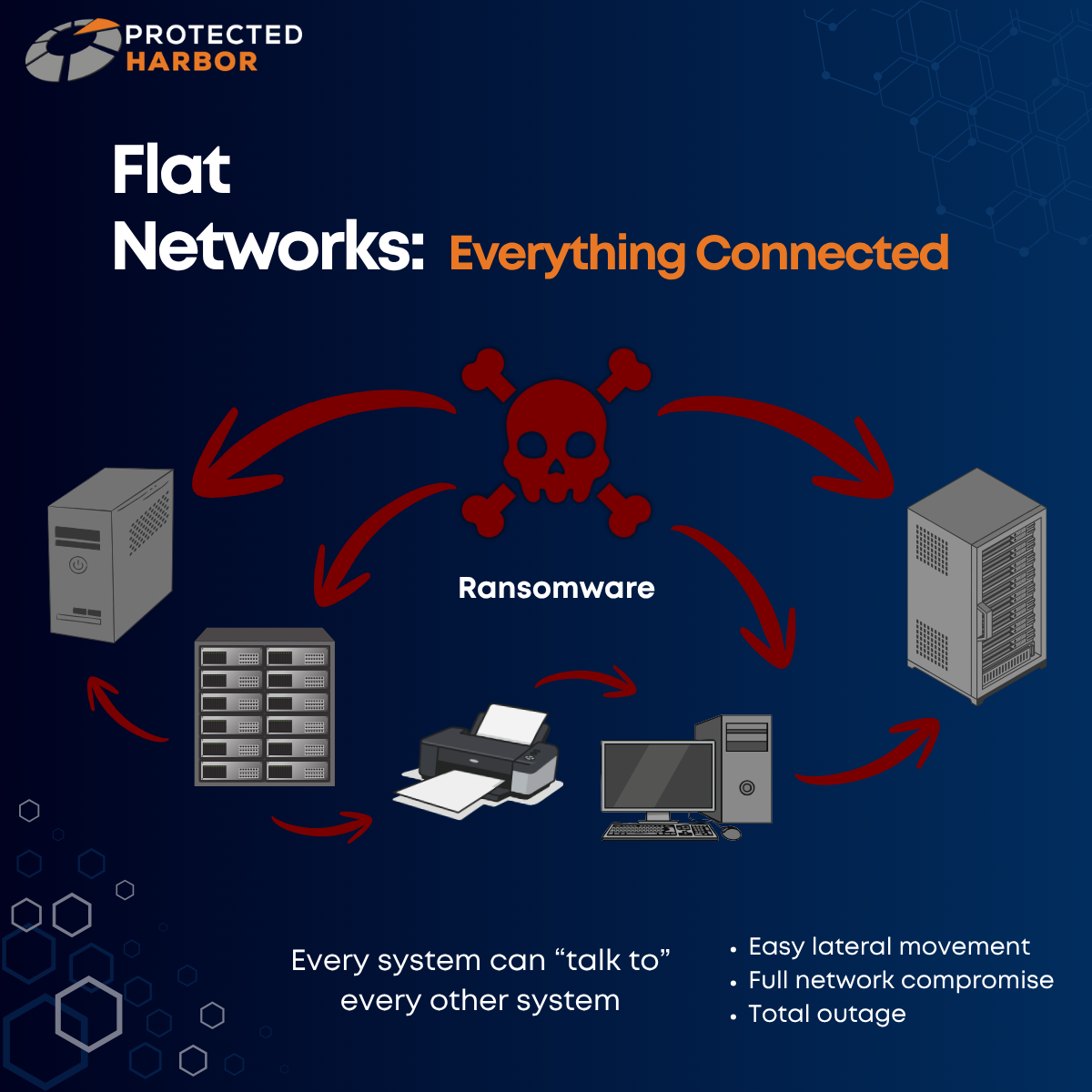
A flat network is one with minimal internal boundaries between systems. Think of flat networks as an open office with no doors.

In these environments:

  • Every system can talk to every other system
  • Application layers are not isolated
  • Data flows are not controlled
  • Dependencies are not understood


From the outside, everything may look operational, but underneath? There’s no structure. No boundaries. No awareness.

Just connectivity.


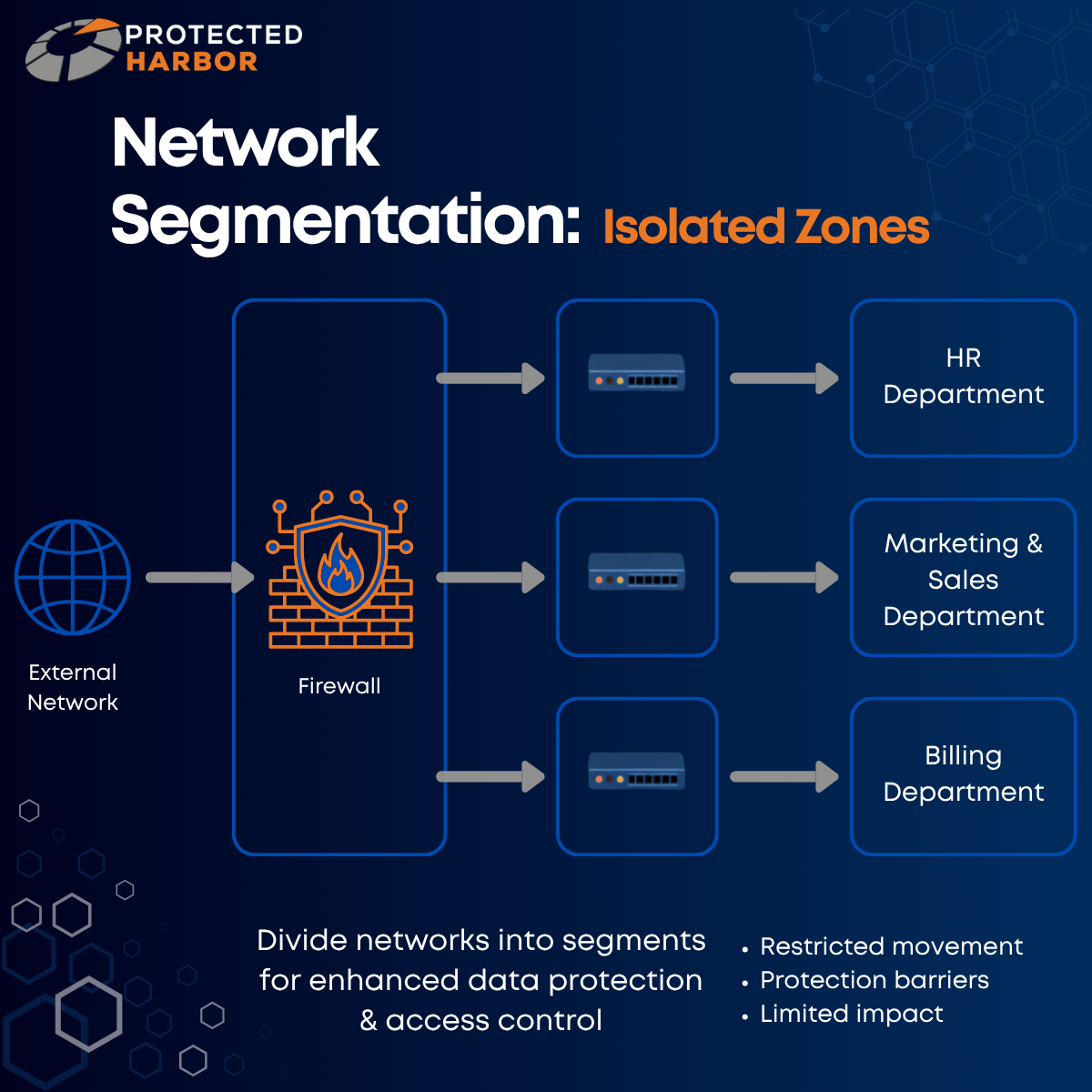
To avoid a flat network, you need network segmentation. Network segmentation divides a single network into different segments to enhance data protection and control access. Segmented networks can be thought of as a secured office building with badge-controlled rooms.

From Incidents to Outages: The Cost of Getting It Wrong


One of the hardest parts for an attacker is actually getting into your system:

Crafting an email that looks legitimate to trick someone into clicking a malicious download link.

Finding their way into exposed remote desktop access.

Exploiting a public Wi-Fi network.


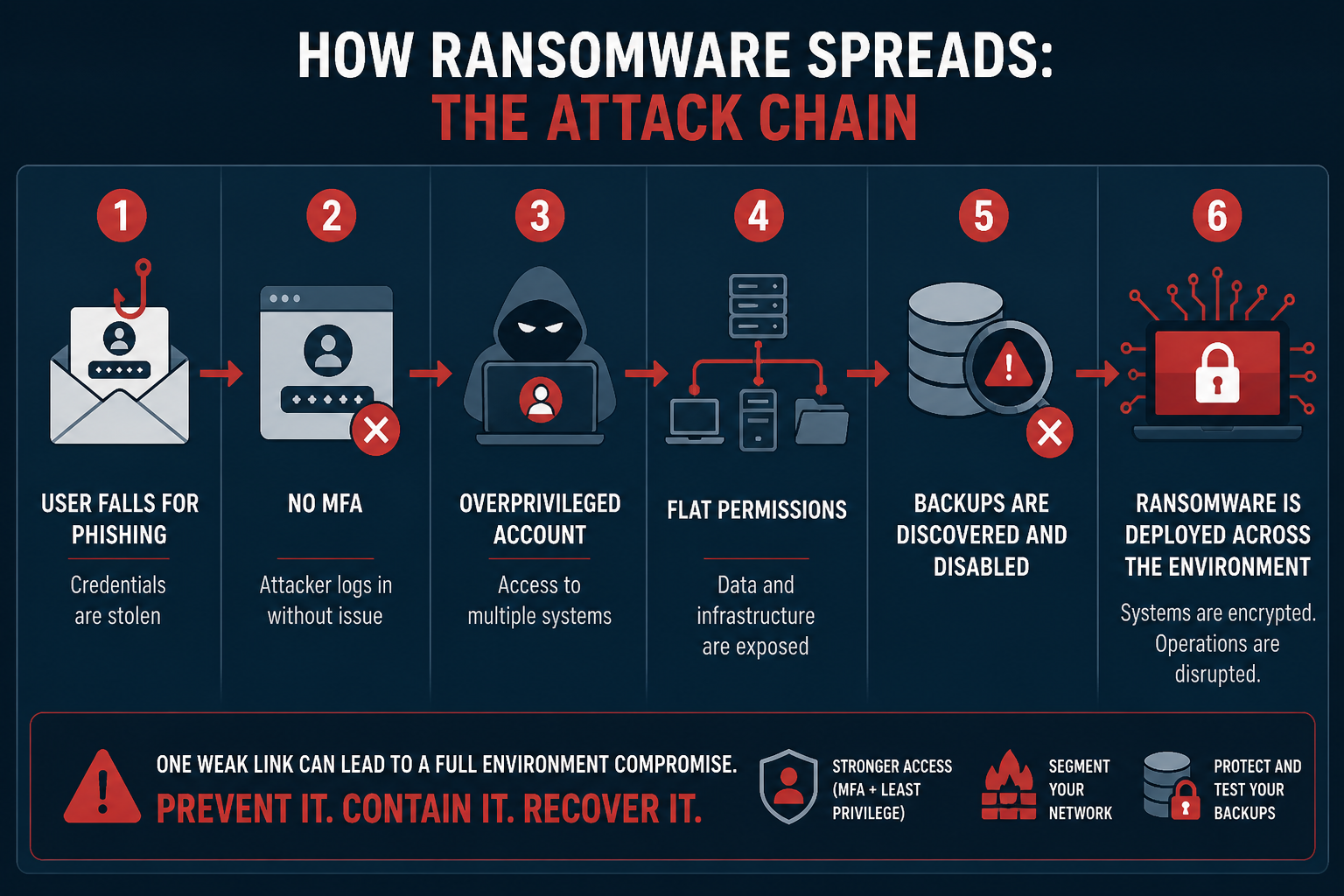
But once they’re in? It’s go time. When a single compromised machine can take down your entire organization, the real issue isn’t how the attacker got in — it’s how far they were allowed to go once they did. During an attack, minutes and hours matter more than almost anything else. Slowing the spread of malware increases your chances of early detection, isolating key systems, and preventing the full deployment from being impacted.


If a fire breaks out in a dense forest, the entire forest will burn quickly and uncontrollably. If an attacker gains access to a network with little to no segmentation, there is no barrier to movement. The consequence?

Ransomware will spread in minutes, not hours.


Not only can the ransomware spread quicker, but it’s easier for attackers to access high-value systems like your file servers, backups, and domain controllers. The issue here is lateral movement. The initial breach is often small, but the damage becomes massive due to internal spread. In this context, segmentation would be firebreaks (strips of land where trees and vegetation are removed in order to stop or slow the spread of a fire). They won’t prevent fires from starting, but they contain the damage.


Why Segmentation Failures Lead to Total Outages


When ransomware hits a flat network, your entire environment will be encrypted simultaneously and you’ll have a full outage on your hands within hours. This means a full operational shutdown, longer recovery timelines, and a higher pressure to pay the ransom.


When an attacker breaches a flat network, they don’t need to break in again. They can freely move from:

  • User device to application server
  • Application server to database
  • Database to backups
  • Backups to domain control

Your infrastructure is allowing unrestricted traversal across systems that were never meant to be exposed to each other.


Segmentation often determines whether a ransomware attack means one department is down, or the entire company goes offline. Every minute of downtime caused by an attack hurts your organization.

Frustrated customers.

Idle staff.

Missed transactions.

Lost revenue.

Reputational damage.

Increased risk of lawsuits and fines.


When one system goes down? That’s manageable.

When everything goes down? The fate of your entire organization is on the line.


The worse the spread, the longer you’ll be offline. The longer your operations are shut down or you’re without access to your data, the higher the chances are that you’ll never recover. Organizations experiencing data loss for more than 10 days face a 93% bankruptcy rate within a year of a cyberattack. Ransomware can cripple your business if you’re not actively taking steps to ensure you’re protected. Segmentation slows attacks down, limits the blast radius, and buys time for detection and response. In the aftermath, it also makes recovery faster, more contained, and less costly.


How Do Flat Networks Occur?


Flat networks are the result of:

  • Organic growth without architectural oversight
  • Multiple vendors with no single point of accountability
  • “Get it working” decisions that are never revisited
  • A lack of understanding of application behavior


No one designs bad infrastructure on purpose, but flat networks aren’t accidental. Segmentation is an architectural decision. It doesn’t require specialized hardware, you just need to be thinking about it. Flat networks happen when infrastructure is built generically, often due to a lack of expertise. Many organizations end up with a flat network simply because they, or their IT team, don’t know any better.


Segmentation is how you define the boundaries of your application. Common segmentation mistakes include:

  • Overly permissive firewall rules
  • Backup systems on the same network as production
  • Not restricting admin pathways
  • Shared credentials between systems
  • Leaving default accounts enabled
  • Allowing users to install and manage software


As attackers continue to develop new and increasingly advanced methods, this has led to Zero Trust becoming a focus in the industry when it comes to security principles. Zero Trust operates on the idea that you never blindly trust anything in an environment. You must always authenticate and verify every single action and/or change. Zero Trust means that IT teams can no longer operate on implicit trust — they must operate on explicit trust.

How Segmentation Can Save Your Business

In well-engineered environments, segmentation isn’t a feature — it’s built into how the application is structured, accessed, and operated.


The difference between an incident and a disaster is often just a few barriers.


Segmentation works by dividing your systems into isolated zones, adding control, visibility, and security together. Barriers, such as firewalls, access control lists (ACLs), or role-based access control (RBAC), are used to restrict movement so in the event of a cyberattack, attackers can’t freely jump between systems.


Let’s go back to our forest fire example. If a fire begins to spread in one section (such as a compromised laptop), it will spread locally until it hits a barrier. During a cyberattack, this means the ransomware can’t easily cross into server environments, backup systems, or critical infrastructure. The result? Only a portion of the “forest” burns, but the rest remains intact while the firefighters (your security team) have time to respond and mitigate further damage.


You can’t prevent every attack, but you can prevent total destruction. Segmentation isn’t about perfection; it’s about having layers of protection to:

  • Reduce the blast radius
  • Keep incidents manageable
  • Avoid catastrophic outcomes


A lack of segmentation isn’t just a security gap — it’s a fatal design flaw.


The Protected Harbor Difference

Application-Aware Infrastructure: Designing for Outcomes


At Protected Harbor, every time we onboard a new client, our team takes the time to evaluate every aspect their environment so we can identify areas of improvement. Flat networks are a common issue we see, but they’re not the only security concern organizations should focus on. In line with Zero Trust, one of our philosophies is to always prepare for an attack instead of simply hoping it’ll never happen. When you operate under the assumption that you will be attacked eventually, the best way to defend yourself is to implement numerous layers of protection.

These include:


That way, when an attack happens, if one layer is compromised, the others can take over. Taking a multi-layered approach and actually testing your disaster recovery methods is key to protecting yourself from cyber threats.


Flat networks happen when no one owns the infrastructure end-to-end. At Protected Harbor, we design, host, and operate infrastructure as a single accountable system. This means protections such as segmentation, access control, and backup isolation are built in from day one, not bolted on after a breach.


We design infrastructure that understands the application it supports — and owns the outcome.

That means:

  • Mapping how the application operates
  • Designing infrastructure boundaries around that behavior
  • Engineering performance, security, and uptime together
  • Operating as one accountable partner


In an Application-Aware Infrastructure model:

  • Application tiers are isolated intentionally
  • Data access paths are explicitly defined
  • Identity and permissions align to function
  • Critical systems are architected as separate trust zones


Framework: Is Your Network Too Flat?

Flat networks aren’t just risky; they’re a signal that infrastructure was never designed with intent. Infrastructure can’t just exist. It has to understand.

In a flat network:

  • A small breach becomes a full-system event
  • A single compromised device becomes a company-wide outage
  • Recovery becomes slow, expensive, and uncertain

But in a properly architected environment:

  • Incidents stay contained
  • Critical systems remain isolated
  • Recovery is targeted and fast


In a flat network, speed favors the attacker. In a segmented, application-aware environment, time favors you.


Consider:

  • Can a standard user device reach servers directly? Backup systems? Domain controllers?
  • Are there internal firewall rules restricting traffic?
  • Can credentials from one machine be reused broadly?


If you’re not sure whether your environment is segmented, we’ll show you. Contact our team for a complimentary Infrastructure Risk Assessment where we will evaluate your environment and identify:

  • Weak or nonexistent segmentation
  • Ransomware blast radius risk
  • Performance bottlenecks tied to infrastructure design
  • Additional areas of vulnerability


No obligation — just clarity on where you stand.

The Hidden Ransomware Risk Inside Your Server

The Hidden Risk Inside Your Server:

Why ‘Do-It-All’ Environments Invite Ransomware


Ransomware is a type of malware that interferes with a system or server. It does this by limiting or completely cutting off access to your data until a ransom is paid. Ransomware seems like an ominous threat, but companies never expect themselves to be targeted — until they are.


  • Why do attacks happen?
  • What makes you vulnerable?
  • How can you protect yourself?
  • What happens if you are attacked?

These are all important questions to be asking yourself.


Most ransomware attacks don’t start with sophisticated exploits — they succeed because of poor infrastructure design. Ransomware is really good at taking advantage of flaws in mainstream software. Every technology that is wonderful can be used in a harmful way. There is no one single cause of an attack, which means there is no one single solution for preventing a cyberattack. However, there are things to be mindful of and steps you can take to protect yourself and your organization.


Why Is Ransomware So Dangerous?

The target of a ransomware attack is always data because data is valuable. It’s a form of currency, so any location holding data is at risk of being a target. This is why industries such as the financial sector, healthcare/ medical organizations, transportation companies, and law firms are at the highest risk. These institutions have data attackers want — credit card information, social security numbers, phone numbers, addresses. This information is worth a lot of money to people with bad intentions.


Ransomware attacks can cause:

  • Extended downtime
  • Data loss
  • Revenue loss
  • Noncompliance
  • Having to pay large ransoms with no guarantee you’ll actually get your data back
  • Reputation damage
  • Risk of lawsuits
  • Potential fines and law enforcement involvement


Let’s look at the data:

One study found that 25% of organizations are forced to close after a ransomware attack and 80% of companies who paid the ransom suffered a second attack. Another study found that after a ransomware attack, 57% of businesses shut down operations temporarily, 40% lost significant revenue, and only 13% fully recovered their data. Companies experiencing data loss lasting more than 10 days also face a 93% bankruptcy rate within one year. The risk for small businesses is even greater, with 60% of small businesses shutting down within 6 months of a cyberattack.


These are scary statistics, but it’s important for organizations to understand how dangerous ransomware can be. At Protected Harbor, we are constantly looking for new causes of ransomware and ways we can protect our clients and ourselves from an attack. In this blog, we are specifically going to focus on how mixed-use servers can make organizations more vulnerable.

What Are Mixed-Use Servers?

As we mentioned, there is no single cause of a ransomware attack, which means organizations need a multi-layered approach to protect themselves. Many organizations often don’t understand the factors that put them at risk, so making yourself aware of the things that increase your vulnerability and addressing those issues is one of the best ways to protect your business.


During a recent new client assessment, we encountered mixed-use servers, which are servers that have multiple different roles/ workloads. For example, one server that hosts websites as well as databases, or a server that hosts file storage and VPN storage. Using a single server to provide one or multiple key services may seem more convenient for your business, but this is like hitting the jackpot for attackers.


No one intentionally designs bad infrastructure, so how does this happen?

The most common reason mixed-use servers occur is because of cost pressure. Organizations fear the high cost of licensing and adding new servers, so they may try to save money by enabling as many network rolls as possible. Another cause is developer-led builds that prioritize getting you set up fast, without prioritizing the long-term. We have seen many SaaS vendors enable programmers to directly install the programs they’re creating. This is an issue because programmers are excellent at solving code problems, but they usually have little to no training on infrastructure. This means they are not building your environment for scale, which will create friction down the line as your organization tries to grow.


This not only increases your vulnerability to an attack, but also impacts performance. Problems develop as multiple applications stored on a single server become more active.  For example, if a server is both a web server and database server, this can create performance problems when the database server is running complex queries. These queries begin using more and more of the server’s resources, which reduces the server’s ability to respond to web requests.


When performance is threatened, everything is on the line.


How Mixed-Use Servers Make You Vulnerable to An Attack

Mixed-use servers hurt performance because multiple key services are competing for resources, which means none of them can perform optimally. When hit with a cyberattack, mixed-use servers also make you more vulnerable in the following ways:

  • Increased blast radius: It’s easier for attackers to find and steal important data if it’s all stored in one place. Separating workloads makes it more difficult for attackers to find the valuable data they’re looking for because it’s spread out.
  • Damage happens faster: Mixed-use servers allow ransomware to spread within minutes — not hours. This means a cyberattack can do more damage to your organization in a shorter amount of time. By the time you realize something is wrong, it may already be too late.
  • Multiple workloads impacted: If you have multiple workloads on one server, multiple services will go down if that server is targeted by ransomware. Separating workloads helps to prevent multiple key services from being impacted during an attack, which reduces the chances of an attack crippling your business.


Can Maintenance Save You?

An added problem with mixed-use servers is that they are typically poorly maintained and often enabled with open security, both of which create fertile ground for ransomware attacks. Installing updates and security patches are crucial, but they require downtime. For some organizations, it can be hard to prioritize these updates and patches when even an hour of downtime can mean missed transactions, lost revenue, and idle staff. For businesses that use mixed-use servers, these maintenance windows are significantly longer, making the decision to prioritize maintenance and security even more difficult.


Maintenance downtime expands on mixed-use servers because each use will have its own updates that need to be installed. For example, if you have a server that acts as both a web server and a database server, installing all of the updates for the database, web server, and core operating system can result in hours of downtime. A maintenance window that large may cause a business to prioritize uptime and skip maintenance and security patches entirely. However, a system that is not properly maintained or adequately protected is extremely vulnerable to ransomware.


A cyberattack will cost you much more than a few hours of downtime.

The Protected Harbor Difference

Protected Harbor designs and operates infrastructure differently:

we don’t just address symptoms — we fix core issues.


We design environments around the application itself — separating workloads, isolating risk, and ensuring that no single failure can take down your entire business. Our engineers take the time to learn each client’s application inside and out so we can design infrastructure tailored the unique needs and workloads of their organization. This is what we call Application-Aware Infrastructure: where performance, security, and accountability are engineered together, not bolted on later.


Our team understands how dangerous ransomware can be because we’ve seen the havoc it wreaks firsthand. This is why we prioritize security as one of the most important features when designing your environment, instead of treating it like an afterthought. This allows us to deploy an improved and resilient security platform that will help to keep your organization safe from ransomware attacks.


If you’re not sure whether your business relies on mixed-use servers, we’ll show you.


Contact our team for a complimentary Infrastructure Risk Assessment where we will evaluate your environment and identify:

  • Mixed-use server exposure
  • Ransomware blast radius risk
  • Performance bottlenecks tied to infrastructure design


No obligation — just clarity on where you stand.
 

Your ‘Efficient’ Server Setup Might Be a Security Nightmare

Many organizations using mixed-use servers end up here because infrastructure decisions are made around cost or convenience — not how the application actually behaves in production. While cost and convenience are important things to think about, you can’t risk your entire business being crippled by a cyberattack.


Consider:

  • Do you have servers running multiple roles?
  • Do maintenance windows keep getting delayed?
  • Are you noticing performance issues during peak usage?
  • Are your backups completely isolated?
  • Can developers or vendors deploy directly to production servers?


If you want help protecting your organization from ransomware, contact Protected Harbor today

What True Accountability Means in Today’s IT Environment

What Real Accountability Looks Like in IT

What Real Accountability Looks like In IT


Most organizations believe they have accountability in IT.
There are contracts.There are SLAs. There are dashboards showing green checkmarks.
And yet, when something breaks, the same question always surfaces:
Who actually owns this?
Not who manages a ticket.
Not who supplies the software.
Not who passed the last audit.
Who is responsible for the outcome when performance degrades, security drifts, or systems quietly become unstable?
In this post, we’ll define what real accountability looks like in IT—and why organizations stuck in reactive, vendor-fragmented environments rarely experience it.


The Problem: Accountability Is Fragmented by Design

Modern IT environments are rarely owned by anyone end-to-end.
Instead, responsibility is split across:

  • MSPs handling “support”
  • Cloud providers owning infrastructure—but not performance
  • Security vendors monitoring alerts—but not outcomes
  • Internal teams coordinating vendors—but lacking authority to fix root causes

Each party does their part. Each contract is technically fulfilled. And still, problems persist.
Why?
Because accountability without ownership is performative.
When no single party designs, operates, secures, and supports the full system, accountability becomes:

  • Reactive instead of preventive
  • Contractual instead of operational
  • Blame-oriented instead of solution-driven

The result is IT that technically functions—but never truly stabilizes.

The Business Impact: When No One Owns the Outcome

Fragmented accountability doesn’t just create IT issues—it creates business risk.
Organizations experience:

  • Recurring outages with different “root causes” each time
  • Slow degradation of performance that no one proactively addresses
  • Security gaps that pass audits but fail in real-world scenarios
  • Rising cloud costs with no clear explanation—or control
  • Leadership fatigue from coordinating vendors instead of running the business

Most damaging of all: trust erodes.
IT stops being a strategic asset and becomes a source of uncertainty—something leadership hopes will behave, rather than something they rely on with confidence.
This is why so many organizations say they want accountability, but never feel like they actually have it.


What Real Accountability Actually Means

Real accountability in IT isn’t a promise—it’s a structural decision.
It means:

  • One party owns the system end-to-end
  • Design, performance, security, compliance, and operations are treated as a single responsibility
  • Problems are addressed at the root—not patched at the surface
  • Success is measured by stability and predictability, not ticket volume

Accountability shows up before incidents happen.
It looks like:

  • Proactively engineering environments to prevent known failure patterns
  • Designing infrastructure around workloads—not vendor defaults
  • Treating compliance and security as continuous operating disciplines
  • Making IT boring because it works the same way every day

In short: ownership replaces coordination.

The Protected Harbor Difference: Accountability Built Into the Architecture

What Real Accountability Looks Like in IT

At Protected Harbor, accountability isn’t something we claim—it’s something we design for.
We own the full stack:

  • Infrastructure
  • Hosting
  • DevOps
  • Security controls
  • Monitoring
  • Support
  • Performance outcomes

This is why solutions like Protected Cloud Smart Hosting exist.
Instead of renting fragmented services and hoping they align, we engineer a unified system:

  • SOC 2 private infrastructure designed for predictability
  • Environments tuned specifically for performance—not generic cloud templates
  • Fully managed DevOps with white-glove migrations
  • 24/7 engineer-led support with a guaranteed 15-minute response

When we own the system, there’s no ambiguity about responsibility.
If something isn’t working the way it should, the question isn’t who’s involved—it’s what needs to be fixed.
That’s real accountability.


What to Look For If You’re Evaluating Accountability

If you’re assessing whether your IT partner truly offers accountability, ask:

  • Who owns performance when everything is “technically up” but users are struggling?
  • Who is responsible for long-term stability—not just immediate fixes?
  • Who designs the system with the next five years in mind?
  • Who has the authority to change architecture when patterns emerge?

If the answer is “it depends,” accountability is already fragmented.


Closing: Accountability Makes IT Boring—and That’s the Point

The goal of real accountability isn’t heroics.
It’s consistency. Predictability. Confidence.
When accountability is real, IT fades into the background—quietly supporting the business without drama, surprises, or constant intervention.
That’s what organizations burned by reactive IT are really looking for.
Not more tools. Not faster tickets.
Ownership.