
The Real Reason Infrastructure Fails: No One Owns It
The Real Reason Infrastructure Fails:
No One Owns It
When an organization experiences a major outage, the immediate focus is usually on the technical cause. Maybe there was a firewall fault or a storage failure. However, if organizations investigate deeper, they will discover the technical failure wasn’t the root cause at all. The real issue was that no one was responsible for understanding how all the pieces work together.
Modern IT environments are increasingly complex. Infrastructure, cloud platforms, security tools, backup systems, and networking are often managed by different vendors, providers, and internal teams. This creates chaos and confusion, especially in times of crisis. Every component may have an owner, but the environment itself does not. This is where problems arise. If no one owns the outcome, the business will pay the price.
The Rise of Fragmented Infrastructure
IT environments involve a lot of moving parts. As organizations expand and grow, they often build their technology environments incrementally. This means that over time they find themselves depending on multiple different vendors for cloud infrastructure, networking, security, backup services, business applications, etc. Individually, each relationship may make sense. Collectively, however, they create a dangerous gap: no one is accountable for the entire system.
Every provider understands their piece of the puzzle, but no one understands the whole picture.
Who then is responsible when something goes wrong?
The Problem with Shared Responsibility
The term “shared responsibility” may sound reassuring, like you have multiple providers there to support you in times of need. In actuality, shared responsibility means diluted responsibility.
When multiple parties share ownership, critical questions emerge:
- Who is monitoring dependencies?
- Who is validating security controls across platforms?
- Who is responsible for disaster recovery?
- Who is ensuring backup systems can actually recover applications?
- Who is accountable when something fails?
Too often, the answers to these questions are unclear. During a crisis, unclear ownership becomes a serious business risk.
What Does Fragmented Infrastructure Feel Like?
The greatest weakness of fragmented infrastructure is not technical — it’s operational.
A mid-sized company experienced a major outage after a routine infrastructure change triggered a cascading failure across several systems. At first glance, everything seemed to be managed appropriately:
- Their cloud environment was managed by one provider
- Network infrastructure was handled by another
- Security tools were managed by a third-party MSP
- Backups were maintained by a separate vendor
- Critical business applications were supported directly by software vendors
On paper, every component had an owner, but in reality, the environment itself didn’t. As systems began failing, leadership initiated a bridge call involving all five vendors:
- The application provider insisted the application was functioning correctly
- The cloud provider confirmed infrastructure availability
- The network team showed no signs of connectivity issues
- The backup provider verified successful backup jobs
- The security provider reported no active threats
Every vendor explained why the issue was not within their environment, leading to finger-pointing at other vendors, or what we like to call ‘The Blame Game’.
Meanwhile, employees couldn’t work, customers couldn’t access services, and business operations were effectively at a standstill. For nearly eight hours, teams worked in parallel trying to determine the root cause. The issue ultimately turned out to be a dependency between multiple systems that no single vendor fully understood because no single vendor was responsible for the entire architecture.
Every provider could see their piece, but nobody could see the whole picture. The outage itself wasn’t what caused the extended downtime — the lack of ownership did.
Infrastructure Is an Ecosystem, Not a Collection of Products
One of the biggest misconceptions in IT is treating infrastructure as a collection of individual technologies. Infrastructure is not just:
- A server
- A firewall
- A storage array
- A cloud platform
- A backup solution
Infrastructure is the interaction between all of these systems.
Every single dependency, connection, and recovery process matters. When environments are designed as isolated components, organizations create operational blind spots. When environments are designed holistically, organizations create resilience.
Security Suffers When Ownership Is Fragmented
Security is an area that is particularly vulnerable to shared responsibility gaps. Attackers don’t care who manages what, they care about weaknesses between systems — the handoffs, the assumptions, the areas where everyone believes someone else is responsible.
Security must be treated as a top priority, but many vendors approach security as an afterthought. When we onboard new clients, we often see environments where layers of protection have been haphazardly bolted on over time, or even after an attack has already occurred. The security decisions made long before an attack determine if and how well an organization can recover. Many security decisions are not difficult to implement, as long as the people responsible are thinking about them. If no one knows who is responsible, implementing strong layers of protection will fall through the gaps.
Many breaches occur not because protections are absent, but because accountability is absent.
Taking Accountability A Step Further
The biggest risk in modern IT environments isn’t always outdated technology or insufficient security controls. It’s the gap between them.
When responsibility is fragmented, outages take longer to diagnose, recovery takes longer to execute, and businesses waste valuable time figuring out who owns the problem instead of solving it. The most resilient environments aren’t necessarily the ones with the most technology — they’re the ones with the clearest accountability.
Let’s return to the example above. When the organization got tired of coordinating multiple vendors, they transitioned to a fully managed, application-aware infrastructure model. The technology stack didn’t change dramatically, what changed was accountability. Instead of coordinating multiple vendors during every incident, they had a single team responsible for:
- Infrastructure
- Security
- Backup and recovery
- Application dependencies
- Overall system performance
When issues arose, there was no debate over responsibility. There was simply a unified team focused on resolving the problem.
Application-Aware Infrastructure
Application-Aware Infrastructure (AAI) goes beyond traditional “keep the lights on” IT support. Instead of only managing devices, tickets, and generic infrastructure, AAI means understanding how the actual business applications behave, what impacts performance, uptime, security, and revenue, and taking responsibility for it.
For many organizations — especially SaaS, healthcare, logistics, and RCM companies — your application is your business. Many vendors can manage servers and networks, but an AAI-focused provider understands the dependencies between storage latency, database performance, APIs, integrations, user workflows, and cloud architecture. That deeper operational awareness allows them to troubleshoot faster, prevent issues proactively, and optimize environments around business outcomes rather than generalized infrastructure metrics.
Application-Aware Infrastructure also means stronger accountability because one partner owns the entire stack — infrastructure, hosting, monitoring, performance, security, backups, and operational support. This removes the “vendor blame game” that often occurs during outages or incidents.
Application-Aware Infrastructure & Security
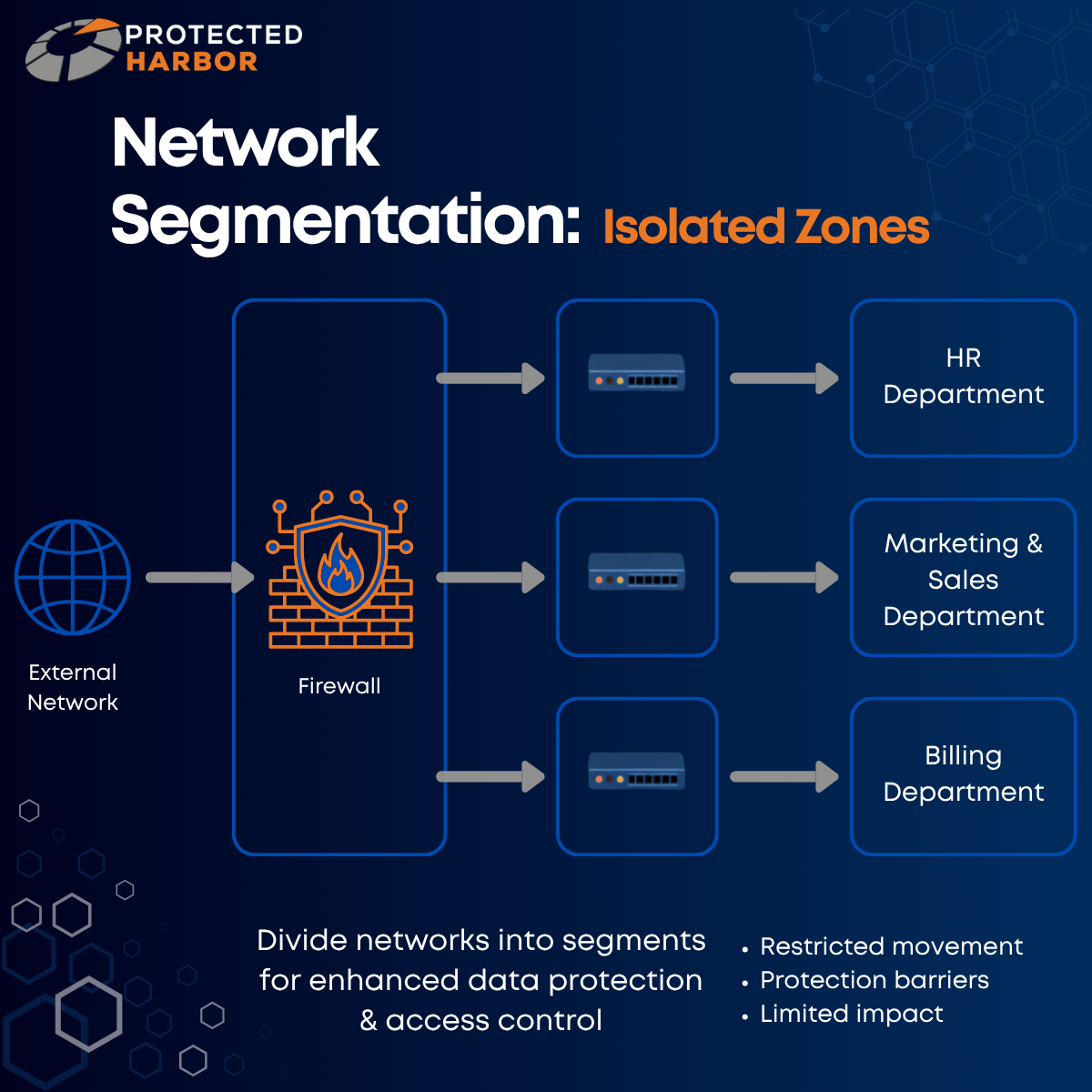
Application-Aware Infrastructure providers are better positioned to implement layered protection because they have a deep understanding of your application’s workflows, sensitive data paths, user access patterns, and operational risks. That makes Zero Trust, segmentation, backup strategies, and recovery planning more effective and better aligned to the application itself.
Enhanced Optimization
AAI providers have a deep understanding of workload behavior, better enabling them to:
- Reduce cloud waste
- Improve application speed and uptime
- Scale infrastructure more intelligently
- Align DR/HA planning to real operational priorities
- Anticipate bottlenecks before users feel them
For organizations, this means:
- Better performance
- Faster issue resolution
- 99% uptime
- Predictable costs
- Stronger security posture
- Fewer vendors to coordinate
- A single partner aligned to business outcomes, not just infrastructure maintenance
The Difference Between Support & Ownership
When multiple vendors, tools, and teams have a hand in the same environment, it becomes difficult to know who is responsible for reliability and performance end-to-end. Many providers offer support, but few offer ownership. Support means responding when something breaks. Ownership means:
- Designing with resilience in mind
- Anticipating failure points
- Understanding dependencies
- Testing recovery paths
- Continuously improving the environment
Support simply reacts. Ownership prevents.
The Protected Harbor Difference
One of Protected Harbor’s core philosophies is to create partnerships with our clients, not just client/vendor relationships. True ownership requires a partner that understands your organization and views infrastructure as a complete system, rather than a collection of technologies. This means:
- Accountability: One team responsible for outcomes — not just individual components.
- Security-First Design: Infrastructure built with security integrated into every layer.
- Application-Aware Infrastructure: Infrastructure designed around the unique needs and workflows of the application it’s meant to support.
- Recovery Readiness: Isolated/ immutable backups, elevated disaster recovery, and regularly tested business continuity plans.
- Architectural Standards: Intentional design that reduces complexity and eliminates unnecessary risk.
- Continuous Visibility: Ongoing understanding of how systems interact and where vulnerabilities exist.
Organizations need more than infrastructure management — they need accountability. Technology environments have become too interconnected and too critical to business operations to rely on fragmented responsibility models. When an outage occurs, businesses shouldn’t need to juggle five different vendors to determine who is responsible for solving the issue. They should have a partner that understands the entire environment, owns the outcome, and is accountable for restoring operations.
Resilience isn’t created by having more vendors. It’s created by having clear ownership.
Infrastructure Doesn’t Fail Because Technology Fails
Infrastructure fails when responsibility is fragmented, ownership is unclear, and every provider owns a piece, but no one owns the outcome. The organizations that build resilient environments understand that technology alone is not enough. They need:
- Reliable architecture
- Full accountability
- Clear ownership
Because at the end of the day, the most important question during an outage isn’t “whose fault is it?”, it’s “who owns making it right?”.
Contact Protected Harbor for a complimentary Infrastructure Risk Assessment. Our engineers will evaluate your environment and identify:
- Where revenue is at risk
- Performance bottlenecks tied to infrastructure design
- Areas of vulnerability
- Ransomware blast radius risk
- Whether your backups are actually recoverable
- Where you are overpaying
No obligation — just clarity on where you stand.