Category: Ransomware

FBI: Russian hackers spy on, scour energy sector of the US; 5 companies targeted
FBI Russian hackers spy on, scour energy sector of the US 5 companies targeted

FBI: Russian hackers spy on, scour energy sector of the US; 5 companies targeted

According to a March 18 FBI advice to US businesses received by CNN, hackers affiliated with Russian internet addresses have been examining the networks of five US energy corporations as a possible preliminary to hacking operations.
As the Russian military suffers significant casualties in Ukraine and Western sanctions on the Kremlin begin to bite, the FBI alert only days before President Joe Biden openly warned that Russian-linked hackers could target US companies.

Key Highlights:

  • According to the Federal Bureau of Investigation, at least five U.S. energy businesses and 18 others in critical infrastructure sectors have seen “abnormal scanning” from Russian-linked IP addresses, according to a Friday bulletin first published by CBS News on March 22.
  • The behavior “certainly suggests early phases of reconnaissance, searching networks for vulnerabilities for use in potential future attacks.”
  • In a statement, Dennis Hackney, senior director of industrial cybersecurity services development at ABS Group, stated, “It is not surprising that Russia would activate its most effective war-fighting tools online.” “State-sponsored cyberattacks are difficult to attribute definitively,” he added.
  • On Monday, Biden warned business executives, “The enormity of Russia’s cyber capability is fairly consequential, and it’s coming.” Read more here.
  • Although no breaches have been established due to the scanning, the FBI advises the latest in a series of warnings from US officials to critical infrastructure operators about the possibility of Russian hacking. Biden’s public notice was broad and aimed to raise awareness of the problem, whereas the FBI advice was intended for a private, technical audience to help firms defend their networks.

An overview of the situation

In an address to the Detroit Economic Club, FBI Director Christopher Wray said Tuesday that federal law enforcement is “working closely” with cyber personnel in the private sector and abroad to assess potential threats.

“With the ongoing crisis in Ukraine, we’re focusing especially on the catastrophic cyber threat posed by Russian intelligence services and the cybercriminal groups they defend and promote,” Wray added. “We have cyber personnel collaborating closely with Ukrainians and other allies overseas, corporate sector, and local partners.”

Wray’s remarks come four days after the FBI warned that vital infrastructure providers were under attack, particularly the energy sector.

According to CBS News, the FBI warning instructed: “US Energy Sector companies to analyze current network traffic for these IP addresses and initiate follow-up investigations if discovered.”

However, the FBI advisory does not specify if the “scanning” is a new threat.
“I’m not sure what this announcement is supposed to mean,” independent security consultant Tom Alrich said in an email. “Probably every large utility in the country is scanned thousands of times an hour, 24 hours a day, by bad actors, so I’m not sure what this announcement means.”

An attack on crucial infrastructure, according to experts, might be interpreted as a war crime, giving a nation-state actor pause. The most adept attackers, on the other hand, maybe able to conceal their origins, according to Hackney.

“He explained that the higher the sum of money, the better the cybercriminals’ capacity to hide who they are and how they are funded. “Because state-sponsored threat actors might have large funds, they are usually adept at concealing their true ties. As a result, assigning blame is impossible.”

President Joe Biden has warned Russia that “we are prepared to retaliate” if it “pursues cyberattacks against our industries, our key infrastructure.” For months, the federal government has been striving to improve the protection of 16 critical industries, including energy, communications, finance, and agriculture. On Monday, President Trump released a statement reinforcing previous warnings that Russia could use harmful cyber activity to retaliate for economic penalties imposed by the US and other countries.

Utilities in the United States have stated that they are “closely monitoring” the situation in Ukraine and that they are collaborating with their peers and the federal government.

“Russia has the capability to launch cyberattacks in the United States that have localized, temporary disruptive effects on critical infrastructures, such as temporarily shutting down an electrical distribution network.,” according to the assessment by Senate Select Committee on Intelligence.

Safety Tips from Protected Harbor

Protected Harbor’s security team has been following the matter for a long time and continues to emphasize cybersecurity. Some tips from our experts on how you can protect your business from cyberattacks:

  • Install firewalls and other advanced protections at workstations and network equipment such as routers and switches to detect unauthorized activity by hackers who might try compromising your system remotely through internet connections.
  • Backup & Disaster Recovery Plan- Always back up data before it is lost in case of an attack. Ensure that all devices are constantly updated with the latest antivirus software available. Password protection should be enabled not just on computers but also on any mobile device or tablet someone may have access to.
  • Know your organization’s pain points and consider how to protect them. Understand that cybersecurity is not just about protecting data but also ensuring resiliency so services can continue when attacked or compromised
  • Consider security from end-to-end; it’s essential to have a sound strategy for both physical and digital assets on-site and remote access via mobile devices.
  • Be aware of what you share online: make sure all social media posts are set appropriately (e.g., don’t post sensitive information like passwords); be cautious with attachments in emails; choose strong passwords that are different than those used elsewhere because they may get stolen by cybercriminals.
  • Logging tools such as Palo Alto Network’s next-generation firewalls should be used to monitor for odd activities (NGFW) continuously. The records should subsequently be examined daily to detect any irregularities.
  • Enable multi-factor authentication (MFA) for all websites, accounts, systems, and network logins, particularly emails. A user’s mobile device is loaded with an application that generates a series of random codes during the login procedure. The code, as well as the password, must be entered by the user.
  • Patch any vulnerabilities and software, including older versions. If you merely patch against known attacks, you risk being caught due to an unknown exposure. Patch your computers, networks, webpages, mobile apps, and anything else connected to the Internet.

The Cybersecurity and Infrastructure Security Agency recently issued a notice listing 13 known vulnerabilities that Russian state-sponsored hackers have used to attack networks. Criminals use gaps to penetrate systems. Therefore network cybersecurity and network protection are critical for a company’s safety.

Recent cyber-attacks on government websites were carried out with simple tools. The website crashed due to multiple users accessing it at the same time. As shown in this piece, cyberwar threatens Western governments and agencies. To increase their security, businesses must take proactive actions.

Protected Harbor assists businesses in defending themselves and their IT operations against known and unknown threats, such as malware, ransomware, viruses, and phishing. We help organizations back up their data and prevent data loss due to ransomware attacks or other security issues. Learn more about Protected Harbor and request a free IT audit to learn how we can assist you in defending against the Russian Cyber Invasion.

What causes healthcare data breaches the most frequently?

What is the most common cause of healthcare data breaches?

Patient’s medical records are a goldmine for malicious hackers—if they can get their hands on them. According to Cisco Internet Security Threat Report, healthcare is currently the most targeted industry by cybercriminals.

Health data breaches have been on the headlines for a while now. From the crippling breach of Anthem to the compromising of 10 million patient records at UCLA Health — nothing is sacred when it comes to cyberattacks these days. While the impact of security incidents might differ depending on their magnitude, it seems that poorly protected IT systems and hacking/IT incidents are often the biggest culprits in causing privacy and financial setbacks.

Healthcare data breaches are on the rise. Although many are concerned with hacking, several factors could potentially cause a significant healthcare data breach.

Common causes of healthcare data breaches!

Data breaches are becoming more and more common. With the rise of hacking, phishing, malware attacks, and new security regulations, all healthcare organizations need to stay proactive in protecting their data.

The most common cause of data breaches for healthcare organizations is malicious or cyber-criminal attacks. Data breaches can come from various sources, including hackers stealing protected health information (PHI) from an organization’s database, unencrypted devices, or a weak, stolen password. One of the biggest causes of healthcare data breaches is misconfigured medical devices and office equipment. Medical device security remains a major concern for organizations. Click here to know how do breaches happen and how to prevent them?

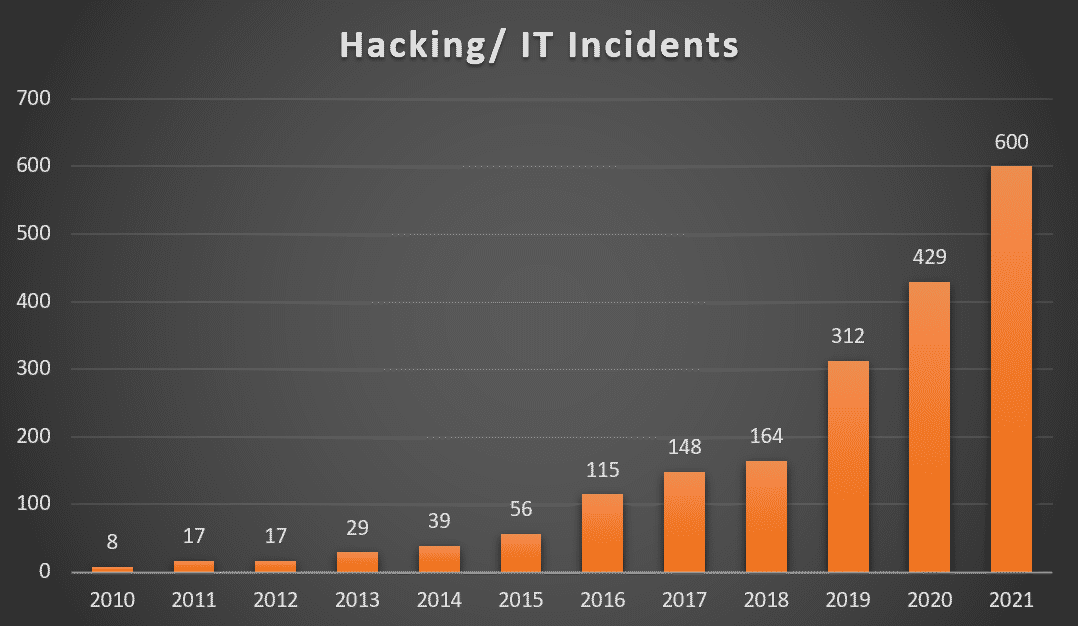
Hacking/ IT Incidents accounts for 47% of healthcare data breaches making it the #1 cause of healthcare data breaches.
(Source: Electronic Health Reporter)

hacking bar ratioPatient Data Theft: High risk
Health care industry members are all too familiar with data theft and new methods of exfiltrating information from connected medical devices such as electronic medical records (EMRs) and protected health information (PHIs). IP-enabled medical devices can be easily exploited by experienced hackers because of minimal access controls and known vulnerabilities. A hacker may then take data directly from the medical device, but since medical devices typically contain limited data, he is more likely to go to servers, data centers, or other devices on the network, like the XP workstation that is connected to the electronic medical record. Data breaches in healthcare are defined as theft and loss 32% of the time, compared to only 15% in different industries, 2nd to Hacking and IT incidents, as per Healthcare drive. With the number of high-profile breaches in healthcare over the past three years, healthcare organizations need tighter controls to mitigate this risk.


What is the cost to your company?

According to IBM’s Cost of Data Breach Report 2021:

  • Healthcare organizations spent an average of $161 per breached record in 2021, which is expected to increase in the future.
  • On average, it takes 329 days to identify a breach.

The reports show that the cost of data breaches has risen once again, reaching a record high since IBM first published the report 17 years ago. The average cost of a data breach increased by 10% year over year, to $4.24 million per incident and that of healthcare data breaches increased by $2 million to $9.42 million per incident in 2021. The average cost of ransomware attacks was $4.62 million per incident.

How can you avoid a data breach?

  • Back up data– Having a proper backup schedule and implementing a secure process to access the off-site data is a preliminary requirement. Confirm that your backup/recovery partner is also HIPAA compliant. Cloud hosting solutions can also be considered for better security.
  • Two factor authentication- Multi-factor authentication, also known as 2FA, is a simple concept that can be implemented by companies easily. A key benefit of two-factor verification lies in its very name: it requires two variables to access an account, just as you need two keys to enter a house. The security is therefore twice as strong.
  • Safeguard data and devices- Ensure that the tools and policies for security are implemented, securing all the devices accessing your network. Remote monitoring for unauthorized access and unusual activity can opt. Limit and set proper data control and access for the devices.
  • Train and educate staff– create a policy for regular security training and practice sessions. Identifying phishing emails, ensuring password complexity, and adhering to anti-malware protocols should be a part of this training. More details

To wrap things up!

Security and compliance are among the top factors healthcare organizations consider when adopting new technologies. Many organizations didn’t or were not able to take the time to strategically align new cloud-based tools and platforms with existing security standards as they transitioned to remote work after the pandemic.
Security and privacy should be a priority when working with technology partners in healthcare. It is a trusted partner’s responsibility to ensure users’ privacy and security, having incorporated a variety of safeguards into their processes, designs, and code, as well as constructing the infrastructure to ensure careful protection of user information. Cisco, Greenway, GE Healthcare, and Protected Harbor are some of the most trusted and reliable healthcare IT solution providers who take pride in their experience of delivering solutions to healthcare and other organizations.

What is a data breach? How to prevent one?

What is a data breach How to prevent one

What is a data breach? How to prevent one?

Data breach has become more common every year. According to the Identity Theft Resource Center (ITRC) data breach 2021 report there were over 1291 data breaches that exposed more than 7 billion records last year. Data breaches can harm your company’s reputation, bringing production to a halt, and even cause enough financial harm to send your company under. In this article, we will review what is data breach and how to stop one?

What is a data breach?

A data breach is a cyber-attack where unauthorized individuals gain access to sensitive personal or confidential information. When a security breach occurs, the hacker can steal and misuse personally identifiable information (PII) such as social security numbers, credit card details, bank account numbers, and even your protected health information (PHI) that could be used for fraudulent activity. A data breach on an organization leads to the release of client information or internal content, moreover, it can be intentional (theft, sabotage) or unintentional (internal error).

Among the data breaches, this year, the manufacturing and utilities sectors were deeply affected, accounting for 48 breaches and 48,294,629 victims. The healthcare sector was second, with 78 compromises and more than 7 million victims. In addition, financial services, government, and professional services each sustained more than 1.5 million victims.

Security magazine’s top data breaches list for 2021:data breach

  • Brazilian Database — 223 million, January
  • Bykea — 400 million, January
  • Facebook — 553 million, August
  • LinkedIn — 700 million, June
  • Cognyte — 5 billion, June
  • Other notable breaches: Ubiquiti, Clubhouse, USCellular, Twitch, T-Mobile, Panasonic, GoDaddy

How do breaches happen?

Data breaches come in many forms. In the case of Asian delivery and rental company Bykea, it was a lack of server encryption. A flaw in Facebook’s address book contacts import feature was their undoing. Cognyte let an unsecured database get indexed, Twitch got hit due to a bad server configuration, and for T-Mobile, it was weak access control points.

Missing Security Patches –  Security tools can become outdated quickly and updates are needed to stop new threats. It’s not just antivirus software that needs patching, many network-level vulnerabilities are caused by unpatched Cisco, Microsoft, and Apache applications.

Unencrypted Data – It is simply plaintext or unaltered data that can be accessed by anyone. This can be sensitive information stored online on cloud servers with no layers of protection. By using encryption, you can prevent brute force attacks and cyberattacks, such as malware and ransomware. Using encryption, data is protected while being transmitted in the cloud or on a computer system.

Phishing – This is the most common hacking technique, that can trick an employee into clicking on a link or opening an attachment. Phishing attacks are used by hackers to gain direct access to a target’s email, social media, or other accounts or to change or compromise connected systems, such as point-of-sale machines and order processing systems.

Spyware – This is a type of malware that tracks your activity until a hacker has what they need to strike. Employee’s don’t even have to download an infected file to get tagged with spyware,

Worms – This is a type of malware hackers install onto a system’s memory. Once installed, worms infect your entire system, stealing data directly, changing system files, or opening a backdoor for hackers to control later on.

Virus – This relies on an employee activating the infected file themselves. The majority of viruses are downloaded from shady websites, usually by people who have no idea what they’re doing. This is another example in support of employee cybersecurity education.

Trojan horses – Attacks of this type pretend to be another program. If you attempt to pirate software or download it from an untrustworthy source, it will often come packaged with a trojan horse. After you’ve installed your program, it often works as it should, but at the same time, a trojan horse is collecting your data or controlling your PC in the background.

Ransomware– The most obvious and dangerous type of malware is ransomware. Viruses, worms, and trojan horses make it onto the computer, and it then annihilates it. To unlock the victim’s system, hackers force them to pay a ransom, often in bitcoin. Victims of cyber-attacks have in some cases paid millions of dollars to get back access to their networks.

How to prevent a data breach?

A data breach is a threat to every organization. It can happen to anyone, from the smallest e-commerce company to the largest bank. Although it’s on the rise, It can be avoided if you know how.

The first step is to stop thinking about your data as “yours” and start thinking of it as “theirs.” The security of your data is no longer just about what you can do to protect it; now, it’s also about what others can do to steal it. It’s not enough to secure your own network. You must also take steps to secure the networks and computer systems of those who connect to yours. Below are the best practices to follow to prevent data breaches:

  1. Educate and train your employees- Employees might be a weak link in the data security chain, and of-course human being human, open suspicious emails every day. A proper training and awareness plan would minimize the chances. As part of this effort, you can teach them how to create strong passwords, how often passwords should be changed, and how to identify, avoid, and report phishing scams.
  2. Create procedures and update software regularly- It’s wise to create data security procedures and update them consistently. Install patches, application software, and operating systems whenever available. Performing regular security audits reveals data integrity and serves as a data protection checklist. Also, perform regular vulnerability checks. Businesses must include in their vulnerability assessments all aspects, from data storage to remote access for employees to Bring Your Own Device (BYOD) strategy as well as policies and procedures.
  3. Data backup, recovery, and remote monitoring- It’s utterly important to have your data backed up because sometimes data breaches can delete your data. Your IT team should have a 24×7 remote monitoring of your network and an automated remote backup system in place. You can work with an MSP if you don’t have a dedicated IT team.
  4. Encrypt data- To maintain the confidentiality of your data while using email or other services, make sure that they are encrypted before they are being sent. Ensure your team has a dedicated Wi-Fi network that the public cannot access. The most sensitive data may need to be restricted from Wi-Fi use since it may allow cybercriminals to intercept it.
  5. Data protection regulations compliance- Organizations must adhere to the regulations and compliances to manage data privacy and people’s data. Companies that store, process, or transmit credit card information must abide by the PCI DSS to safeguard sensitive PII such as credit card numbers. The HIPAA regulations govern who can view and use protected health information, such as the name and Social Security number of patients.
  6. Developing data breach response plan- Even though many companies haven’t developed response plans for breaches yet, such a framework has an important role to play in dealing with cybersecurity incidents, limiting damages, and rebuilding trust among employees and the public. To do this, you need to clearly define the roles and responsibilities of those tasked with handling breaches. A summary of the investigation process should also be included. Additionally, consider multi-factor authentication and encryption as methods of protecting your data.

To wrap things up

A data breach can happen to anyone and when it does, it’s not just your business that is affected. It’s your customers, employees, and brand. To mitigate the risks of a data breach by implementing a strategy that fits your organization’s needs it is important to invest in full-proof security and follow the best practices. Data breach response plans and the security infrastructure vary from organization to organization.

But you don’t have to go it alone. Partnering with a data security and managed IT services provider who understands your business and application needs can help set you up for success. Cisco, Symantec, Transunion, Protenus, and Protected Harbor are some of the top data breach solution providers. With the growing number of data breaches, it’s imperative to have an effective solution in place, so don’t waste any more time, get protected today.

Log4j vulnerability puts the internet at risk.

Logic vulnerability puts the internet at risk


Log4j vulnerability puts the internet at risk.

Various cybersecurity organizations around the globe reported about the discovery of critical vulnerability of Apache Log4j library. The reports of attacks exploiting this vulnerability are already on the internet. Some researchers say this could be one of the worst attacks of all time, so how bad is the risk, and what needs to be done now?

Highlights

  • Log4j is an open-source Apache logging framework used by developers to record activities within an application.
  • Log4j’s security vulnerability allows hackers to execute remote commands on a target system, putting countless services at risk of an attack by hackers.
  • Researchers rated this critical java-based library vulnerability 10 out of 10 in CVSS (Common Vulnerability Scoring System).
  • Amazon, Cisco, Apple iCloud, Twitter, Red Hat, Steam, Tesla, and more software companies and services use the Log4j library.

What is Log4j, and Why you’re at risk?

Log4j or Log4shell is a Java-based logging utility, one of several java logging frameworks developed by Apache software foundation. Any modern-day software you use keeps track of errors and other events in the form of logs. Instead of creating a logging system for storing records and additional information, the Log4j shell comes in handy for the developers as it’s an open-source platform. That’s why the Log4j library is a widely used and most popular logging package.

Hackers can take control of any software using Log4j, exploiting the newfound vulnerability, to run malicious code against the network firewall by forcing it to store a log entry. Hackers are in action looking for the systems which might be vulnerable. The attackers have already developed automated attacking tools that exploit the bugs and worms present on the system. And if the conditions are adequate, these can act independently and spread to more systems and servers.

On Friday, December 10, The United States Cybersecurity and Infrastructure Security Agency reported the Log4j vulnerability, as did CERT Australia. New Zealand’s NCSC supported the statements adding that the vulnerability is actively being exploited. Here’s a tweet by the United States Department of Homeland Security, just in case if you think we’re kidding.


Is cPanel plugin also vulnerable?

cPanel hosting, in simple words, is a control panel dashboard built on a Linux-based model. Website developers use it to manage the hosting environment, backups, FTP, emails, etc. cPanel web hosting allows developers to integrate the websites with a GUI (graphical user interface), similar to looking like a desktop interface. With it, you can update the version of PHP used on websites, control the firewall, and add a security certificate, among other things. BuiltWith, a leading web profiler company, estimates that there are more than three million users of cPanel, and all are at risk of Log4j shell vulnerability.


So what happens now?

Apache has already rushed to develop a solution. Thousands of IT teams from companies around the globe are rushing to update to the most recent Log4j version 2.15.0, which is the most effective solution as of now. While patches and updates will soon be delivered, applying them to all the systems would still be a cumbersome task. Because the web servers and computing mechanisms are not that simple now, layered with multiple code levels and customized according to needs, on an estimate, it could take months from now to get them upgraded.

It’s not the first time we have encountered a vulnerability like this, and this isn’t the last time either. So, in the long run, you are constantly exposed to these critical loopholes, especially on the popularly used tools and plugins. There are only two roads from here; you stay on the already existing vulnerable system or upgrade to a proactive service provider who takes care of it all.


Get secured

Technology is getting better and faster every day, which means there are enough loopholes, attacks, and inevitable vulnerabilities. At Protected Harbor, customers’ safety and security is the utmost priority, and we satisfy our customers at all cost.

“What makes us different is we expect attacks,” commented Protected Harbor CEO Richard Luna. “We assume at any point a system can be compromised and plan for it by limiting the extent of data loss.  We prepare for failure at every hardware and software level, from multiple failover firewalls and multiple redundancy resilient databases to web servers and everything in between.  We protect our clients. After all, our name is Protected Harbor.”

Protective Harbor’s proactive security is one of the most powerful shields to these attacks. The company’s remote servers and air-gapped data backup add to the level of security and functionality. Also, rapid mitigation and resolution are faster than the industry standard because our clients are not limited to a network.

While regular MSPs have used cloud backups, we use a direct 10 GB pipe to our house. These other MSPs have to wait for the restore to download the image from the cloud. That could be a very long time. Our servers and solutions are all in-house. In the case of an emergency, we can switch data between servers and immediately upload a restored image instantly.

There’s a lot more to it, Click here to check how secured you are.

The Emerging Way Around 2FA

The Emerging Way Around 2FA


The Emerging Way Around 2FA

With individuals and companies understanding that security and phishing risks are rising, the implementation of 2FA (2 Factor Authentication) has become increasingly more prevalent. 2FA allows users to add a level of security by adding another “factor” besides their usernames and passwords that they must enter correctly to gain access to their account. Typically, 2FA is enabled as a security feature on more high-risk accounts such as finance applications or email, but as the threat increases, it’s becoming utilized on more sites and apps.

As technology progresses, the social engineering capability does as well. Instead of a standard phishing attack where you receive an email or text message on a phone number with a dummy link, click the dummy link, then enter your (very real) banking information. The hacker then takes that information, tries it on the real banking site, and gains access to your bank account. You can read more about how phishing works here.

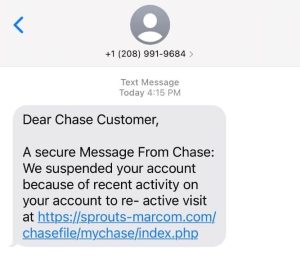
As 2 Factor Authentication becomes more prominent, the depth of these phishing-style attacks also increases. Attacks are now being sent through text messages making it more difficult to sense their legitimacy. See a Chase website scam example below:

2FA

The way these attacks are conducted is as follows:

Step 1: You’ll receive a text message like the one above from a “trusted” institution like Chase or Bank of America, explaining some reason why you need to access your online banking account or credit card.

Step 2: You click the link leading you to a dummy online banking page that looks identical to a Chase or Bank of America Website.

Step 3: The website asks you to “reset” your password asking you to enter your old username and passwords and then your new one.

Step 4: Within 15-30 seconds, that information is plugged into the actual Chase of BOA website, but you have 2FA enabled.

Step 5: You get a real text from the financial institution asking you to input a code on their site (the one the hackers are currently logging into); however, the dummy site also asks for the code.

Step 6: You input the 2 Factor Authentication code into the dummy site, and hackers now have your passwords and 2FA code and have gained full access to your account.

Once a hacker gains access via 2FA, it’s pretty much over for any information behind that wall, they can use the same technology that got them in there to keep you out. Typically, by the time you’re able to allow the company to grant you access to the page, they’ve already done what they needed to do.


The Most Common 2FA Bypass Attacks

Two-factor authentication (2FA) stands as a crucial defense against unauthorized access, but it’s not impervious to attacks. Let’s delve into some of the most common methods used to bypass 2FA security:

1. Phishing Attacks: Despite 2FA, phishing remains a prevalent threat. Attackers trick users into providing both their credentials and the 2FA code, granting them access.

2. Man-in-the-Middle (MITM) Attacks: In an MITM attack, the attacker intercepts communication between the user and the authentication system, capturing the 2FA code in transit.

3. SIM Swapping: Attackers convince the victim’s mobile carrier to transfer their phone number to a new SIM card under the attacker’s control. This enables them to intercept the 2FA code sent via SMS.

4. Credential Stuffing: Attackers use previously breached username-password pairs to gain access to accounts. If users have reused passwords across multiple accounts, even 2FA may not stop unauthorized access.

5. Social Engineering: Attackers manipulate individuals into revealing sensitive information, including 2FA codes, through deception or coercion.

Understanding these common 2FA bypass techniques is crucial for implementing effective security measures and mitigating the risks associated with them. Vigilance, education, and the adoption of additional security layers beyond 2FA are essential to bolstering the overall security posture.


How to spot a potential 2FA phishing attempt?

There are key factors when it comes to spotting a fraudulent message, much like emails or text messages. If a text contains the following: Misspellings, links that don’t seem consistent with the brand that’s reaching out, broken English, and sometimes improper wording.

These are effective because you could easily miss the aforementioned criteria if you’re not paying close attention. A text message differs from an email because no name, signature, font options, colors, etc., can tell you different things about an email. With text messaging, you have a single font and color, so all they have to do is get the wording and verbiage correct.

These attacks are so widespread that throughout the summer of 2021, the number of phishing URLs designed to impersonate Chase’s website jumped by 300%, says security firm Cyren. That speaks to not only the shift in types of phishing but the effectiveness overall.


How you can protect your account?

Protect your account using 2FA (Two-Factor Authentication) by adding an extra layer of security. After entering your password, you must verify your identity with a second factor, like an OTP Authentication sent to your phone or email. Various 2FA authentication methods include authenticator apps, biometric scans, or hardware tokens. What is Passkey, it’s a secure and unique password, that can also enhance your protection. By implementing 2FA, you significantly reduce the risk of unauthorized access to your accounts.


Never Share your Authentication Code

In the realm of two-factor authentication (2FA), safeguarding your authentication code is paramount. Whether you receive an email one-time passcode or use a TOTP (Time-based One-Time Password) app, these codes are your personal keys to secure access. TOTP, or Time-based One-Time Password, is a dynamic code generated by an authentication app that changes every 30 seconds. Unlike static passwords, TOTPs are ephemeral, providing a higher level of security. The benefits of 2FA are numerous: it enhances security by requiring a second form of authentication, such as a TOTP, which significantly reduces the risk of unauthorized access; it protects against phishing, as even if a hacker obtains your password, they cannot access your account without the second factor, typically a code sent via email or generated by an app; and it increases trust among users and customers, knowing their data is protected by an additional layer of security. Remember, your authentication code is unique to you. Never share your email one-time passcode or TOTP with anyone. Keeping these codes confidential ensures that your accounts remain secure and protected from potential breaches.


What to do to avoid falling victim?

Overall, these campaigns are meant to deceive; attackers know how to trick us. Attackers consider dozens of factors to make us believe the message we have received is legitimate. Here are a few ways you can help yourself not become a victim:

Links – Never click links or dial phone numbers in emails or text messages. When possible, go to a company’s website or mobile app to ensure you’re accessing the right information and not getting targeted for a phishing attack.

Second Opinion – A second opinion thwarts more attacks than you’d expect. The second set of eyes on a questionable message or email is a proven way to make sure that someone else can see the same potential inaccuracies that you are. Often times others have been approached with similar phishing style messages so it’s good to show a friend or family member if you receive something you think is suspicious.

Slow Down – This is a large part of the attacker’s advantage, we’re all so engaged in our lives that sometimes move too fast and don’t ask simple questions like “why is this website link different?” or “why doesn’t this email address have the proper suffix?”. Attackers prey on our ability to trust bigger, very reputable corporations and follow instructions given to us because of their proven trustworthiness. In the end, just slow down and look into anything you receive that regards a high priority account before inputting username and passwords.

Overall, we have to be vigilant and use several security feature when it comes to unfamiliar texts or emails we receive. It’s especially important to help older friends and family members who may not be technologically savvy because they make up a large part of the victims of scams like this one among many others. If something doesn’t look or feel right about a text or email, odds are, it probably isn’t.

Take the help of a partner to enable 2FA and enhance cybersecurity.

What varieties of viruses and ransomware are there?

What are the different types of viruses


What are the different types of viruses and ransomware?

In this digital age, viruses and ransomware are becoming a growing security concern for computer users. The threat of malicious software is real, and understanding the different types of viruses and ransomware is essential to protect yourself and your data. There are four main types of viruses, each with its own characteristics and potential harm. These include Trojans, bots, malware, and ransomware. With some basic knowledge, computer users can better protect themselves against these malicious programs. Knowing the differences between these types of viruses and their capabilities is the first step to keeping your computer safe and secure.

Virus:

A computer virus is a malicious code or program written to alter how a computer operates and is designed to spread from one computer to another. A virus operates by inserting or attaching itself to a legitimate program or document that supports macros to execute its code. In the process, a virus can potentially cause unexpected or damaging effects, such as harming the system software by corrupting or destroying data.

Two types of viruses causing headaches for security experts are multipartite virus and polymorphic virus. Multipartite viruses leverage multiple attack vectors to infiltrate systems, while polymorphic viruses cunningly change their code to evade detection. Understanding and defending against these sophisticated adversaries is crucial to safeguarding our digital world.

A macro virus is a malicious code quickly gaining popularity amongst hackers. It is a type of virus that replicates itself by modifying files containing macro language, which can replicate the virus. These can be extremely dangerous as they can spread from one computer to another and can cause damage by corrupting data or programs, making them run slower or crash altogether. Users need to take preventive measures against the threat of viruses, as they can eventually cause serious damage.

Worm:

A computer worm is a type of malware that spreads copies of itself from computer to computer and even operating system. A worm can replicate itself without any human interaction and does not need to attach itself to a software program to cause damage.

Ransomware:

The idea behind ransomware, a form of malicious software, is simple: Lock and encrypt a victim’s computer or device data, then demand a ransom to restore access.

In many cases, the victim must pay the cybercriminal within a set amount of time or risk losing access forever. And since malware attacks are often deployed by cyber thieves, paying the ransom doesn’t ensure access will be restored.

Ransomware holds your personal files hostage, keeping you from your documents, photos, and financial information. Those files are still on your computer, but the malware has encrypted your device, making the data stored on your computer or mobile device inaccessible.

Who are the targets of ransomware attacks?

Ransomware can spread across the Internet without specific targets since it’s one of the most common types of computer virus. But this file-encrypting malware’s nature means that cybercriminals can also choose their targets. This targeting ability enables cybercriminals to go after those who can — and are more likely to — pay larger ransoms.

Trojan:

A Trojan horse, or Trojan, is a type of malicious code or software that looks legitimate but can take control of your computer. A Trojan is designed to damage, disrupt, steal, or inflict some other harmful action on your data or network.

A Trojan acts like a bona fide application or file to trick you. It seeks to deceive you into loading and executing the malware on your device. Once installed, a Trojan can perform the action it was designed for.

A Trojan is sometimes called a Trojan or a Trojan horse virus, but that’s a misnomer. A Trojan cannot. A user has to execute Trojans. Even so, Trojan malware and Trojan virus are often used interchangeably.

Bots:

Bots, or Internet robots, are also known as spiders, crawlers, and web bots. While they may be utilized to perform repetitive jobs, such as indexing a search engine, they often come in the form of malware. Malware bots are used to gain total control over a computer.

The Good

One of the typical “good” bots used is to gather information. Bots in such guises are called web crawlers. Another “good” use is automatic interaction with instant messaging, instant relay chat, or assorted other web interfaces. Dynamic interaction with websites is yet another way bots are used for positive purposes.

The Bad

Malicious bots are defined as self-propagating malware that infects its host and connects back to a central server(s). The server functions as a “command and control center” for a botnet or a network of compromised computers and similar devices. Malicious bots have the “worm-like ability to self-propagate” and can also:

  • Gather passwords
  • Obtain financial information
  • Relay spam
  • Open the back doors on the infected computer

Malware:

Malware is an abbreviated form of “malicious software.” This is software specifically designed to gain access to or damage a computer, usually without the owner’s knowledge. There are various types of malware, including spyware, ransomware, viruses, worms, Trojan horses, adware, or any malicious code that infiltrates a computer.

Each type of malware has its own purpose and potential impacts, making it important to be aware of the different types of malware. We can protect ourselves from these malicious software threats with the right knowledge and resources.

Generally, the software is considered malware based on the creator’s intent rather than its actual features. Malware creation is rising due to money that can be made through organized Internet crime. Originally malware was created for experiments and pranks, but eventually, it was used for vandalism and destruction of targeted machines. Today, much malware is created to make a profit from forced advertising (adware), stealing sensitive information (spyware), spreading email spam or child pornography (zombie computers), or extorting money (ransomware).

The best protection from malware — whether ransomware, bots, browser hijackers, or other malicious software — continues to be the usual preventive advice: be careful about what email attachments you open, be cautious when surfing by staying away from suspicious websites, and install and maintain an updated, quality antivirus program.

Spyware:

Spyware is unwanted software that infiltrates your computing device, stealing your internet usage data and sensitive information. Spyware is classified as a type of malware — malicious software designed to gain access to or damage your computer, often without your knowledge. Spyware gathers your personal information and relays it to advertisers, data firms, or external users.

Spyware is used for many purposes. Usually, it aims to track and sell your internet usage data, capture your credit card or bank account information, or steal your personal identity. How? Spyware monitors your internet activity, tracking your login and password information, and spying on your sensitive information.

Evading Rise of Ransomware

Evading Rise of Ransomware


Evading Rise of Ransomware

Security can be termed as protection from unwanted harm or unwanted resources. Information security protects the data from unauthorized users or access. It can also be termed as an important asset for any organization which plays a vital role. In earlier days it was difficult to identify ransomware before it enters or attacks the user’s system. These attacks would damage the mail servers, databases, expert systems, and confidential systems. In this paper, we propose the analysis and detection of ransomware which will have a major impact on business continuity.

RANSOMWARE

Lately, with the extensive usage of the internet, cybercriminals are rapidly growing targeting naïve users thru threats and malware to generate a ransom. Currently, this ransomware has become the most agonizing malware. Ransomware comprises of two. They are locker ransomware and crypto-ransomware. Of them, crypto-ransomware is the most familiar type that aims to encrypt users‟ data and locker ransomware prevent the users from accessing their data by locking the system or device. Both types of a ransomware demand a ransom payable via electronic mode for restoring the access of the data and system. Locker ransomware claims fee from the victims in terms of fine for downloading illegal content as per their fake law enforcement notice. Crypto ransomware has a time limit that warns the victims to pay the ransom within the given time else the data will be lost forever.

Spreading of ransomware is possible by the following methods:

  1. Phishy e-mail messages with malicious file attachments;
  2. Software patches that download the threat into the victim’s machine whilst working online.

Spreading of Ransomware Attack

  1. Phishing emails: The most common way of spreading Ransomware is thru phishing emails or spam emails. These mails include a .exe file or an attachment, which when opened launches ransomware on the victim’s machine.
  2. Exploit kits: these are the compromised websites planned by the attackers for malicious use. These exploit kits search for vulnerable website visitors to download the ransomware onto their machine.

VULNERABILITY ASSESSMENT AND TOOLS

The vulnerability can be termed as unsafe or unauthorized access by an intruder into an unprotected or exposed network. Common vulnerabilities are worms, viruses, spyware applications, spam emails, etc. Vulnerability Assessment is the most important technique that is conducted to rate the spontaneous attacks or risks that occur in the system thereby affecting the business continuity of an organization. Vulnerability assessment has many steps such as

  1. Vulnerability analysis
  2. Scope of the vulnerability assessment
  3. Information gathering
  4. Vulnerability identification
  5. Information Analysis and
  6. Planning

Assessment Tools

Vulnerability assessment which is nothing but testing can be carried out by best-known tools which are called vulnerability assessment tools. These tools are used to mitigate the identified vulnerabilities such as investigating unethical access to copyrighted materials, policy violations of the organizations‟ etc. The red alert issue about the vulnerability assessment is that it warns us about the vulnerability before the system is compromised and helps us in avoiding or preventing the attack. These vulnerability assessment tools can also be categorized as proactive security measures of an organization. The major step of the vulnerability assessment is the accurate testing of a system. The major step of the vulnerability assessment is the accurate testing of a system. If overlooked, it might lead to either false positives or false negatives. False-positive can be presumed as quicksand where we can’t find what we are searching for. False-negative can be presumed as a black hole where we don’t know what we want to search for. False positives can be rated as a significant level in testing.

Common Vulnerability Assessment Tools

  • Vulnerabilities are the most crucial part of information systems. An error in configuration or violation of a policy might compromise a network in an organization. These attacks can be for personal gain or corporate gain.
  • Not only the local area networks but also the websites are also more susceptible to attacks where the systems can be exploited either by the insiders or outsiders of an organization.
  • Some of the very commonly used vulnerability assessment tools are listed below:
    • Wireshark
    • Nmap
    • Metasploit
    • OpenVAS
    • AirCrack

Limitations of Existing Vulnerability Assessment Tools

The concept of false positives is the dangerous and horrendous limitation of the existing vulnerability assessment tools. These false positives require lots of testing and study for assessing the nature of the errors that occurred, which is a very expensive and time taking process. All the identification-related information mostly leads to false positives.

Penetration Testing

  • Penetration Testing also called as Pen Test is an attempt to assess a malicious activity or any security breach by exploiting the vulnerabilities.
  • It includes the testing of the networks, security applications and processes that are involved in the network.
  • Penetration testing is done to improve the performance of the system by testing the system’s efficiency.

Top 10 Ransomware Attacks 2021

Top 10 Ransomware Attacks 2021


Top 10 Ransomware Attacks


Ransomware Definition

Ransomware is a type of malware (malicious software) that threatens to publish or prevent access to data or a computer system, typically by encrypting it. The victim is faced with the ultimatum of either paying a ransom or risking the publication or permanent loss of their data or access to their system. The ransom demand usually involves a deadline. If the victim doesn’t pay on time, the data is permanently lost, or the ransom is increased.

Attacks using ransomware are all too frequent these days. It has affected both large firms in North America and Europe. Cybercriminals will target any customer or company, and victims come from every sector of the economy.

The FBI and other government agencies, as does the No More Ransom Project, advise against paying the ransom to prevent the ransomware cycle because it doesn’t ensure retrieval of the encrypted data. If the ransomware is not removed from the system, 50% of the victims who pay the ransom will likely experience further attacks.


History and Future of Ransomware

According to Becker’s Hospital Review, the first known ransomware attack occurred in 1989 and targeted the healthcare industry. 28 years later, the healthcare industry remains a top target for ransomware attacks.

The first known attack was initiated in 1989 by Joseph Popp, Ph.D., an AIDS researcher, who attacked by distributing 20,000 floppy disks to AIDS researchers spanning more than 90 countries, claiming that the disks contained a program that analyzed an individual’s risk of acquiring AIDS through the use of a questionnaire.

However, the disk also contained a malware program that initially remained dormant in computers, only activating after a computer was powered on 90 times. After the 90-start threshold was reached, the malware displayed a message demanding a payment of $189 and another $378 for a software lease. This ransomware attack became known as the AIDS Trojan or the PC Cyborg.

There will be no end to ransomware anytime soon. Ransomware as a service raas attacks have skyrocketed in 2021 and will continue to rise. About 304.7 million ransomware attacks were attempted in the first half of 2021, and many attacks went unreported as per Ransomware statistics 2021.

A recent report by Tripwire supported the fact that ransomware will keep growing, and the post-ransomware costs will keep climbing significantly. There’s no denying the fact that Ransomware is being used as a weapon, and how ransomware spreads is no longer a mystery.

Modern-day attacks target operational technology, operating system, medical and healthcare services, third-party software, and IoT devices. Fortunately, organizations don’t have to be sitting ducks; they can minimize the risk of attacks by being proactive and having a reliable ransomware data recovery infrastructure.

Top Ransomware Attacks


1. Kia Motors

Kia Motors America (KMA) was hit by a ransomware attack in February that hit both internal and customer-facing systems, including mobile apps, payment services, phone services, and dealership systems. The hack also impacted customers’ IT systems that were required to deliver new vehicles.

DoppelPaymer was thought to be the ransomware family that hit Kia, and the threat actors claimed to have also targeted Kia’s parent business, Hyundai Motors America. Similar system failures were also experienced by Hyundai.

On the other hand, Kia and Hyundai denied being assaulted, a frequent approach victims use to protect their reputation and customer loyalty.

2. CD Projekt Red

In February 2021, a ransomware attack hit CD Projekt Red, a video game studio located in Poland, causing significant delays in developing their highly anticipated next release, Cyberpunk 2077. The threat actors apparently stole source codes for numerous of the company’s video games, including Cyberpunk 2077, Gwent, The Witcher 3, and an unpublished version of The Witcher 3.

According to CD Projekt Red, the unlawfully obtained material is currently being distributed online. Following the incident, the company installed many security measures, including new firewalls with anti-malware protection, a new remote-access solution, and a redesign of critical IT infrastructure, according to the company.

3. Acer

Acer, a Taiwanese computer manufacturer, was hit by the REvil ransomware outbreak in March. This attack was notable because it demanded a ransom of $50,000,000, the greatest known ransom to date.

According to Advanced Intelligence, the REvil gang targeted a Microsoft Exchange server on Acer’s domain before the attack, implying that the Microsoft Exchange vulnerability was weaponized.

4. DC Police Department

The Metropolitan Police Department in Washington, D.C., was hit by ransomware from the Babuk gang, a Russian ransomware syndicate. The police department refused to pay the $4 million demanded by the group in exchange for not exposing the agency’s information and encrypted data.

Internal material, including police officer disciplinary files and intelligence reports, was massively leaked due to the attack, resulting in a 250GB data breach. Experts said it was the worst ransomware attack on a police agency in the United States.

5. Colonial Pipeline

The Colonial Pipeline ransomware assault in 2021 was likely the most high-profile of the year. The Colonial Pipeline transports roughly half of the fuel on the East Coast. The ransomware attack was the most significant hack on oil infrastructure in US history.

On May 7, the DarkSide group infected the organization’s computerized pipeline management equipment with ransomware. DarkSide’s attack vector, according to Colonial Pipeline’s CEO, was a single hacked password for an active VPN account that was no longer in use. Because Colonial Pipeline did not use multi-factor authentication, attackers could access the company’s IT network and data more quickly.

6. Brenntag

In May, Brenntag, a German chemical distribution company, was also struck by a DarkSide ransomware attack around the same time as Colonial Pipeline. According to DarkSide, the hack targeted the company’s North American business and resulted in the theft of 150 GB of critical data.

They got access by buying stolen credentials, according to DarkSide affiliates. Threat actors frequently buy stolen credentials — such as Remote Desktop credentials — on the dark web, which is why multi-factor authentication and detecting unsafe RDP connections are critical.

The first demand from DarkSide was 133.65 Bitcoin, or nearly $7.5 million, which would have been the highest payment ever made. Brenntag reduced the ransom to $4.4 million through discussions, which they paid.

7. Ireland’s Health Service Executive (HSE)

In May 2021, a variation of Conti ransomware infected Ireland’s HSE, which provides healthcare and social services. The organization shut down all of its IT systems after the incident. Many health services in Ireland were impacted, including the processing of blood tests and diagnoses.

The firm refused to pay the $20 million ransom in Bitcoin because the Conti ransomware group provided the software decryption key for free. However, the Irish health service was still subjected to months of substantial disruption as it worked to repair 2,000 IT systems that had been infected by ransomware.

8. JBS

Also, in May 2021, JBS, the world’s largest meat processing plant, was hit by a ransomware attack that forced the company to stop the operation of all its beef plants in the U.S. and slow the production of pork and poultry. The cyberattack significantly impacted the food supply chain and highlighted the manufacturing and agricultural sectors’ vulnerability to disruptions of this nature.

The FBI identified the threat actors as the REvil ransomware-as-a-service operation. According to JBS, the threat actors targeted servers supporting North American and Australian IT systems. The company ultimately paid a ransom of $11 million to the Russian-based ransomware gang to prevent further disruption.

9. Kaseya

Kaseya, an IT services company for MSP and enterprise clients, was another victim of REvil ransomware — this time during the July 4th holiday weekend. Although only 1% of Kaseya’s customers were breached, an estimated 800 to 1500 small to mid-sized businesses were affected through their MSP. One of those businesses included 800 Coop stores, a Sweden-based supermarket chain that was forced to temporarily close due to an inability to open their cash registers.

The attackers identified a chain of vulnerabilities — ranging from improper authentication validation to SQL injection — in Kaseya’s on-premises VSA software, which organizations typically run in their DMZs. REvil then used MSP’s Remote Monitoring and Management (RMM) tools to push out the attack to all connected agents.

10. Accenture

The ransomware gang LockBit hit Accenture, the global tech consultancy, with an attack in August that resulted in a leak of over 2,000 stolen files. The slow leak suggests that Accenture did not pay the $50 million ransom.

According to CyberScoop, Accenture knew about the attack on July 30 but did not confirm the breach until August 11, after a CNBC reporter tweeted about it. CRN criticized the firm for its lack of transparency about the attack, saying that the incident was a “missed opportunity by an IT heavyweight” to help spread awareness about ransomware.


Bonus: CNA Financial (2021)

CNA Financial, the seventh largest commercial insurer in the United States, announced on March 23, 2021, that it had “experienced a sophisticated cybersecurity attack.” Phoenix Locker ransomware was used in the attack, which was carried out by a group called Phoenix.

CNA Financial paid $40 million in May 2021 to regain access to the data. While CNA has been tight-lipped about the specifics of the negotiation and sale, it claims that all of its systems have been fully restored since then.


Types of ransomware:

There are two main types of ransomware:

  1. Crypto Ransomware

    Crypto ransomware encrypts files on a computer so the user cannot access them.

  2. Locker Ransomware

    Does not encrypt files. Rather, it locks the victim out of their device, preventing them from using it. Once they are locked out, cybercriminals carrying out locker ransomware attack demands a ransom to unlock the device.

Now you understand what ransomware is and the two main types of ransomware that exist. Let’s explore 10 types of ransomware attacks to help you understand how different and dangerous each type can be.

  • Locky

    Locky is a type of ransomware that was first released in a 2016 attack by an organized group of hackers. With the ability to encrypt over 160 file types, Locky spreads by tricking victims to install it via fake emails with infected attachments. This method of transmission is called phishing, a form of social engineering. Locky targets a range of file types that are often used by designers, developers, engineers, and testers.

  • WannaCry

    WannaCry is a ransomware attack that spread across 150 countries in 2017. Designed to exploit a vulnerability in Windows, it was allegedly created by the United States National Security Agency and leaked by the Shadow Brokers group. WannaCry affected 230,000 computers globally. The attack hit a third of hospital trusts in the UK, costing the NHS an estimated £92 million. Users were locked out and a ransom was demanded in the form of Bitcoin. The attack highlighted the problematic use of outdated systems, leaving the vital health service vulnerable to attack. The global financial impact of WannaCry was substantial -the cybercrime caused an estimated $4 billion in financial losses worldwide.

  • Bad Rabbit

    Bad Rabbit is a 2017 ransomware attack that spread using a method called a ‘drive-by’ attack, where insecure websites are targeted and used to carry out an attack. During a drive-by ransomware attack, a user visits a legitimate website, not knowing that they have been compromised by a hacker. Drive-by attacks often require no action from the victim, beyond browsing the compromised page. However, in this case, they are infected when they click to install something that is malware in disguise. This element is known as a malware dropper. Bad Rabbit used a fake request to install Adobe Flash as a malware dropper to spread its infection.

  • Ryuk

    Its a ransomware, which spread in August 2018, disabled the Windows System Restore option, making it impossible to restore encrypted files without a backup. Ryuk also encrypted network drives. The effects were crippling, and many organizations targeted in the US paid the demanded ransoms. August 2018 reports estimated funds raised from the attack were over $640,000.

  • Troldesh

    The Troldesh ransomware attack happened in 2015 and was spread via spam emails with infected links or attachments. Interestingly, the Troldesh attackers communicated with victims directly over email to demand ransoms. The cybercriminals even negotiated discounts for victims with who they built a rapport with — a rare occurrence indeed. This tale is the exception, not the rule. It is never a good idea to negotiate with cybercriminals. Avoid paying the demanded ransom at all costs as doing so only encourages this form of cybercrime.

  • Jigsaw

    Jigsaw is a ransomware attack that started in 2016. This attack got its name as it featured an image of the puppet from the Saw film franchise. Jigsaw gradually deleted more of the victim’s files each hour that the ransom demand was left unpaid. The use of horror movie imagery in this attack caused victims additional distress.

  • CryptoLocker

    CryptoLocker is ransomware that was first seen in 2007 and spread through infected email attachments. Once on your computer, it searched for valuable files to encrypt and hold to ransom. Thought to have affected around 500,000 computers, law enforcement, and security companies eventually managed to seize a worldwide network of hijacked home computers that were being used to spread Cryptolocker. This allowed them to control part of the criminal network and grab the data as it was being sent, without the criminals knowing. This action later led to the development of an online portal where victims could get a key to unlock and release their data for free without paying the criminals.

  • Petya

    Petya (not to be confused with ExPetr) is a ransomware attack that first hit in 2016 and resurged in 2017 as GoldenEye. Rather than encrypting specific files, this vicious ransomware encrypts the victim’s entire hard drive. It does this by encrypting the primary file table, making accessing files on the disk impossible. Petya spread through HR departments via a fake job application email with an infected Dropbox link.

  • GoldenEye

    The resurgence of Petya, known as GoldenEye, led to a global ransomware attack that happened in 2017. Dubbed WannaCry’s ‘deadly sibling,’ GoldenEye hit over 2,000 targets, including prominent oil producers in Russia and several banks. Frighteningly, GoldenEye even forced workers at the Chernobyl nuclear plant to check radiation levels manually as they had been locked out of their Windows PCs.

  • GandCrab

    GandCrab is a rather unsavory famous ransomware attack that threatened to reveal the victim’s porn-watching habits. Claiming to have a high-jacked user’s webcam, GandCrab cybercriminals demanded a ransom, or otherwise, they would make the embarrassing footage public. After having first hit in January 2018, GandCrab evolved into multiple versions. As part of the No More Ransom Initiative, internet security providers and the police collaborated to develop a ransomware decryptor to rescue victims’ sensitive data from GandCrab.

How to Spot a Ransomware Email

You now know about the various types of ransomware attacks that have been perpetrated against individuals and businesses in recent years. Many of the victims of the ransomware attacks we’ve mentioned became infected after clicking on links in spam or phishing emails or opening malicious attachments.

So, how can you avoid being a victim of a ransomware assault if you receive a ransomware email? Checking the sender is the easiest approach to recognizing a ransomware email. Is it from a reliable source? Always be cautious if you receive an email from someone or a firm you don’t recognize.

Never open email attachments from senders you don’t trust, and never click on links in emails from untrustworthy sources. If the attachment asks you to activate macros, proceed with caution. This is a popular method of ransomware distribution.


Using a Ransomware Decryptor

Do not pay a ransom if you are the victim of a ransomware assault. Paying the ransom demanded by cybercriminals does not guarantee that your data will be returned. After all, these are crooks. It also strengthens the ransomware industry, increasing the likelihood of future assaults. You will be able to restore the data that is being held to ransom if it is backed up outside or in cloud storage.


Types of Ransomware Extensions

The ransomware includes a particular file extension, you can point it out with some of the extensions defined below

.ecc, .ezz, .exx, .zzz, .xyz, .aaa, .abc, .ccc, .vvv, .xxx, .ttt, .micro, .encrypted, .locked, .crypto, _crypt, .crinf, .r5a, .XRNT, .XTBL, .crypt, .R16M01D05, .pzdc, .good, .LOL!, .OMG!, .RDM, .RRK, .encryptedRSA, .crjoker, .EnCiPhErEd, .LeChiffre, .keybtc@inbox_com, .0x0, .bleep, .1999, .vault, .HA3, .toxcrypt, .magic, .SUPERCRYPT, .CTBL, .CTB2, .locky or 6-7 length extension consisting of random characters

Best Tips to Protect yourself from Ransomware

Best Tips to Protect yourself from Ransomware


Tips to Protect yourself against Ransomware attacks

It is becoming more difficult to prevent ransomware attacks, event large IT departments can have difficulty, just ask Sony, the City of Baltimore, or the City of Atlanta.

For the last 40 years, we have built networks and office systems with the concept of sharing data. Shared folders for example make it easy for users to exchange and edit documents, but also those shared folders are the target of Ransomware attacks.

Some tools can be added to reduce the likelihood of ransomware, but nothing can be purchased to “protect” a company.

The most effective protection for Ransomware starts with a network and desktop redesign followed by layers of security and isolated backups. The best approach is not to try to protect against Ransomware, it is to develop a plan that minimized the impact of an attack. Unfortunately, many of the steps listed below require a desktop or office changes and many organizations are unwilling to change.

tips to protect against ransomware

The Protected Harbor Difference

At Protected Harbor we will not onboard a client without making the changes needed to protect against Ransomware. We think a new reality is that only good network design and good governance can keep networks safe. Most small IT companies are ill-equipped to understand the depth of the risk, much less take the necessary steps to protect against Ransomware.

The end-user resistance to change combined with tight IT budgets and the concept that IT is low cost has created a climate of a one-stop drop-in application or solution to stop all IT problems. This approach will not work to stop Ransomware. In short at Protected Harbor we protect our clients through better design.

keep your business protected from ransomware

Ways to PROTECT YOUR SYSTEM FROM RANSOMWARE

Below are the steps we take to protect our clients and we recommend the steps are deployed by all organizations.

Desktop/Network & Backup Isolation

The first step in a new network design is to limit through segmentation the network. Desktops, Servers and the backup should all be on separated and isolated networks. Using this approach an infected desktop will not be able to access the backups and will not infect the backups.

Virtualization

Protected Harbor will accomplish desktop and network isolation using virtualization. Virtualization allows Protected Harbor to back up the entire desktop, not just shared folders, or databases, or scanned folders, but all folders. This means we can recover the entire office, and not pieces of the office.

Email & Web Filtering

Filtering of email and web content is an important part of the Protected Harbor Ransomware defense. Good email filtering should include pattern recognition. The initial Ransomware attacks follow a template and email filtering systems when properly configured either block or quarantine the attack.

Enable network monitoring

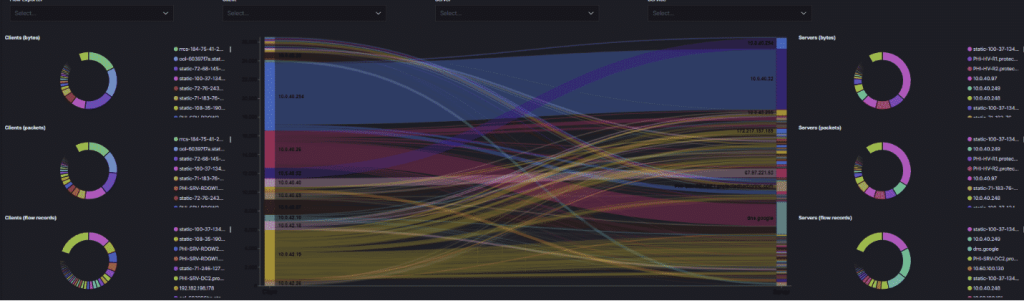
We monitor for inbound and outbound traffic, which allows us to react to attack patterns in addition to standard monitoring. Network monitors can alert and warn on unusual traffic, or traffic that is typical of an attack; for example, if certain information is transmitted out of the network that would trigger an alert. We protect our customers by constantly monitoring network traffic, especially activity to or from parts of the world that are high sources of attacks, for example, Russia or China. We also monitor and alert on traffic flow. Oftentimes, if an end-user connects an infected phone or laptop to the network, we will see a change in the traffic flow which will trigger an alert.

ransomware traffic monitoring
Above is a sample of our traffic monitoring.
ransomware network traffic monitoring

Tighten local server/desktop permissions

Our clients do not run their programs as Administrators. Enhancing the security drastically reduces a ransomware attack and virtually eliminates malware attacks. Enhanced security reduces what an attack can affect through better design.

Reduce the number of common shares folders

Typically, clients will have one or two shared folders that all users have access to. Ransomware attacks not only infect those shares but then use them to spread the attack to other non-infected systems. We work with clients to reduce or eliminate shared folders, increasing the protection through better design to ransomware.

Reduce public corporate contact information

Live email addresses should not be published on a website. If a website needs an email address, the published address shouldn’t use the same format as the internal address. If jsmith is the email prefix, as in jsmith@abc.com then for the website the published email should be jacksmith@abc.com. Additionally, sensors can be added to the content filter for petersmith@abc.com for example. This would mean the attacking IP (the one attempting to send email to petersmith@abc.com) is really a robot attacker; adding that IP to the block list would prevent all future attacks from occurring.

Parameter or Geo Blocking

For our clients we maintain enhanced network protection that includes active parameter checking and Geo-Blocking. For example, we check the address of inbound requests, and if the IP is from a blocked country, then the traffic is blocked even before it reaches the client’s network. Countries we routinely block are North Korea, Russia and countries are known for sending out Ransomware attacks. If access is needed from a blocked country, a simple support ticket resolves the issue.

Testing & Training

At Protected Harbor we perform routine simulated Ransomware attacks. These tests are productive at helping end user stay vigilant to attacks and the tests allow end users to be identified that might need some additional assistance to understand the importance of being careful with email.

What is a Ransomware attack?

What is a Ransomware attack


“We guarantee we can PROTECT YOU FROM RANSOMWARE!”


Any vendor that says that or implies that is lying. There is no one magic happy pill, service, or device to stop ransomware. When done right guarding against ransomware is a combination of multiple technologies, backups, education good layered network design and human intervention.

Protected Harbor is a unique vendor because we don’t resell other company services, we engineer our own solutions. That depth of knowledge is a foundational difference between us and anyone else. The depth of technical ability allows us to write this document and solve the problem at the core and not band-aid the problem as others do.


Ransomware Explained

Ransomware is malicious software that targets computer systems and locks down important data until a ransom is paid. Ransomware is an increasingly prevalent form of cyber-attack, which can cause serious disruption to businesses and individuals alike. It works by malicious actors encrypting a victim’s data and then demanding a ransom payment in order to restore access to it. Organizations must take active steps toward ransomware protection and prevention, as the costs associated with a successful attack can be substantial. Investing in robust IT security measures, such as antivirus software and regular backups, will significantly reduce the risk of becoming a target. Furthermore, ensuring employees have the necessary understanding of ransomware prevention techniques will help protect your organization from this form of cyber-attack.


What is a Ransomware attack?

Ransomware is the encryption of files, without knowing the password, and most of the time the encryption is self-executed for local files, network files and operating system files combined with Trojan installations to enable later additional data theft or additional attacks.

Most of us have used or made a password protected ZIP file before. ZIP files are a form of encrypted and compressed files. The encryption and compression process
works by mathematically removing the empty and repeated characters in the data using password. The mathematical formula uses the password as a seed and applies a
compression algorithm to the data, securing and reducing the data. Using this technique, a ZIP file is both secure, because without the password it can’t be decrypted and smaller in size.

A Ransomware attack at its core is where the organizations data files have been encrypted using a similar technique to a password protected ZIP file. Typically,
ransomware attacks encrypt one file at a time. Ransomware attacks can be devastating because the data once encrypted is not recoverable. Initially versions of ransomware attacks targeted local files on local computers, but more recent attacks have caused greater damage by targeting network folders and operating system files.
Once an operating system file is infected the server or PC will never work right and should be totally reformatted and recreated.

Ransomware attacks also attempt to install infected files, also called Trojans. The Trojans are used to later attack the computer or server again and or are used to
monitor the infected system to steal data. Some Trojans don’t directly attack but instead run in background monitoring and sending new data. This is what occurred at the Sony attack;  Modern cleaning tools like Malwarebytes do a good job at removing infected cookies and web attacks but do not clean operating system files very well, which is why we always recommend not cleaning a PC or Server but rebuilding it.

How does a Ransomware attack occur?

But how did it occur? How did it get in? Virtually all of the time the attack is self-started, meaning the attack was triggered by a trusting employee. Most Ransomware attacks start via email. An external email server or email account is compromised, and the compromised account is then used to send out infected emails.

Image is an example. The email itself it not infected. The email account is legitimate, and at the time the email server amegybank.com was not flagged as a spammer – meaning this email would have passed through most firewalls, filters and blocking services.

The infection is the attached HTML file. The attached HTML file is the payload. The HTML file will look to many anti-virus programs as a web cookie or bot, i.e. a
legitimate attachment. Bots or payloads can take many forms, Macros in Word, Excel or PDF files are typically used.

how ransomware occurs

A payload is a small piece of programming code designed to look like a legitimate web from a web site. Once the end-user clicks on the attachment the payload is activated. Once active the payload will download from a remote site the actual attack. The attack will be a larger program that is also designed to slip through firewalls and content filters, this program will start to encrypt files and also will look for links to remote data, either remote server (RDP for example) login information, web site links with stored passwords, FTP or STP file transfer links, virtually any form of data connection is attempted. The attack is designed to find as much data as is possible, the more data that is encrypted the more the infected company is willing to pay.