How to Save your Business Through Backup and Disaster Recovery

how to save your business through backup and disaster recovery


How to Save your Business Through Backup and Disaster Recovery


The world is increasingly evolving and becoming connected globally. Ever since the inception of the internet, people and businesses have shared and stored their data online. This only means one thing, we have more to lose than ever before. It does not matter what type of business you operate, but your data and protection are vital for your business operations. Before you think that you do not need a data backup or a recovery plan, we would like to clarify a few points that are essential for your business survival:

  1. People make mistakes
  2. Software or hardware failure may result in the failure of primary data.
  3. accidental deletion of data and malicious ransomware attacks may halt your business.

Hence several things are out of our control, and it is essential to have disaster recovery plans to avoid losing critical business data.


data recovery

Given the importance of data backup in business continuity here’s what you can do to save your business from losing critical data

  1. Have a Disaster Recovery Plan (DR)

What is Disaster Recovery in IT? A disaster recovery plan is a set of rules and SOPs (standard operating procedure) on a formal document created by the organization. It entails all the details on tackling situations like cyber-attacks, power outages, any act of God, and other disruptive and unexpected events. Having a DR including cloud disaster recovery is vital for your business as it ensures that your business operations resume back to normal after an accident has caused an interruption. Without a DR, your company can suffer heavy financial losses, loss of reputation, and unhappy customers. A DR can help in the following ways.

  • Control damage and financial loss
  • Your employees become trained to tackle unexpected cyber security situations.
  • There is a streamlined restoration process and the guidelines to restore and bring business on track.

2. Backup Validation

What are the benefits of data backup for business? Backup validation is an integral part of Disaster Recovery Plans, which allows you to test your backup protocols’ consistency and recoverability. Every data block retrieved from the backup is given a checksum via validation. The sole exception is file-level backups stored in cloud storage, which must be validated. The consistency of the metadata recorded in the backup is checked to ensure validity.

Validation is a time-consuming procedure, even for a tiny incremental or differential backup. This is because the operation verifies the data physically present in the backup and all of the information that can be recovered by selecting the backup. This necessitates access to backups that have already been produced. While successful validation indicates a high likelihood of recovery, it does not examine all elements that affect the recovery process.

It is vital to test backups and restore processes to check if they work. There is a chance that some backup archives are corrupt or damaged, which will hamper the restoration process. You must test the restore process; it helps learn about data recovery from backups should there be a disaster. The testing can also help you learn about real-life risks without losing the actual data.


3. Use Air-Gapped Backups to Isolate the data

An air gapping technique is one of the most popular backup strategies. At any given time, all your business’ critical data shall have a copy stored offline, which will be disconnected and inaccessible via the internet. Air gapping isolates data from unsecured networks or production environments, and they can be stored off-site.


4. In-house Data Recovery Solutions

Your business will greatly benefit from a data backup solution all in-house. It can be a physical server on or off-site. If data backups are on the cloud (online backup), they will take an ample amount of time to get restored, costing you time and money. Some IT companies deploy a 10Gb pipe to hosts, allowing them great flexibility, and they are never limited to their network. They are cost-effective for small-sized businesses. The data is also accessible without the internet, which is excellent as it allows access to data 24/7. The importance of data recovery in business is undeniably large.


Choose your IT management partner carefully.

You must have an excellent IT management partner who can be available for your business 24/7. These IT partners must have the proper skill set, which is an essential first step to ensure your data remains safe and uncompromised. The responsibility to protect crucial business data is vast, and you must work with companies that provide you with excellent customer support. You never know when your data is attacked or compromised.

If you want to ensure your company has the necessary IT infrastructure in place to continue operating during and after a disaster, it’s crucial to partner with a reputable and reliable IT provider. Protected Harbor ensures your data is backed up and is continuously being monitored to ensure its integrity so that we’d be able to restore your data should it ever get lost or corrupted. By working with Protected Harbor, you can have peace of mind knowing that your business is protected, no matter what happens.

Above all, it is vital to have a backup plan with new-gen cloud disaster recovery. The strategies outlined in this article will help you to achieve that. Armed with the knowledge of how to recover your business after a disaster, you can be confident that your investors and employees will thank you. With Protected Harbor by your side, you will be better prepared for any eventuality, and in this case, that’s going to count for a lot. Contact us now.

What are DaaS providers?

daas provider

What are DaaS providers?

DaaS is short for Desktop as a Service. It’s a cloud-based computing solution that gives you access to your desktop and remote working via the internet, regardless of where you are. As a result, third-party hosts provide one sort of desktop virtualization. A virtual desktop or hosted desktop service is another name for DaaS.

DaaS Providers

If you’re diving into cloud services to deliver your applications, a growing proportion of these apps may be hosted in the cloud. When your application needs storage, networking, and computing resources, you can host it yourself or with a service provider. But you might want to consider a third option: a DaaS provider.

DaaS providers allow on-demand access to infrastructure and app environments from a single provider, with lower costs than buying your own servers. They also provide services like load balancing, high availability, and disaster recovery if needed. In basic terms, DaaS service providers are organizations that provide desktop virtualization services as per your needs.

Why should you consider using a DaaS provider?

Data centers are a necessity in today’s digital world. But, with so many options and daas offerings, and different features, choosing the right one can be overwhelming. However, it is not hard to find the right one once you know what you want.

It can offer increased security for your managed desktop, servers and ensure your business continuity is never compromised. They can provide you with multi-factor authentication, 24/7 support, and the facilities to install a disaster recovery plan on-site. Many data centers have built-in backup power systems to keep your network running smoothly at any time of day.

Desktop as a service (DaaS) providers offer a wide range of hosted desktop solutions. Many can provide turnkey virtual desktop infrastructure (VDI) implementations that support multiple users, but some also offer single-user desktops. Some providers offer additional services and management options, while others provide only essential software.

There are many reasons to consider using a DaaS provider:

  • They can allow IT to focus on more strategic projects by taking over day-to-day tasks such as application and OS updates and patches.
  • They can simplify the deployment of new desktops by reducing the need for manual configuration.
  • They can reduce hardware costs through thin clients or zero clients.
  • They can enable BYOD policies by allowing users to access their desktops from any device with an internet connection.

What are some of the benefits of using a DaaS provider?

There are numerous benefits of daas, making it an ideal solution for businesses. By adopting DaaS offerings and cloud desktop services, companies can enjoy improved scalability, enhanced data security, and simplified IT management. With DaaS solutions, businesses can seamlessly provide their workforce with flexible and secure desktop environments, reducing operational overhead and ensuring remote accessibility across various devices.

The most obvious benefit of a DaaS provider is the flexibility it allows your business. This can be particularly advantageous if you need to hire new staff quickly. You can add more desktops and operating systems whenever needed and remove them at short notice.

When you use a DaaS solution, you only pay for what you use, so there’s no need to worry about capital expenditure or over-provisioning.

The fact that desktops and operating systems are hosted offsite and accessed over the internet makes it easy for employees to work from anywhere — a definite plus in an era when remote working and cloud computing is becoming increasingly common.

Another benefit of DaaS solutions such as citrix virtual apps is that they’re easy for IT teams to manage, as the provider does all the work. The only maintenance required on your part is to keep client machines up to date and running smoothly.

Setting up a desktop virtualization solution using traditional methods can be expensive, so you may save money by using a service DaaS provider instead.

Who are the big players in the market?

Stability, security, mobility, and multi-factor authentication are all features to look for in a DaaS service provider. The following is a list of the Top Desktop as a Service (DaaS) providers in 2021:

How to choose the best desktop as a service solution

Choosing the right managed desktop solution can be difficult. First, you should assess your business needs when deciding on the right DaaS platform. Consider whether you’re looking for a secure virtual desktop infrastructure vdi solution or need help with end-user support and remote working. Second, look into the solution’s scalability and ensure it fits your current and future IT requirements.

Finally, research the DaaS platform provider’s pricing structure and customer service to ensure that you get the best value for your budget. With this in mind, you should have no trouble finding the perfect desktop-as-a-service solution for your business so that you can leverage all benefits of daas.

Conclusion

Any of the players named above will not let you down. All of them are excellent DaaS providers. Ultimately, it comes down to which cloud services best satisfies your needs while focusing on the cost savings.

When you’re short on time and need to enable a vast workforce, it’s challenging to examine every DaaS service provider access and make an informed decision.

We leverage a unified data center in a DaaS solution like Protected Harbor Desktop to deliver desktop virtualization services to end-users over the internet, on their preferred device, and at their preferred time, and regular snapshots and incremental backups keep your essential data safe.

Protected Desktop is a cloud-based virtual desktop that provides a wholly virtualized Windows environment. Your company will incorporate highly secure with integrated multi-factor authentication and productive applications within DaaS by utilizing one of the most recent operating systems (OS). With our on-demand recovery strategy, we monitor your applications for a warning indication that may require proactive action.

Protected Harbor alleviates the problems that come with traditional, legacy IT systems. Another significant benefit of our high-quality DaaS solution is that it allows you to extend the life of your endpoint devices that would otherwise be obsolete. Set up your desktop; click.

What is a Data Center Architecture and how to design one?

data center architecture


What is a Data Center Architecture, and how to design one?

As businesses scale and data demands increase, the structure and strategy behind your data center architecture become more critical than ever. Traditional data centers—characterized by rows of servers housed in physical racks—were complex to manage, costly to maintain, and prone to inefficiencies. These systems required constant attention, from patching and updates to power management and cooling—leading to growing investments in data center infrastructure and optimization efforts.

Today, modern organizations are shifting towards more agile and scalable solutions. Enter cloud data center architecture, modular data center design, and edge data center design—innovative models that are transforming the way data is processed and delivered. These modern approaches focus on flexibility, energy efficiency, and proximity to the user, improving performance and reducing latency.

This blog will guide you through the essentials of data center layout and design, exploring how virtualization and cloud integration reshape traditional data center planning. Whether you’re building from scratch or optimizing an existing setup, understanding how to balance physical infrastructure with cloud scalability is key. By leveraging modular and edge designs, businesses can create a resilient and future-ready data center that meets evolving demands.


Types of Data Center Architecture

There are four primary types of data center architecture, each tailored to different needs: super spine mesh, mesh point of delivery (PoD), three-tier or multi-tier model, and meshwork.

  1. Mesh Network System: The mesh network system facilitates data exchange among interconnected switches, forming a network fabric. It’s a cost-effective option with distributed designs, ideal for cloud services due to predictable capacity and reduced latency.
  2. Three-Tier or Multi-Tier Model: This architecture features core, aggregation, and access layers, facilitating packet movement, integration of service modules, and connection to server resources. It’s widely used in enterprise data centers for its scalability and versatility.
  3. Mesh Point of Delivery: The PoD design comprises leaf switches interconnected within PoDs, promoting modularity and scalability. It efficiently connects multiple PoDs and super-spine tiers, enhancing data flow for cloud applications.
  4. Super Spine Mesh: Popular in hyperscale data centers, the super spine mesh includes an additional super spine layer to accommodate more spine switches. This enhances resilience and performance, making it suitable for handling massive data volumes.


Fundamentals of a Data Center Architecture

Understanding the fundamentals of data center architecture is crucial for businesses aiming to optimize their IT infrastructure. At the heart of this architecture lies the colocation data center, offering a shared facility for housing servers and networking equipment. Effective data center management is essential for ensuring seamless operations and maximizing resource utilization.

When designing a data center architecture, several factors must be considered to meet the organization’s requirements for reliability, scalability, and security. Robust data center services and solutions are key components, encompassing power and cooling systems, network connectivity, and security measures.

A data center design and architecture involves careful planning to achieve optimal layout and efficient resource allocation. This includes determining the right balance between space utilization and equipment density while ensuring adequate airflow and cooling capacity.

By leveraging advanced data center solutions and best practices in data center management, organizations can design architectures that deliver high performance, reliability, and scalability to support their evolving business needs.


What is a data center architecture?

In simple terms, it describes how computer resources (CPUs, storage, networking, and software) are organized or arranged in a data center. As you may expect, there are almost infinite architectures. The only constraint is the number of resources a company can afford to include. Still, we usually don’t discuss data center network architecture in terms of their various permutations but rather in terms of their essential functionality.

A data center is a physical facility where data and computing equipment are stored, enabling central processing, storage, and exchange of data. Modern data center architecture involves planning how switches and servers will connect, typically during the planning and construction phases. This blueprint guides the design and construction of the building, specifying the placement of servers, storage, networking, racks, and resources. It outlines the data center networking architecture, detailing how these components will connect. Additionally, it encompasses the data center security architecture, ensuring secure operations and safeguarding data. Overall, it provides a comprehensive framework for efficient data center operations.

Today’s data centers are becoming much larger and more complex. Because of their size, the hardware requirements vary from workload to workload and even day to day. In addition, some workloads may require more memory capacity or faster processing speed than others so data center optimization becomes necessary.

In such cases, leveraging high-end devices will ensure that the TCO (total cost of ownership) is lower. But because the management and operations staff are so large, this strategy can be costly and ineffective. For this reason, it’s important to choose the right architecture for your organization.

While all data centers use virtualized servers, there are other important considerations for designing a data center. The building’s design must take into account the facilities and premises. The choice of technologies and interactions between the various hardware and software layers will ultimately affect the data center’s performance and efficiency.

For instance, a data center design may need sophisticated fire suppression systems and a control center where staff can monitor server performance and the physical plant. Additionally, a data center should be designed to provide the highest levels of security and privacy.


How to Design a Data Center Architecture

The question of how to design the architecture of data center has a number of answers. Before implementing any new data center technology, owners should first define the performance parameters and establish a financial model. The design of the architecture must satisfy the performance requirements of the business.

Several considerations are necessary before starting the data center construction. First, the data center premises and facility should be considered. Then, the design should be based on the technology selection.  There should be an emphasis on availability. This is often reflected by an operational or Service Level Agreement (SLA). And, of course, the design should be cost-effective.

Another important aspect of data center design is the size of the data center itself. While the number of servers and racks may not be significant, the infrastructure components will require a significant amount of space.

For example, the mechanical and electrical equipment required by a data center will require significant space. Additionally, many organizations will need office space, an equipment yard, and IT equipment staging areas. The design must address these needs before creating a space plan.

When selecting the technology for a data center, the architect should understand the tradeoffs between cost, reliability, and scalability. It should also be flexible enough to allow for the fast deployment and support of new services or applications. Flexibility can provide a competitive advantage in the long run, so careful planning is required. A flexible data center with an advanced architecture that allows for scalability is likely to be more successful.

Considering availability is also essential it should also be secure, which means that it should be able to withstand any attacks and not be vulnerable to malicious attacks.

By using the technologies like ACL (access control list) and IDS (intrusion detection system), the data center architecture should support the business’s mission and the business objectives. The right architecture will not only increase the company’s revenue but will also be more productive.
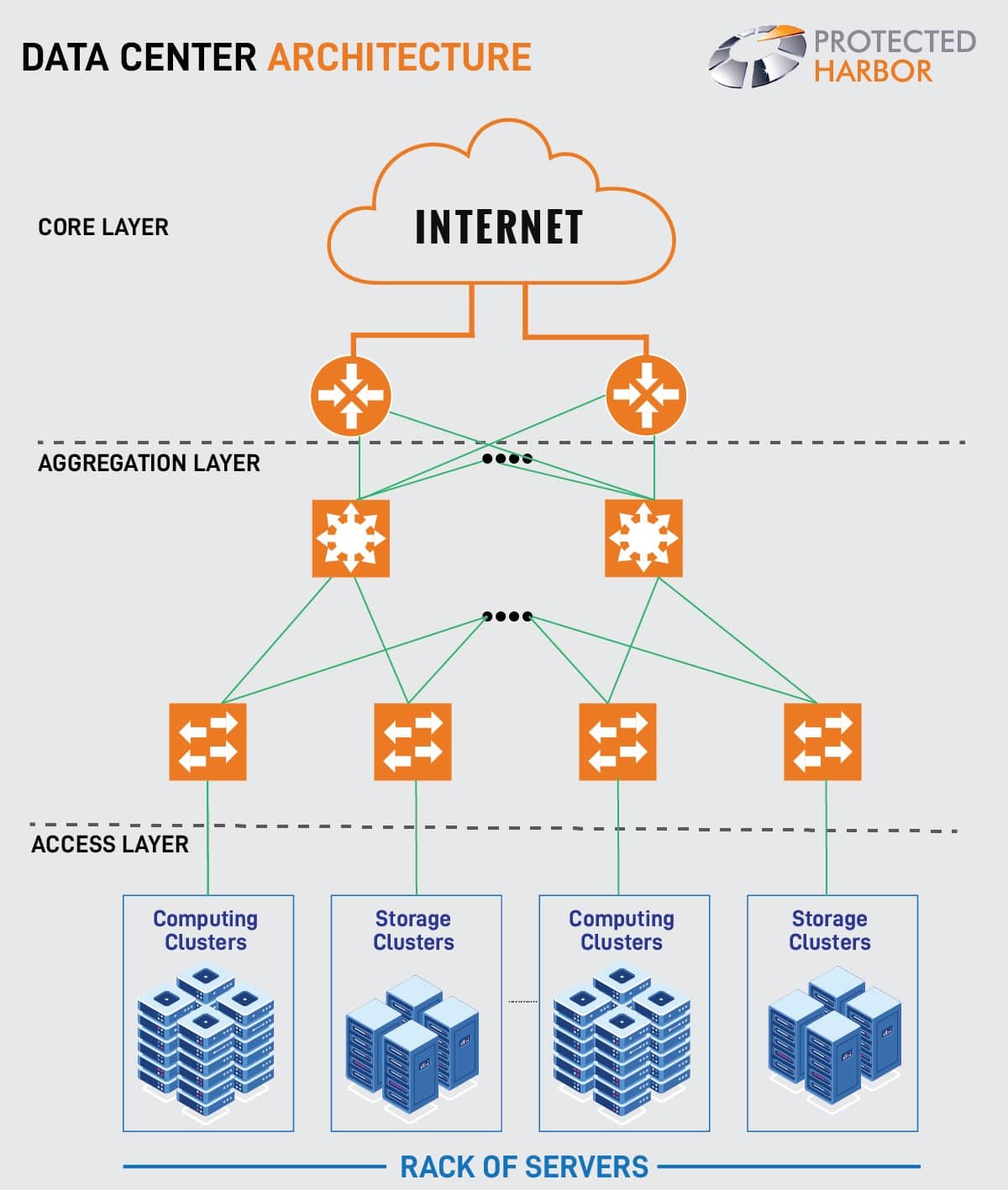
data center archietecture.


Data center tiers:

Data centers are rated by tier to indicate expected uptime and dependability:

Tier 1 data centers have a single power and cooling line, as well as few if any, redundancy and backup components. It has a 99.671 percent projected uptime (28.8 hours of downtime annually).

Tier 2 data centers have a single power and cooling channel, as well as some redundant and backup components. It has a 99.741 percent projected uptime (22 hours of downtime annually).

Tier 3 data centers include numerous power and cooling paths, as well as procedures in place to update and maintain them without bringing them offline. It has a 99.982 percent anticipated uptime (1.6 hours of downtime annually).

Tier 4 data centers are designed to be totally fault-tolerant, with redundancy in every component. It has a 99.995 percent predicted uptime (26.3 minutes of downtime annually).

Your service level agreement (SLAs) and other variables will determine which data center tier you require.

In a data center architecture, core infrastructure services should be the priority. The latter should include data storage and network services. Traditional data centers utilize physical components for these functions. In contrast, Platform as a Service (PaaS) does not require a physical component layer.

Nevertheless, both types of technologies need a strong core infrastructure. The latter is the primary concern of most organizations, as it provides the platform for the business. DCaaS and DCIM are also a popular choice among the organizations.

Data Center as a Service (DCaaS) is a hosting service providing physical data center infrastructure and facilities to clients. DCaaS allows clients remote access to the provider’s storage, server and networking resources through a Wide-Area Network (WAN).

The convergence of IT and building facilities functions inside an enterprise is known as data center infrastructure management (DCIM). A DCIM initiative aims to give managers a comprehensive perspective of a data center’s performance so that energy, equipment, and floor space are all used as efficiently as possible.


Data Center Requirements

To achieve operational efficiency, reliability, and scalability, a data center setup must meet stringent requirements. The following are critical considerations:

1. Reliability and Redundancy– Ensuring high performance and uninterrupted services necessitates robust data center redundancy. This includes having redundant power sources, networking infrastructure, and cooling systems. Data center redundancy is crucial to mitigate the risk of downtime and maintain continuous operations.

2. Scalability– With data volumes growing exponentially, data centers must be scalable to accommodate future growth without compromising performance. Scalable infrastructure allows for seamless expansion and adaptation to increasing demands, ensuring long-term operational effectiveness.

3. Security– Data center security is paramount due to the sensitive information stored within these facilities. To protect data integrity and privacy, stringent security measures such as access controls, continuous monitoring, and encryption are essential. Robust data center security protocols help safeguard against breaches and unauthorized access.

4. Efficiency– Optimizing data center efficiency is essential for reducing operational expenses and minimizing environmental impact. Efficient energy use in data centers lowers costs and promotes sustainability. Implementing energy-efficient technologies and practices enhances overall data center efficiency, contributing to a greener operation.

By focusing on data center security, efficiency, and redundancy, organizations can ensure their data centers are well-equipped to handle current and future demands while maintaining high performance and reliability.


Conclusion

Data centers have seen significant transformations in recent years. Data center infrastructure has transitioned from on-premises servers to virtualized infrastructure that supports workloads across pools of physical infrastructure and multi-cloud environments as enterprise IT demands to continue to migrate toward on-demand services.

Two key questions remain the same regardless of which current design strategy is chosen.

  • How do you manage computation, storage, and networks that are differentiated and geographically dispersed?
  • How do you go about doing it safely?

Because the expense of running your own data center is too expensive and you receive no assistance, add in the cost of your on-site IT personnel once more. DCaaS and DCIM have grown in popularity.

Most organizations will benefit from DCaaS and DCIM, but keep in mind that with DCaaS, you are responsible for providing your own hardware and stack maintenance. As a result, you may require additional assistance in maintaining those.

You get the team to manage your stacks for you with DCIM. The team is responsible for the system’s overall performance, uptime, and needs, as well as its safety and security. You will receive greater support and peace of mind if you partner with the proper solution providers who understand your business and requirements.

If you’re seeking to create your data center and want to maximize uptime and efficiency, The Protected Harbor data center is a secure, hardened DCIM that offers unmatched uptime and reliability for your applications and data. This facility can operate as the brain of your data center, offering unheard-of data center stability and durability.

In addition to preventing outages, it enables your growth while providing superior security against ransomware and other attacks. For more information on how we can help create your data center while staying protected, contact us today.

What is API security, and why does it matter?

api security


What is API security, and why does it matter?

The process of preventing or mitigating attacks on APIs is known as F. APIs serve as the foundation for mobile and web apps. As a result, it’s vital to safeguard the sensitive information they send.

An API is a software interface that determines how different pieces of software interact with one another. It regulates the kind of requests between programs, how they are made, and what data formats are utilized. APIs are being used in the Internet of Things (IoT) and website applications. They frequently collect and process data or allow the user to submit data processed within the API’s context.

Google Maps, for example, is powered by an API. Google Maps can be embedded into a page by a web designer. When users use Google Maps, they are just using a prewritten API given by Google, rather than code that the web designer built piece by piece. API security includes both your APIs and those you use indirectly.

Web API security entails user and program authentication to secure sensitive data and prevent malicious conduct. Web API security is critical to the success of web applications and for safe communication in your company. This article walks you through the procedures to secure the security of your APIs.

Types of API Security

API security has grown increasingly critical, especially with the rise of IoT. Users, APIs, and the apps and systems they interact with exchange critical and sensitive data. Hackers can use an insecure API to get access to a computer or network that is otherwise secure. Let’s take a look at commonly used API security types.

API Gateway Security

api security

An API Gateway is a critical component of an API security architecture because it acts as a focused server that regulates traffic. This functionality can also detect potential vulnerabilities, potentially exposing your APIs.

The process of defining API security involves four steps. The first step is to determine the security goals. Next, you need to identify testable implementation constraints and complete the verification. During this step, you need to ensure that the security measures are sufficient to protect your API from threats. The third step involves identifying new assets and goals. And the fourth step is the security strategy to implement the controls that will protect your API.

When you develop a sample API, incorporate security controls into the code. These controls will prevent unauthorized users from modifying or intercepting the messages. Another step is to enforce the security policy in your API. You should use application-level security measures and check your code for vulnerabilities. For example, use OAuth to protect your API against external attackers. However, this is not enough. It’s imperative to follow data privacy regulations.

Restful API security

REST APIs support HTTP and Transport Layer Security (TLS) encryption. TLS is an internet security standard that verifies that data delivered between two systems (a server and a server, or a server and a client) is encrypted and unaltered. This means that a hacker attempting to steal your credit card information from a shopping website will be unable to view or modify your information. If a website’s URL starts with “HTTPS,” you know it’s secured with TLS (HyperText Transfer Protocol Secure).

REST APIs also use JavaScript Object Notation (JSON), a file format that makes data movement between web browsers easier. REST APIs don’t need to keep or repackage data because they use HTTP and JSON, making them much faster than other APIs.

Web Application Security

Web application security is the practice of defending websites and online services from various security risks that take advantage of flaws in the application’s code. Content management systems (e.g., WordPress), database administration tools (e.g., phpMyAdmin), and SaaS apps are common targets for online application assaults.

Organizations that fail to safeguard their web applications are vulnerable to attack. This can lead to data theft, strained client relationships, canceled licenses, and legal action, among other things.

Why does API security matter for businesses?

Many organizations use APIs, but do they adhere to API security best practices? If not, this may be one of the most overlooked security risks. These services are not limited in the number of resources they allow, which opens up the door to brute force attacks. Additionally, APIs can expose users’ sensitive information to attackers who take advantage of weak authentication processes. It usually takes 200 days before a company becomes aware of a breach – and it usually takes an external party to discover it.

Developing API security is an important step in securing your application. This requires you to adhere to best coding practices and implement proper security practices. Some common vulnerabilities make your system prone to attacks, such as user-level authentication, weak encryption, storing critical secrets on disk, and not applying security updates and patches. So, it is vital to protect your business against these problems.

In addition to good coding practices, API security can also be compromised if a user uses unsecured public Wi-Fi, as these networks are the perfect environment for hackers. The security of your API depends on how you secure it, so be sure to use a secure VPN to prevent such problems. If you are using public Wi-Fi, your software must have a VPN for security.

Why is API important?

It is vital to protect your business against security issues. There are several ways to do this. For example, you should check your APIs periodically to ensure that they are secured against malicious code. You can test the security of your APIs with a tool like Sqreen. These tools are free and can be used by any business. A security expert can recommend the best practices to secure your APIs. If you don’t want to worry about security, use a security tool to protect your application.

In addition to keeping the data of your customers safe, APIs also help companies protect themselves from identity theft. There are many different types of attacks that can target an API, and each one has its own unique set of risks. For example, two-factor authentication is the best way to protect your APIs. It can prevent unauthorized transactions and can also prevent bots. Then, it would help if you used a security solution that protects your business.

The key to protecting your APIs is a comprehensive security strategy. Your security team should consider your business’s API access. It should be able to handle unauthorized access and protect sensitive data. It’s essential to know how APIs work. You can also implement a firewall by integrating the security solution into the API.

How to implement API security?

To protect your APIs, you need to consider all possible threats. Your APIs should be protected against attacks that might be malicious. By doing this, you’re preventing the attackers from using sensitive data. Moreover, it’s essential to encrypt your APIs as they may become vulnerable to attack from external sources. You need to ensure that every API you offer is encrypted and password-protected so that there’s no way for hackers to access them.

Verification
To secure your API from ill-usage, you need to validate users’ identities. You can verify user identity by using a unique API key. To prevent this, you can also verify their identity through the server. To prevent DNS, routing, or IP spoofing, you must implement an authentication protocol to avoid possible attacks. The best way to ensure this is to integrate authentication into your API security framework. If you do not, it’s impossible to guarantee your API will be secure.

Authentication
It is essential to the security of your API. Authentication ensures that your APIs are only accessible to people with the proper credentials. By ensuring that only trusted users can access your data, you can increase the trust of your APIs. This is important for several reasons. For one thing, authentication keeps unauthorized users from damaging your data. And when the user wants to change the API, they need to verify that the user is indeed you.

Limit Access
A good API security policy is not just a matter of setting limits. It also ensures that the APIs are secure. An attacker will not be able to get access to sensitive data if they are not logged in. A good security plan will prevent this from happening. It will also protect your APIs from brute force attacks. It would help if you did not allow people to access your stored data. Object-level authentication will ensure that your users are authenticated.

Conclusion

APIs are expected to become the leading attack vector shortly because they are an attractive target to attackers.

Taking proactive actions to safeguard your API design is the only method to protect your API from attackers.

Following an API Security checklist, such as the one outlined in this post, is the best method. You can also partner with one of the leading security services providers, and they can take care of this for you.

Protected Harbor secures your business using OWASP and similar resources, making sure you’re safe from the most common vulnerabilities at all times. Protected Harbor partners with the clients understanding their requirements and then successfully implementing the ways you might need to safeguard your API against common threats. There’s still a lot to learn about API security, but this is a fantastic place to start. Secure yourself today.

API Security Checklist

A checklist to help you plan and carry out your testing strategy:

  • Create a separate test environment for your API whenever possible so you can test without breaking production.
  • Create functional tests for the happy path first, then automate them with your preferred toolchain.
  • Using the same tools, create negative tests for edge scenarios that lead to security concerns. Begin with testing authentication as a first quick victory.
  • Create detailed documentation for all access control techniques, such as roles, in your APIs. Create test users with a variety of permissions and access to secret resources. Then create test scenarios in which these users try to access unlawful resources. Keep in mind that authorization is just as necessary as authentication!
  • Don’t think of your API as if it were a black box. Discover the kind of issues that your back-end architecture is susceptible to (such as mass assignments, SQL injections, etc.).
  • Create test cases with input exceeding boundaries. Additional attributes, going outside established constraints, and command or SQL injections are all examples (if necessary).
  • Keep an eye on all error responses for signs of internal information leakage.
  • Include security tests in the performance testing process to guarantee that any unusual behavior under stress does not compromise security.

How Secure Are VoIP Calls?

How secure are VoIP calls


How Secure Are VoIP Calls?

voip calls

VOIP is a top-rated phone service because it offers many perks over traditional landlines. They’re generally cheaper and more convenient, but are they really any more secure? You should know a few things about VOIP security before making the switch.

VoIP is great for small businesses. Its advanced features allow small businesses to compete with the big boys in customer service. VoIP has many features that will enable your staff to stay connected to your customers in various ways, including missed call texting and automatic call distribution. These features are ideal for any business, especially those that travel frequently. But how safe is your business from hackers when you commit yourself to VoIP?

Why Should Businesses use VOIP?

To keep your VoIP communication secure, you’ll need to protect it from hackers. These hackers can steal confidential information from your network, including customer and employee information. They can also use this information against you – blackmailing you or selling it to your competitors. The same is true for the internet. In addition to these issues, you should also make sure that your VoIP service provider encrypts all your data with SSL.

For starters, VoIP eliminates long-distance charges from your communication bill. Because VoIP uses the Internet, you won’t pay extra to call long-distance. Just like your ISP won’t charge you for visiting websites from around the world. Compared to the traditional circuit-switched telephone network, VoIP calls are 60 percent cheaper. International calls are 90 percent cheaper. And with fewer phone lines, your company’s infrastructure can also grow. This makes VoIP the best choice for businesses in a growing economy. In addition to lower costs, it’s easier to manage. You can set up and operate your phone network with a single service without hassles.

Because VoIP allows you to work from any device, your staff can use the same number from anywhere in the world. The same software is used in call centers so that telecommuting employees can work from their home computers. Employees can use their phones in the office or on the road. If you need to reach a large group of people, VoIP is a great option. You can even use VoIP for a small team, and you won’t have to worry about the quality of the call. With the flexibility that VoIP gives you, your staff will work more efficiently.

Furthermore, they can make important business calls from anywhere. Your mobile devices can connect to your VoIP provider over a hotspot with VoIP. This means you can stay connected even when you’re out and about. It’s one of the best ways to save money. It’s also easy to manage.

How secure is VoIP?

As businesses embrace cost-saving VoIP (Voice over Internet Protocol) technology, they must also address its limitations. Suppose you’re working with sensitive information, such as private client data or intellectual property. In that case, you need to know that the method of communication you choose will protect your data and keep it private.

The security of a VoIP call depends on the network it’s travelling over. The two most prominent protocols in use today are SIP (Session Initiation Protocol) and H.323. But, as always, the devil is in the details. To signal and govern interactive communication sessions, the Session Initiation Protocol (SIP) is employed. Voice, video, chat, instant messaging, interactive games, and virtual reality are possibilities for such interactions. H.323 is an ITU Telecommunication Standardization Sector (ITU-T) guideline that specifies protocols for audio-visual (A/V) communication sessions across all packet networks.

Is VOIP Cyber-secure?

First of all, it’s essential to consider the source of your VoIP. Are you using a public WiFi connection? If so, it’s possible that hackers could hack into your network. And if you’re using a secure office connection, your data could be compromised. You should also check whether the provider’s IT infrastructure is protected against different types of network attacks. Ultimately, the answer to that question will affect the security of your calls.

Another way to increase your VoIP security is to keep your VoIP network updated. Most VoIP phones offer a default password for their users. You’ll want to change this to something more complex. For instance, you should set a password at least ten characters long. You can also add extra security measures like firewalls and VPNs to your VoIP network. These steps will significantly improve the security of your network. Just check for updates and make sure they’re running the latest versions of this software.

VoIP Encryption

Voice encryption is an important and necessary measure. It prevents hacker access to your call information and encrypts the content of your call. Advanced encryption is also used to protect your call information from hackers. SRTP is a protocol that applies the Advanced Encryption Standard to data packets. It offers message authentication and additional protection against replay attacks. (For more information, visit https://securevoipcalls.org)

SRTP (Secure Real-time Transport Protocol) is a security protocol that protects the contents of voice calls. It is an important security measure, as SRTP adds message authentication to protect sensitive company data. Moreover, if your employees steal confidential company data, a phreaking attack can be a significant security risk. Encrypting and adding layers of security is the only option. Therefore partnering with a VoIP service provider could be a viable option.

You might think that VOIP calls are not secure and could be intercepted by a third party listening to what you are saying. However, encryption is often used to protect data as it travels on the internet, including VOIP services such as Skype and FaceTime. While encryption cannot guarantee that no one will listen in, it will make it much harder without some very sophisticated equipment and software. The most common protection is through 256-bit Advanced Encryption Standard (AES) encryption. This is used by Apple, Microsoft, and some other tech giants.

Conclusion

VoIP has proved some high-level security features leaving many to believe that it can be safe for business discussions and non-sensitive conversations. However, this is not always the case. Improperly using your phone can allow eavesdroppers to listen in on your conversation. Suppose you would like to remain secure while using VOIP, but if you want the value of VOIP and are still unsure about the security, there are always extra steps you can take to increase safety, connectivity, and reliability.

All VOIP providers will create a unified VoIP solution that is easy to use at a lower cost than traditional business phone systems. Next-level providers know how to take it a step further. Ensure your business VoIP service is connected throughout your business phone, video conferencing, employee cell phones, customer service chats, and your employee’s remote workstations. Additionally, these providers offer accurate managed phone services, including advanced technology and cybersecurity solutions.

For instance, at Protected Harbor, we give each client a dedicated VoIP phone system and their VoIP server within our data center that we own. They are managed, programmed, and monitored by Protected Harbor full-time engineers allowing us to avoid outages before they happen and instantly modify systems and setting for optimal use.

Protected phones by Protected Harbor is one of the best unified VoIP solutions providers. High-quality, low price, and easy-to-use services have made it incredibly popular among consumers. But that’s not it; features like Live 24×7 support, dedicated remote system, highly configurable, and SIP forking make it the ultimate choice over the VoIP providers. Experience the quality yourself; book a call now.

How we spent New Year 2022


How we spent New Year 2022


How we spent New Year 2022

While the world was busy welcoming the new year, Protected Harbor ensured that our customers were still up and running, regardless of date and time. Shortly after midnight on January 1st, 2022, our monitoring system raised an unusual condition, as emails suddenly stopped being transmitted for a client and instead started to build up. A build-up of outbound emails triggered the Application Outage Avoidance alert. Our team started the new year off doing what we love: helping businesses stay protected and productive.

What happened?

The email server was experiencing an error, stopping outbound emails from being delivered.

The Manager on duty, Fasif VP, immediately responded and found the problem was something we hadn’t experienced before. Fasif followed Protected Harbor protocols by restarting services, troubleshooting, and rebooting cluster nodes. Regardless of what he did, emails were still not being sent. Nick Solimando, our Director of Technology, was dispatched to investigate.

Nick confirmed Fasif’s concern. We had never encountered this error before. Nick walked through the standard procedure, reviewing the steps Fasif had taken to confirm the issue. Nick could not find a solution despite bypassing our reputation filter and moving emails from one node to another. Upon further investigation, Nick found other people over the internet are experiencing the same issue, indicating that there was a problem in the programming code of the server. His experience and intuition led him to disable the internal email filter, and emails began to flow again.

Eventually, he found a REDDIT thread – Exchange 2019 Anti-Malware – Bad Update? : sysadmin (reddit.com) covering the issue. One thing about the people at Protected Harbor, they are eager to learn. Technology is constantly changing, and our team needs to stay up to date. We are never egotistical enough to believe we know it all and enjoy working with the IT support and MSP community to stay on top of new trends and issues.

From beginning to end, the event took 40 minutes. Our customers were unaware of this event, nor did we receive a single support call or ticket regarding missing emails.

It’s just another day at Protected Harbor – where we solve problems others cannot.

Protected Harbor celebrated this new year by standing true to its name, protecting and delivering the customers at any cost, no matter the day and time. Customer satisfaction is the utmost priority, and this is what we strive to do.

“This is an example of events that customers are unaware of occurring but are the hallmark of the difference between other MSPs and us.  As CEO of a technical architecture company, there are the events I am most proud of.”     -Richard Luna, CEO, Protected Harbor

Closing thoughts and future plans!

We’ve all heard the saying, “Know thy customer.” It’s a simple concept that’s been around for ages. But it is also one of the most critical factors in creating a successful brand. If you know your customers—their struggles, their needs, and what they expect from you—you’ll be able to create a brand that resonates with them.

Having complete control and management of all our internal technology is our core philosophy to deliver better customer uptime, experience, durability, and responsiveness.
We refer to ourselves as the Anti-MSP since we take an opposite approach to most Managed Service Providers (MSPs). The majority of MSPs are now just reselling cloud services; they have no control over, or understanding of, the technology they are managing.
A more extreme example of this was the Office 365 attacks from 2021 when thousands of company emails were compromised due to the MSP that managed the accounts.
As the ANTI-MSP, your responsibilities are more significant.  We must respond 24 hours per day, 365 days per year, including on New Year’s Day 2022, since we control and manage our technology.

We plan to protect the customers and deliver at all costs in the future. The customer is interested in how we can help them with their IT needs, not what we offer. We need to articulate that value proposition and then deliver on it.

The good thing is that the new year brings a fresh start, and we are all ready to start something new. Switch from a reseller MSP to the experts who understand your needs. We at Protected Harbor are excited about the industry’s future and are looking forward to delighting our customers with unmatched services and solutions. Let’s get started with the new year 2022! Learn how we do this.[/vc_column_text][/vc_column][/vc_row]

What causes healthcare data breaches the most frequently?

What is the most common cause of healthcare data breaches?

Patient’s medical records are a goldmine for malicious hackers—if they can get their hands on them. According to Cisco Internet Security Threat Report, healthcare is currently the most targeted industry by cybercriminals.

Health data breaches have been on the headlines for a while now. From the crippling breach of Anthem to the compromising of 10 million patient records at UCLA Health — nothing is sacred when it comes to cyberattacks these days. While the impact of security incidents might differ depending on their magnitude, it seems that poorly protected IT systems and hacking/IT incidents are often the biggest culprits in causing privacy and financial setbacks.

Healthcare data breaches are on the rise. Although many are concerned with hacking, several factors could potentially cause a significant healthcare data breach.

Common causes of healthcare data breaches!

Data breaches are becoming more and more common. With the rise of hacking, phishing, malware attacks, and new security regulations, all healthcare organizations need to stay proactive in protecting their data.

The most common cause of data breaches for healthcare organizations is malicious or cyber-criminal attacks. Data breaches can come from various sources, including hackers stealing protected health information (PHI) from an organization’s database, unencrypted devices, or a weak, stolen password. One of the biggest causes of healthcare data breaches is misconfigured medical devices and office equipment. Medical device security remains a major concern for organizations. Click here to know how do breaches happen and how to prevent them?

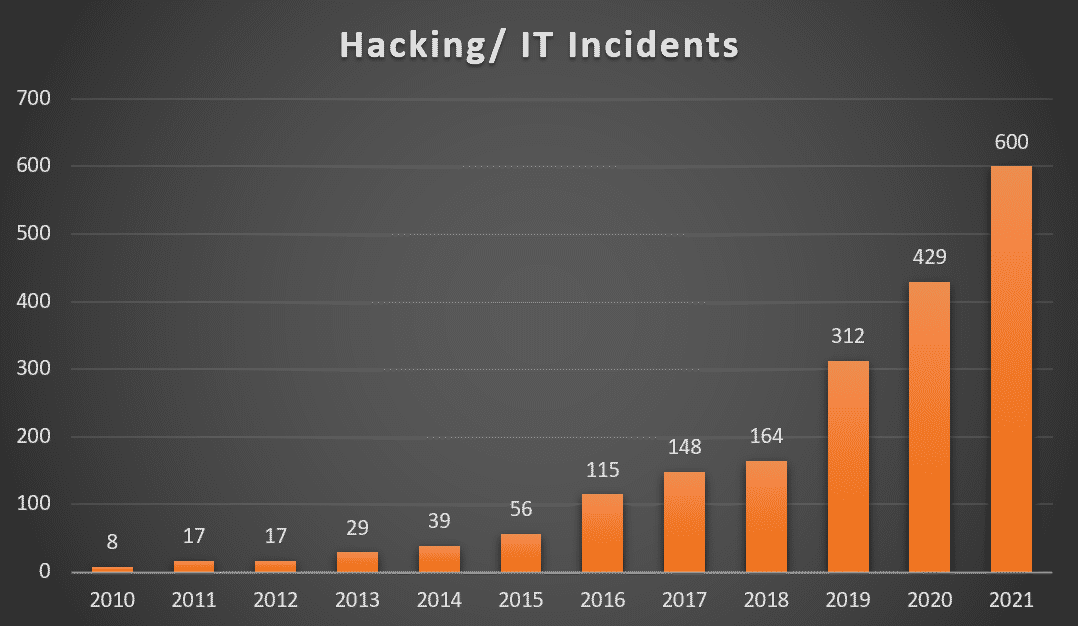
Hacking/ IT Incidents accounts for 47% of healthcare data breaches making it the #1 cause of healthcare data breaches.
(Source: Electronic Health Reporter)

hacking bar ratioPatient Data Theft: High risk
Health care industry members are all too familiar with data theft and new methods of exfiltrating information from connected medical devices such as electronic medical records (EMRs) and protected health information (PHIs). IP-enabled medical devices can be easily exploited by experienced hackers because of minimal access controls and known vulnerabilities. A hacker may then take data directly from the medical device, but since medical devices typically contain limited data, he is more likely to go to servers, data centers, or other devices on the network, like the XP workstation that is connected to the electronic medical record. Data breaches in healthcare are defined as theft and loss 32% of the time, compared to only 15% in different industries, 2nd to Hacking and IT incidents, as per Healthcare drive. With the number of high-profile breaches in healthcare over the past three years, healthcare organizations need tighter controls to mitigate this risk.


What is the cost to your company?

According to IBM’s Cost of Data Breach Report 2021:

  • Healthcare organizations spent an average of $161 per breached record in 2021, which is expected to increase in the future.
  • On average, it takes 329 days to identify a breach.

The reports show that the cost of data breaches has risen once again, reaching a record high since IBM first published the report 17 years ago. The average cost of a data breach increased by 10% year over year, to $4.24 million per incident and that of healthcare data breaches increased by $2 million to $9.42 million per incident in 2021. The average cost of ransomware attacks was $4.62 million per incident.

How can you avoid a data breach?

  • Back up data– Having a proper backup schedule and implementing a secure process to access the off-site data is a preliminary requirement. Confirm that your backup/recovery partner is also HIPAA compliant. Cloud hosting solutions can also be considered for better security.
  • Two factor authentication- Multi-factor authentication, also known as 2FA, is a simple concept that can be implemented by companies easily. A key benefit of two-factor verification lies in its very name: it requires two variables to access an account, just as you need two keys to enter a house. The security is therefore twice as strong.
  • Safeguard data and devices- Ensure that the tools and policies for security are implemented, securing all the devices accessing your network. Remote monitoring for unauthorized access and unusual activity can opt. Limit and set proper data control and access for the devices.
  • Train and educate staff– create a policy for regular security training and practice sessions. Identifying phishing emails, ensuring password complexity, and adhering to anti-malware protocols should be a part of this training. More details

To wrap things up!

Security and compliance are among the top factors healthcare organizations consider when adopting new technologies. Many organizations didn’t or were not able to take the time to strategically align new cloud-based tools and platforms with existing security standards as they transitioned to remote work after the pandemic.
Security and privacy should be a priority when working with technology partners in healthcare. It is a trusted partner’s responsibility to ensure users’ privacy and security, having incorporated a variety of safeguards into their processes, designs, and code, as well as constructing the infrastructure to ensure careful protection of user information. Cisco, Greenway, GE Healthcare, and Protected Harbor are some of the most trusted and reliable healthcare IT solution providers who take pride in their experience of delivering solutions to healthcare and other organizations.

What is a data breach? How to prevent one?

What is a data breach How to prevent one

What is a data breach? How to prevent one?

Data breach has become more common every year. According to the Identity Theft Resource Center (ITRC) data breach 2021 report there were over 1291 data breaches that exposed more than 7 billion records last year. Data breaches can harm your company’s reputation, bringing production to a halt, and even cause enough financial harm to send your company under. In this article, we will review what is data breach and how to stop one?

What is a data breach?

A data breach is a cyber-attack where unauthorized individuals gain access to sensitive personal or confidential information. When a security breach occurs, the hacker can steal and misuse personally identifiable information (PII) such as social security numbers, credit card details, bank account numbers, and even your protected health information (PHI) that could be used for fraudulent activity. A data breach on an organization leads to the release of client information or internal content, moreover, it can be intentional (theft, sabotage) or unintentional (internal error).

Among the data breaches, this year, the manufacturing and utilities sectors were deeply affected, accounting for 48 breaches and 48,294,629 victims. The healthcare sector was second, with 78 compromises and more than 7 million victims. In addition, financial services, government, and professional services each sustained more than 1.5 million victims.

Security magazine’s top data breaches list for 2021:data breach

  • Brazilian Database — 223 million, January
  • Bykea — 400 million, January
  • Facebook — 553 million, August
  • LinkedIn — 700 million, June
  • Cognyte — 5 billion, June
  • Other notable breaches: Ubiquiti, Clubhouse, USCellular, Twitch, T-Mobile, Panasonic, GoDaddy

How do breaches happen?

Data breaches come in many forms. In the case of Asian delivery and rental company Bykea, it was a lack of server encryption. A flaw in Facebook’s address book contacts import feature was their undoing. Cognyte let an unsecured database get indexed, Twitch got hit due to a bad server configuration, and for T-Mobile, it was weak access control points.

Missing Security Patches –  Security tools can become outdated quickly and updates are needed to stop new threats. It’s not just antivirus software that needs patching, many network-level vulnerabilities are caused by unpatched Cisco, Microsoft, and Apache applications.

Unencrypted Data – It is simply plaintext or unaltered data that can be accessed by anyone. This can be sensitive information stored online on cloud servers with no layers of protection. By using encryption, you can prevent brute force attacks and cyberattacks, such as malware and ransomware. Using encryption, data is protected while being transmitted in the cloud or on a computer system.

Phishing – This is the most common hacking technique, that can trick an employee into clicking on a link or opening an attachment. Phishing attacks are used by hackers to gain direct access to a target’s email, social media, or other accounts or to change or compromise connected systems, such as point-of-sale machines and order processing systems.

Spyware – This is a type of malware that tracks your activity until a hacker has what they need to strike. Employee’s don’t even have to download an infected file to get tagged with spyware,

Worms – This is a type of malware hackers install onto a system’s memory. Once installed, worms infect your entire system, stealing data directly, changing system files, or opening a backdoor for hackers to control later on.

Virus – This relies on an employee activating the infected file themselves. The majority of viruses are downloaded from shady websites, usually by people who have no idea what they’re doing. This is another example in support of employee cybersecurity education.

Trojan horses – Attacks of this type pretend to be another program. If you attempt to pirate software or download it from an untrustworthy source, it will often come packaged with a trojan horse. After you’ve installed your program, it often works as it should, but at the same time, a trojan horse is collecting your data or controlling your PC in the background.

Ransomware– The most obvious and dangerous type of malware is ransomware. Viruses, worms, and trojan horses make it onto the computer, and it then annihilates it. To unlock the victim’s system, hackers force them to pay a ransom, often in bitcoin. Victims of cyber-attacks have in some cases paid millions of dollars to get back access to their networks.

How to prevent a data breach?

A data breach is a threat to every organization. It can happen to anyone, from the smallest e-commerce company to the largest bank. Although it’s on the rise, It can be avoided if you know how.

The first step is to stop thinking about your data as “yours” and start thinking of it as “theirs.” The security of your data is no longer just about what you can do to protect it; now, it’s also about what others can do to steal it. It’s not enough to secure your own network. You must also take steps to secure the networks and computer systems of those who connect to yours. Below are the best practices to follow to prevent data breaches:

  1. Educate and train your employees- Employees might be a weak link in the data security chain, and of-course human being human, open suspicious emails every day. A proper training and awareness plan would minimize the chances. As part of this effort, you can teach them how to create strong passwords, how often passwords should be changed, and how to identify, avoid, and report phishing scams.
  2. Create procedures and update software regularly- It’s wise to create data security procedures and update them consistently. Install patches, application software, and operating systems whenever available. Performing regular security audits reveals data integrity and serves as a data protection checklist. Also, perform regular vulnerability checks. Businesses must include in their vulnerability assessments all aspects, from data storage to remote access for employees to Bring Your Own Device (BYOD) strategy as well as policies and procedures.
  3. Data backup, recovery, and remote monitoring- It’s utterly important to have your data backed up because sometimes data breaches can delete your data. Your IT team should have a 24×7 remote monitoring of your network and an automated remote backup system in place. You can work with an MSP if you don’t have a dedicated IT team.
  4. Encrypt data- To maintain the confidentiality of your data while using email or other services, make sure that they are encrypted before they are being sent. Ensure your team has a dedicated Wi-Fi network that the public cannot access. The most sensitive data may need to be restricted from Wi-Fi use since it may allow cybercriminals to intercept it.
  5. Data protection regulations compliance- Organizations must adhere to the regulations and compliances to manage data privacy and people’s data. Companies that store, process, or transmit credit card information must abide by the PCI DSS to safeguard sensitive PII such as credit card numbers. The HIPAA regulations govern who can view and use protected health information, such as the name and Social Security number of patients.
  6. Developing data breach response plan- Even though many companies haven’t developed response plans for breaches yet, such a framework has an important role to play in dealing with cybersecurity incidents, limiting damages, and rebuilding trust among employees and the public. To do this, you need to clearly define the roles and responsibilities of those tasked with handling breaches. A summary of the investigation process should also be included. Additionally, consider multi-factor authentication and encryption as methods of protecting your data.

To wrap things up

A data breach can happen to anyone and when it does, it’s not just your business that is affected. It’s your customers, employees, and brand. To mitigate the risks of a data breach by implementing a strategy that fits your organization’s needs it is important to invest in full-proof security and follow the best practices. Data breach response plans and the security infrastructure vary from organization to organization.

But you don’t have to go it alone. Partnering with a data security and managed IT services provider who understands your business and application needs can help set you up for success. Cisco, Symantec, Transunion, Protenus, and Protected Harbor are some of the top data breach solution providers. With the growing number of data breaches, it’s imperative to have an effective solution in place, so don’t waste any more time, get protected today.

China eyeing U.S. healthcare data

china eyes on us healthcare data


China eyeing U.S. healthcare data

Do you want your PHI (protected health information) or DNA going to an authoritarian regime that has a history of using DNA for repression and surveillance? People’s Republic of China (PRC) has collected large sets of data from U.S. over the years, through every means possible. Access to American healthcare data now poses a serious risk to the privacy, economy, and national security of the United States.

The Covid-19 outbreak is only one part of the healthcare pandemic the country is suffering. The sudden dent in the healthcare infrastructure left the companies and the government reeling. As COVID rates and testing have requirements spiked, China’s BGI (Beijing Genomics Institute) Group, the world’s largest biotech and healthcare analytics company, proposed to help build and run advanced COVID testing labs throughout the U.S.  BGI would provide technical expertise, high throughput sequencers, and even make financial donations for more research.

With America struggling to set up enough testing and research facilities, China’s proposal was hard to ignore in times of such desperation. That is until the U.S. National Counterintelligence and Security Center raised suspicion and warned against it.
“access to U.S. healthcare and genomic data by China poses serious national security and privacy risk for the United States.” The NCSC said in a statement. Apparently, the Chinese biotech group supplying the COVID-19 testing kits and helping to set up more than 18 research labs also planned on using samples to obtain healthcare data on American citizens, such as DNA and PHI.


China’s access to U.S. healthcare data

The People’s Republic of China (PRC) has been looking to obtain America’s ethnically diverse health data for years. According to National Counterintelligence and Security Center (NCSC), they have been able to gain access to US healthcare data, including genomic data, through a variety of channels, both legal and illegal, including theft of research and cyberattacks.”

According to a report by CFR (Council of Foreign Relations), China already has more data on the genetic sequencing of the US population than the United States has on its own population.
Chinese companies invested in U.S. firms that handle sensitive personal and healthcare data, providing them with easy access to this US Electronic Health Records (EHR). For example, BGI purchased U.S. genomic sequencing company Complete Genomics in 2013, and China’s Wuxi Pharma acquired NextCODE Health in the U.S. and later formed Wuxi NextCODE Genomics.

Recent healthcare data breaches from hackers in China within the PRC government include the theft of personal data and EMRs. Anthem Inc. in 2015 lost healthcare data on roughly 78 million people; information including health identification numbers, names, Social Security numbers, employment, and income information. Two individuals based in China were indicted by the U.S. Justice Department for hacking Anthem and three other U.S. companies, in 2019.


The China Challenge

Bill Evania, a veteran of both the CIA and the FBI, also suspected that offer of help from BGI was a modern-day trojan horse. Using the labs as a way to establish a foothold in the U.S. healthcare market, much like previous corporate acquisitions, and then mining the health data even US Government agencies can’t access. Further, all Chinese companies are obligated to share data collected with the PRC government under the PRC’s national security laws. So any Chinese healthcare company on U.S. soil poses a national security risk.

We have seen the consequences in the past. The U.S. Department of Commerce sanctioned two subsidiaries of China’s BGI in July 2020 over the PRC government’s use of genetic techniques to repress Uyghurs and other Muslim minority groups in Xinjiang.

But how has this happened? China has taken the advantage of the loose safety and security infrastructure protecting our PHI and EMR. Policies need to be revamped concerning the sharing and control of these data at the national and international levels.

China’s BGI has collaborated with many American healthcare and research entities over the past decade, providing them with genomic sequencing services, as well as gaining access to health records and genetic information of U.S. citizens. But to date there are not enough regulations and policies to stop internal employees to share such information with other company employees, who just happen to also work for the Chinese government.


Conclusion and Diagnosis

“We have a short term approach to data management, solve the problem today, but that often leads to larger problems down the road.”                                – Richard Luna, CEO, Protected Harbor

To address the ever-growing surveillance capabilities of China and other authoritarian states, the U.S. and other nations should take bold action instead of timid, gentle steps. To begin with, the government needs to strengthen healthcare privacy legislation and regulation. Enhanced privacy laws would provide protections against only for foreign states, but also from domestic governments and private parties wishing access to protected healthcare data.

National healthcare IT organizations should also increase user safety and privacy, encryption, reporting, auditing, to enhance data transfer and internet openness. Since electronic health records (EHR) are now the norm, every healthcare organization must be sensitive to the intersection of health information, security, and must adhere to HIPAA compliances. HIPAA Security Rule involves many physical safeguards, technological measures, and organizational standards. It applies to technology in three key ways: technologies that store PHI must log out after a certain time to prevent unauthorized access, all users must be assigned unique logins that can be audited, and, PHI must be encrypted.

No healthcare IT department is alone in the battle to protect against illegal or legal healthcare data breaches. Partnering with reliable and secured healthcare IT solution expert such as Protected Harbor can help solve the issues at a grassroots level. With two organizations working together, the healthcare data industry can lay multiple pillars of healthcare data infrastructure to strengthen national security. We cannot accept our information as safe as is, given the scope of data collection on devices and China’s known involvement in this area. There are no checks and balances in the sharing of data. For example, a company allows the vendors access to the billing data to generate reports. But the vendor has access to ALL of the data, not just what’s needed to generate reporting. The IT department and cybersecurity U.S. needs to be heavily vested in the security and safety of data.

The U.S. has spent the last decade creating interoperable healthcare systems and China is now using legitimate interconnected companies to capture data. As a result of the COVID-19 outbreak, different technologies and data have been linked at a faster rate than security measures applied to the data. Millions of Americans have lost their DNA and personal information, allowing China to leverage our health information to develop artificial intelligence and precision medicine, putting America’s $100 billion biotechnology industry at a disadvantage. We need to cut the oxygen and this starts from the ground level moving up the ladder to the national level.

IT lessons learned from the Covid-19 outbreak

IT lessons learned from the Covid 19 outbreak


IT lessons learned from the Covid-19 outbreak

The Covid-19 pandemic transformed the IT industry beyond the thoughts of our economies and societies.

It’s the end of the year 2021, and the world is still recuperating from the effects of the Covid-19 crisis that significantly impacted the technology sector. The Pandemic fluctuated the supply chain technology and came as an unusual shock.

The crisis transformed the lives of people around the globe digitally. We started being more dependent on technology than exposed. Now it’s almost two years, and the technology adoption we have seen is revolutionary.

At the pandemic’s beginning, companies opted for temporary solutions for their work and operations. A few months later, it was transparent businesses would need to find new ways to adapt for the long term. This started a rise in digitizing workplace applications and operations.

A recent pandemic news report by Mckinsey concluded that the Covid-19 pandemic brought about years of technology change and innovation in just a few months. Customer relationships and supply chains have been digitized, and internal operations have been moved to the cloud three to four years early. In the last few years, companies have multiplied their digitally enabled products in their portfolio by sevenfold.


Potential long-term impact on the technology sector

  • Forecasts indicate that cloud infrastructure services and specialized software will be in demand. As organizations motivate employees to work from home, the telecom services and communications equipment market is also anticipated.
  • IT departments and solution providers will play a more significant role in transforming businesses to digital. The need for reliable, secure, and flexible network systems is evident.
  • Demand for cybersecurity software will increase 37% as companies need to secure endpoints, particularly from employees working from home on less-than-ideally secure Wi-Fi. With the increase in report work came a massive increase in attacks. Attacks from home computers connected over VPN are difficult to stop because a VPN is a trusted connection. Still, computers at home, even company computers, are difficult to keep clean from viruses and attacks when there are no corporate firewalls or other layers of protection.
  • It’s proven that most employees would continue working from home even after restrictions are lifted. During the pandemic, we saw a productivity improvement. Studies show that during COVID, people worked more hours than they previously did when they worked in the office. The organizations must see this as a long-term impact and invest in creating a digitally sustainable environment. Read more here.


Practical next steps

Organizations across the country and from every industry reported a significant increase in customers’ and employees’ needs and remote working. We also saw a rise in advanced AI technologies in operations and business decision-making. Services such as DaaS, ransomware protection, and data centers are most likely to stay in the long term. After living through the impact of Covid-19 on technology and business, CIOs will be defined by their ability to respond, recover, and thrive.

Here are some practical next steps to make your business pandemic proof

  • The rise in remote work and co-working spaces will push the need for Remote Desktops (RDP) so employees can take their desktop images of apps, documents, and folders anywhere. Therefore developing a budget for technology improvement and implementation to prepare your company for the future sounds like a plan.
  • With a rise of remote workers comes a drop in in-office workers. Companies will be able to save on office space costs. The reduction in real estate also allows companies to reduce their hardware profile by switching from on-prem to off-prem servers and hosting. Besides saving physical space, off-premise servers are also secured and maintained by the provider.
  • Flexibility is the key to innovation and understanding how disruptions can be minimized in future events. Because the shift will have long-term ramifications that no one can foresee, custom networking and server hosting are critical to gain the flexibility your company needs for whatever comes next.
  • In the future, we will see a digitally enabled work environment and advanced tools for business processes, including back-end office functions. The Tech boom has advanced all technology integrations such as artificial intelligence and machine learning. Adapt and make use of technology for an edge over the competition.
  • One of the most important steps is to make your infrastructure and technology sustainable and focus on mental health during pandemic. Because going digital is a new normal now, we are moving towards a highly technology-driven environment. Businesses have to be agile, which means understanding, changing, and adapting quickly to the environment. Consider a solution provider who spends time understanding your needs and provides customized solutions.
  • If you are ready to migrate your data and applications to a protected cloud network and still own your data, you need to look past a traditional MSP and find a Managed IT infrastructure and design partner.


Take the final step

Post Covid-19 business IT priorities have changed. More than half of the business leaders say they invest in digitization and technology for competitive advantage, creating the entire business strategy. The needs of customers and your employees have become more digital, and as an organization, you must ensure the best of the services.

Remote work is no longer a culture of experimentation; it is a culture of necessity. The companies that invested in cloud technologies and figured out how to fit remote work into their processes were rewarded because the small work culture is here to stay long-term.

With businesses moving to virtual and cloud servers, it’s wise to opt for reliable, flexible, and secured data centers. And what’s even more brilliant is to take the help of one of the industry experts. Protected Harbor works with businesses to create personalized solutions. We keep your data on our internal servers with 99.99% uptime and 24×7 monitoring, ensuring you don’t crash and your team stays working. Remote work has left businesses vulnerable to malware and ransomware.

All Protected Harbor solutions employ custom-solution cyber security protocols to protect your business and your data. We made extra investments into air-gapped servers and triple-backed-up images, so your information is always on and always protected. Does your managed IT provider do that?