The Hidden Ransomware Risk Inside Your Server
The Hidden Risk Inside Your Server:

Why ‘Do-It-All’ Environments Invite Ransomware


Ransomware is a type of malware that interferes with a system or server. It does this by limiting or completely cutting off access to your data until a ransom is paid. Ransomware seems like an ominous threat, but companies never expect themselves to be targeted — until they are.


  • Why do attacks happen?
  • What makes you vulnerable?
  • How can you protect yourself?
  • What happens if you are attacked?

These are all important questions to be asking yourself.


Most ransomware attacks don’t start with sophisticated exploits — they succeed because of poor infrastructure design. Ransomware is really good at taking advantage of flaws in mainstream software. Every technology that is wonderful can be used in a harmful way. There is no one single cause of an attack, which means there is no one single solution for preventing a cyberattack. However, there are things to be mindful of and steps you can take to protect yourself and your organization.


Why Is Ransomware So Dangerous?

The target of a ransomware attack is always data because data is valuable. It’s a form of currency, so any location holding data is at risk of being a target. This is why industries such as the financial sector, healthcare/ medical organizations, transportation companies, and law firms are at the highest risk. These institutions have data attackers want — credit card information, social security numbers, phone numbers, addresses. This information is worth a lot of money to people with bad intentions.


Ransomware attacks can cause:

  • Extended downtime
  • Data loss
  • Revenue loss
  • Noncompliance
  • Having to pay large ransoms with no guarantee you’ll actually get your data back
  • Reputation damage
  • Risk of lawsuits
  • Potential fines and law enforcement involvement


Let’s look at the data:

One study found that 25% of organizations are forced to close after a ransomware attack and 80% of companies who paid the ransom suffered a second attack. Another study found that after a ransomware attack, 57% of businesses shut down operations temporarily, 40% lost significant revenue, and only 13% fully recovered their data. Companies experiencing data loss lasting more than 10 days also face a 93% bankruptcy rate within one year. The risk for small businesses is even greater, with 60% of small businesses shutting down within 6 months of a cyberattack.


These are scary statistics, but it’s important for organizations to understand how dangerous ransomware can be. At Protected Harbor, we are constantly looking for new causes of ransomware and ways we can protect our clients and ourselves from an attack. In this blog, we are specifically going to focus on how mixed-use servers can make organizations more vulnerable.

What Are Mixed-Use Servers?

As we mentioned, there is no single cause of a ransomware attack, which means organizations need a multi-layered approach to protect themselves. Many organizations often don’t understand the factors that put them at risk, so making yourself aware of the things that increase your vulnerability and addressing those issues is one of the best ways to protect your business.


During a recent new client assessment, we encountered mixed-use servers, which are servers that have multiple different roles/ workloads. For example, one server that hosts websites as well as databases, or a server that hosts file storage and VPN storage. Using a single server to provide one or multiple key services may seem more convenient for your business, but this is like hitting the jackpot for attackers.


No one intentionally designs bad infrastructure, so how does this happen?

The most common reason mixed-use servers occur is because of cost pressure. Organizations fear the high cost of licensing and adding new servers, so they may try to save money by enabling as many network rolls as possible. Another cause is developer-led builds that prioritize getting you set up fast, without prioritizing the long-term. We have seen many SaaS vendors enable programmers to directly install the programs they’re creating. This is an issue because programmers are excellent at solving code problems, but they usually have little to no training on infrastructure. This means they are not building your environment for scale, which will create friction down the line as your organization tries to grow.


This not only increases your vulnerability to an attack, but also impacts performance. Problems develop as multiple applications stored on a single server become more active.  For example, if a server is both a web server and database server, this can create performance problems when the database server is running complex queries. These queries begin using more and more of the server’s resources, which reduces the server’s ability to respond to web requests.


When performance is threatened, everything is on the line.


How Mixed-Use Servers Make You Vulnerable to An Attack

Mixed-use servers hurt performance because multiple key services are competing for resources, which means none of them can perform optimally. When hit with a cyberattack, mixed-use servers also make you more vulnerable in the following ways:

  • Increased blast radius: It’s easier for attackers to find and steal important data if it’s all stored in one place. Separating workloads makes it more difficult for attackers to find the valuable data they’re looking for because it’s spread out.
  • Damage happens faster: Mixed-use servers allow ransomware to spread within minutes — not hours. This means a cyberattack can do more damage to your organization in a shorter amount of time. By the time you realize something is wrong, it may already be too late.
  • Multiple workloads impacted: If you have multiple workloads on one server, multiple services will go down if that server is targeted by ransomware. Separating workloads helps to prevent multiple key services from being impacted during an attack, which reduces the chances of an attack crippling your business.


Can Maintenance Save You?

An added problem with mixed-use servers is that they are typically poorly maintained and often enabled with open security, both of which create fertile ground for ransomware attacks. Installing updates and security patches are crucial, but they require downtime. For some organizations, it can be hard to prioritize these updates and patches when even an hour of downtime can mean missed transactions, lost revenue, and idle staff. For businesses that use mixed-use servers, these maintenance windows are significantly longer, making the decision to prioritize maintenance and security even more difficult.


Maintenance downtime expands on mixed-use servers because each use will have its own updates that need to be installed. For example, if you have a server that acts as both a web server and a database server, installing all of the updates for the database, web server, and core operating system can result in hours of downtime. A maintenance window that large may cause a business to prioritize uptime and skip maintenance and security patches entirely. However, a system that is not properly maintained or adequately protected is extremely vulnerable to ransomware.


A cyberattack will cost you much more than a few hours of downtime.

The Protected Harbor Difference
Protected Harbor designs and operates infrastructure differently:

we don’t just address symptoms — we fix core issues.


We design environments around the application itself — separating workloads, isolating risk, and ensuring that no single failure can take down your entire business. Our engineers take the time to learn each client’s application inside and out so we can design infrastructure tailored the unique needs and workloads of their organization. This is what we call Application-Aware Infrastructure: where performance, security, and accountability are engineered together, not bolted on later.


Our team understands how dangerous ransomware can be because we’ve seen the havoc it wreaks firsthand. This is why we prioritize security as one of the most important features when designing your environment, instead of treating it like an afterthought. This allows us to deploy an improved and resilient security platform that will help to keep your organization safe from ransomware attacks.


If you’re not sure whether your business relies on mixed-use servers, we’ll show you.


Contact our team for a complimentary Infrastructure Risk Assessment where we will evaluate your environment and identify:

  • Mixed-use server exposure
  • Ransomware blast radius risk
  • Performance bottlenecks tied to infrastructure design


No obligation — just clarity on where you stand.


Your ‘Efficient’ Server Setup Might Be a Security Nightmare

Many organizations using mixed-use servers end up here because infrastructure decisions are made around cost or convenience — not how the application actually behaves in production. While cost and convenience are important things to think about, you can’t risk your entire business being crippled by a cyberattack.


Consider:

  • Do you have servers running multiple roles?
  • Do maintenance windows keep getting delayed?
  • Are you noticing performance issues during peak usage?
  • Are your backups completely isolated?
  • Can developers or vendors deploy directly to production servers?


If you want help protecting your organization from ransomware, contact Protected Harbor today

Mother of All Breaches Exposes 26 Billion Records

Mother-of-All-Breaches-Exposes-26-Billion-Records-from-Twitter-LinkedIn-and-More-Banner-image

Mother of All Breaches Exposes 26 Billion Records from Twitter, LinkedIn, and More!

In a shocking revelation, the cybersecurity world is grappling with what experts are calling the “Mother of All Breaches.” A colossal leak has laid bare 26 billion records, including those from internet giants like LinkedIn, Snapchat, Venmo, Adobe, and the former Twitter, now known as X. This unprecedented breach has ignited concerns about widespread cybercrime and the potential for devastating consequences on a global scale.

The compromised data extends beyond mere login credentials; it includes a trove of “sensitive” information, raising alarms among cybersecurity experts. The dataset’s sheer breadth and depth make it a goldmine for malicious actors, enabling a spectrum of cyber threats such as identity theft, sophisticated phishing schemes, targeted cyberattacks, and unauthorized access to personal and sensitive accounts.

Cybernews, the first to discover this catastrophic breach on an unsecured website, emphasizes the gravity of the situation. “The dataset is extremely dangerous,” warns cybersecurity expert Bob Dyachenko and the Cybernews team. “The majority of the population has likely been affected.”

One silver lining, however, is that the 12 terabytes of data appear to be a compilation of previously stolen information rather than newly acquired data. Cybernews believes it may be a meticulous aggregation of various breaches, making it a so-called “COMB.”

The records that have been made public are from a variety of platforms, with Tencent—the massive Chinese instant messaging company—leading the list with 1.4 billion hacked records. There were additional notable data leaks on Weibo, MySpace, Twitter, Deezer, and LinkedIn. Among the victims are well-known websites like Adobe, Telegram, and Dropbox as well as lesser-known ones like Doordash, Canva, Snapchat, and even international governments.

Protected Harbor’s CEO, Luna, Weighs In:

In response to this cyber Armageddon, Protected Harbor’s CEO, Protected Luna, expressed deep concern about the potential fallout. Luna emphasized the need for swift action and heightened security measures in light of the breach:

The “Mother of All Breaches” exposed today, serves as a sobering reminder of the ongoing dangers that exist in the digital sphere. We must take the initiative to protect our digital identities as stewards of sensitive data. Protected Harbor urges everyone to act right away by changing their passwords, using two-factor authentication, and being watchful for phishing efforts. Our combined defense is essential in this digital age to lessen the effects of such massive breaches.


Leaked Data Includes Passwords

The revelation of the “Mother of All Breaches” underscores a harrowing reality: the compromised data extends far beyond superficial details. Among the 26 billion records laid bare, the inclusion of passwords has set off alarm bells within the cybersecurity community. This treasure trove of leaked data presents a grave threat to data privacy, amplifying concerns about unauthorized access, information leaks, and the proliferation of sophisticated cyber threats.

The exposed passwords once considered a bastion of digital security, now serve as ammunition for malicious actors seeking to exploit vulnerabilities. This grim reality underscores the critical importance of robust security measures and vigilant cybersecurity practices to thwart potential phishing schemes, targeted cyberattacks, and other nefarious activities facilitated by the leaked data. As individuals and organizations grapple with the aftermath of this unprecedented breach, safeguarding sensitive information and fortifying defenses against cyber threats emerge as imperative priorities in the ongoing battle to preserve data privacy and mitigate the risks of unauthorized access.


Here’s What LinkedIn Has to Say

In response to the “Mother of All Breaches,” LinkedIn has acknowledged the significant impact of data exposure and emphasized its commitment to data privacy in cyber security. A LinkedIn spokesperson stated, “We take the security of our members’ data very seriously. Our team is actively investigating about the information leaked on dark web and taking necessary steps to ensure the safety of our platform.”


LinkedIn advises all users to:

1. Change Passwords Immediately: Ensure new passwords are strong and unique.
2. Enable Two-Factor Authentication (2FA): Add an extra layer of security to your account.
3. Be Wary of Phishing Attempts: Stay cautious of unsolicited messages and links.
4. Monitor Account Activity: Regularly check for any suspicious activity.

LinkedIn continues to work closely with cybersecurity experts to address the breach, the most common cyber attacks and safeguard its users’ data. For more information and updates, visit LinkedIn’s Security Center.


Real-life Examples of Major Data Breaches and Their Impact

In recent years, major data breaches have significantly impacted companies and their stakeholders. In 2017, Equifax experienced a breach that exposed the personal information of 147 million people, including Social Security numbers and addresses. Detected in July 2017, the breach had begun months earlier, costing Equifax around $1.4 billion and severely damaging its reputation. Similarly, Yahoo faced two substantial breaches in 2013 and 2014, compromising the data of all 3 billion users. The breaches, disclosed in 2016, included names, email addresses, and phone numbers, leading to a $350 million reduction in its sale price to Verizon and highlighting weaknesses in Yahoo’s security systems. These incidents underscore the critical importance of timely data breach detection and robust cybersecurity measures to protect sensitive information and maintain consumer trust.


Act Now

This breach’s unprecedented scope has shrunk all previous records and established new standards for cyber threats. Following the Mother of All Breaches, consumers need to continue being cautious and implement cybersecurity best practices. Enhancing digital defenses requires regularly changing passwords, putting two-factor authentication into place, and keeping up with emerging threats.

Working with a strong cybersecurity solution is essential in the face of growing cyber threats. With Protected Harbor as your shield against the cyber storm of vulnerabilities, secure your digital future. For cutting-edge cybersecurity solutions, go to Protected Harbor.

Legal Cybersecurity Report

Legal-Cybersecurity-Report-Banner-Image

Legal Cybersecurity Report

 Legal-Cybersecurity-Report-Middle-Image-1

The legal industry has undergone significant changes due to the pandemic and the increasing threat of cybercriminals. With technological advancements and the growing importance of data, law firms face the challenge of protecting sensitive information while meeting client expectations. Data breaches pose severe risks, including reputational harm and financial losses.

What follows are some valuable insights to assist law firms in fortifying their data protection measures. By comprehending the potential risks and implementing recommended strategies, legal professionals can confidently navigate the digital era, ensuring the security of sensitive information and maintaining the trust of their clients.

To gain a more comprehensive understanding of the subject matter, we provide a glimpse into our latest eBook, the “2023 Law Firms Data Breach Trend Report.” This exclusive resource delves deeper into the topic, offering valuable information and analysis. To access the complete report, please download it here.

Current Threat Landscape in the Legal Industry

The legal industry faces an evolving and increasingly sophisticated threat landscape in cybersecurity. Law firms, legal professionals, and their clients are prime targets for cyber-attacks due to the sensitive and valuable information they handle. Here are some critical aspects of the current threat landscape in the legal industry:

  1. Targeted Cyber Attacks: Law firms are targeted explicitly by cybercriminals seeking to gain unauthorized access to confidential client data, intellectual property, or other sensitive information. These attacks range from phishing and social engineering tactics to more advanced techniques like ransomware attacks or supply chain compromises.
  2. Data Breaches: The legal sector is vulnerable to data breaches, which can lead to severe consequences. Breached data can include client information, financial records, case details, and other confidential materials. Such violations result in financial loss and damage the reputation and trust of the affected law firms.
  3. Ransomware Threats: Ransomware attacks have become prevalent across industries, and law firms are no exception. Cybercriminals encrypt critical data and demand ransom payments in exchange for its release. These attacks can cripple law firms’ operations, disrupt client services, and cause significant financial and reputational damage.
  4. Third-Party Risks: Law firms often collaborate with external vendors, contractors, and cloud service providers. However, these third-party relationships can introduce additional risks to the security of confidential data. Inadequate security measures by third parties can compromise law firms’ systems and make them vulnerable to cyber-attacks.
  5. Insider Threats: While external cyber threats are a significant concern, law firms must also be mindful of potential insider threats. Malicious insiders or unintentional negligence by employees can lead to data breaches or unauthorized access to sensitive information.
  6. Regulatory Compliance Challenges: The legal industry operates within strict regulatory requirements and data privacy laws. Compliance with these regulations, such as the General Data Protection Regulation (GDPR) or the California Consumer Privacy Act (CCPA), adds more complexity to maintaining robust cybersecurity practices.

Trending Attacks for 2023

As we navigate the cybersecurity landscape in 2023, several major attack vectors are expected to dominate the threat landscape. Here are the key trending attacks anticipated for this year:

  • Email Hack and Phishing Scams: Email remains a prime target for cybercriminals. Hackers employ sophisticated techniques to breach email accounts, impersonate legitimate entities, and deceive users into sharing sensitive information. Statistics indicate that phishing attacks accounted for approximately 90% of data breaches in 2022, underlining the continued prevalence of this threat.
Legal-Cybersecurity-Report-Middle-Image-2
  • Ransomware: Ransomware attacks remain a significant concern for organizations across industries. These attacks involve malicious software that encrypts critical data and demands a ransom for its release. Recent statistics show a staggering rise in ransomware incidents, with an estimated global cost of over $20 billion in 2022.
  • Mobile Attacks: With the increasing reliance on mobile devices, cybercriminals are targeting smartphones and tablets. Malicious apps, phishing texts, and mobile malware pose significant personal and corporate data risks. In 2022, mobile malware encounters surged by 40%, highlighting the escalating threat landscape.
  • Workplace or Desktop Attacks: Attacks targeting workplace environments and desktop systems are a vital concern. Cybercriminals exploit vulnerabilities in software, operating systems, or weak security practices to gain unauthorized access. In 2022, desktop attacks accounted for a substantial portion of reported security incidents.

Best Practices for Legal Cyber Security

Prioritizing cybersecurity is paramount to safeguarding sensitive client information and maintaining the integrity of legal practices. Implementing best practices for legal cybersecurity is crucial. Leveraging specialized Legal IT Services and Managed IT Services legal firms becomes imperative to address the unique challenges within the legal industry. These tailored services not only enhance data protection but also ensure compliance with stringent regulations governing the legal sector. By adopting proactive measures legal firms can fortify their defenses against cyber threats, fostering client trust and upholding the confidentiality of privileged information. Embracing Managed IT Services specifically designed for the legal sector is an essential step towards establishing a resilient cybersecurity framework in the legal domain.

  1. Data Encryption: Encrypting sensitive data at rest and in transit helps protect it from unauthorized access, even in a breach. Implement robust encryption protocols to safeguard client information, case details, and intellectual property.
  2. Multi-Factor Authentication (MFA): Enforce MFA for all users, including employees and clients, to add an extra layer of security to account logins. This helps prevent unauthorized access, especially in the case of compromised passwords.
  3. Regular Software Updates and Patch Management: Keep all software, including operating systems and applications, updated with the latest security patches. Regularly patching vulnerabilities reduces the risk of exploitation by cyber attackers.
  4. Employee Training and Awareness: Conduct regular cybersecurity training for all staff members to educate them about potential threats, such as phishing scams or social engineering tactics. Promote a culture of cybersecurity awareness to empower employees to recognize and report suspicious activities.
  5. Secure Remote Access: Implement secure remote access protocols, such as Virtual Private Networks (VPNs) and secure remote desktop solutions, to ensure secure communication and data transfer for remote workers.
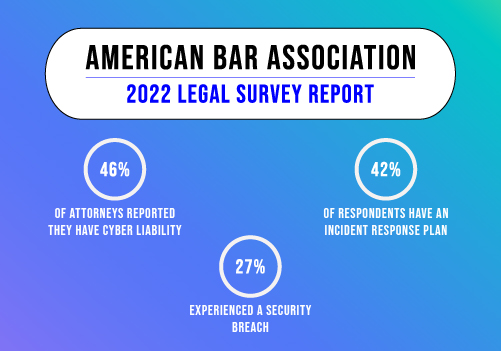
  6. Incident Response Plan: Develop a comprehensive incident response plan that outlines the steps to be taken during a cybersecurity incident. Test the plan periodically and train relevant staff to respond effectively to minimize the impact of any breach.
  7. Access Controls and Privilege Management: Limit access to sensitive data on a need-to-know basis. Regularly review and update user access privileges to prevent unauthorized access and reduce the risk of insider threats.
  8. Regular Data Backups: Maintain frequent backups of critical data and test the restoration process to ensure data availability in case of ransomware attacks or data loss incidents.
  9. Vendor and Third-Party Security Assessments: Regularly assess the cybersecurity practices of third-party vendors, contractors, and cloud service providers to ensure they meet necessary security standards and do not introduce additional risks.
  10. Compliance with Data Privacy Regulations: Stay current with relevant data privacy regulations and ensure compliance with GDPR, CCPA, or industry-specific data protection regulations.

By implementing these best practices, law firms can significantly enhance their cybersecurity posture and better protect themselves and their clients’ sensitive information from evolving cyber threats. A proactive and comprehensive approach to cybersecurity is essential to maintain trust, reputation, and operational integrity in the digital age.


Collaborating with IT and Cyber Security Experts

Collaborating provides access to specialized expertise and experience in identifying and mitigating cyber risks. With a firm like Protected Harbor, our experts stay updated with the latest trends and best practices, tailoring their knowledge to address law firms’ unique challenges.

Collaborations also allow for comprehensive cyber security assessments, customized solutions, proactive monitoring, and incident response capabilities. Training programs our experts provide enhance employee awareness and empower them to recognize and respond to potential threats.

Compliance support ensures adherence to data privacy regulations, while incident investigation and data recovery help minimize the impact of cyber incidents. By partnering with Protected Harbor, law firms can strengthen their overall security posture, safeguard client data, and focus on delivering exceptional legal services.

Safeguarding sensitive client information and protecting against cyber threats is paramount for law firms in the digital age. To stay informed about the latest trends and insights in law firm data breaches, download our 2023 Law Firm Data Breach Trend Report. Protect your firm and client data with the trusted expertise of Protected Harbor. Take the first step towards strengthening your cybersecurity today.

Data Breach at LastPass

Data-Breach-at-LastPass-How-Safe-is-Your-Information-banner-image


Data Breach at LastPass, How Safe is Your Information?

On December 22nd, 2022, while millions of people were preparing to celebrate and ring in the new year, cybercriminals were hard at work laying plans to breach the popular password manager, LastPass’s cloud server leaving all of their users exposed.

Due to a prior breach back in August of 2022, LastPass first sent word to its users about a limited security incident within their development environment. At first, it seemed as though there wasn’t too much cause for concern as the hackers had compromised a single developer account and “took portions of source code and some proprietary LastPass technical information.”

However, this past month, LastPass learned that though no customer data was accessed in the prior incident, there were certain source codes and technical information that was taken and used to dupe a LastPass employee into providing the hacker with credentials and keys to access and decrypt particular storage spaces within their cloud. LastPass’s CEO Karim Toubba has done his best to assure users that so long as they have followed their password guidelines, as restated in their statement above, they should be safe. But how safe is their customers’ information completely?

Let’s break it down.

What is LastPass?

For those who don’t know, LastPass is a popular password management software that allows users to store all of their important data, specifically, passwords. Whether it’s an individual’s banking info, logins to a frequented website, or even saved credit cards, insurance cards, memberships, etc. LastPass secures all of it for you, keeping it safe within their cloud software…at least it did, at one point.

Data-Breach-at-LastPass-How-Safe-is-Your-Information-middle-imageHow Safe is My Information Now?
The truth is, we can’t speak on behalf of LastPass, but it’s important to note that there are never any sure-fire ways to keep your most important data safe from the ever-advancing cyber-criminals. There are only so many measures companies can take themselves in order to promise your security. Now, this isn’t to say that password management software’s such as LastPass can’t ever be trusted. For example, LastPass went so far as to instill quite a few security measures including their zero-knowledge policy, but it’s important to take the extra precautions yourself to ensure your own safety.

Aside from following the guidelines set forth for password protection from LastPass or any other website, we recommend for individuals to do the following:

  • Instill 2-Factor Authorization (2-FA): We understand the ease of being able to just click sign in/login on a screen and having the website right at our fingertips. However, not instilling a 2-FA can cause you more harm than good in the long run. With 2-FA there are many different versions websites tend to use in order to keep your data safe whether that’s by sending a unique code to your phone or email, asking you security questions, and so on. We recommend whenever a user is signing up for any website to always enable 2FA for that extra boost of security.
  • Change Your Passwords Often: Let’s be honest, we all have that one favorite password that we’ve been using for years on multiple sites because it’s the easiest thing to remember. That one password however can result in our immediate downfall if it’s exposed in a breach. We recommend updating your passwords and following the specifications provided by the websites you are signing up for to prevent any potential exposure.
  • Store Your Passwords on Your Own Cloud: Just because LastPass experienced a data breach through their cloud doesn’t mean that all cloud servers can’t be trusted. The safest cloud option that you have available to you, is your own. Whether your passwords are stored on your own personal device in a folder, on your phone, or on your iCloud/Google Cloud, you are the gatekeeper of your passwords as you set the security measures.
  • Don’t Login on Public Computers or Servers: Though this seems obvious, we have to reiterate the importance of staying off of your most important websites when you are out in public. You never know who is around and who is waiting for you to login in order for them to gain access to your most personal files. Always login on a private, personal computer or a private network.

Final Words

Data breaches at this stage in the game of today’s ever-evolving world are inevitable. A security breach on a source like LastPass was something that was unfortunately bound to happen as every single person, including hackers, has their one lucky day. The only thing that internet users can do in order to prevent their information from being spread is to take their own private security measures.

It doesn’t matter whether you’re an average consumer or a company using password managers like LastPass; you need to be sure your data is always safe and take the proper security precautions.

Nervous about how secure your company’s files are after reading about this breach? Contact us today for a Free IT Audit and put your fears at ease.

Free IT audit

How can Schools Increase Security to Protect Private Student Records

Security Practices to Protect Private Student Records Banner

How can Schools Increase Security to Protect Private Student Records?

Schools handle numerous sensitive pieces of information about students and their families. Administrators must actively secure the data from unlawful disclosure by following laws, regulations, and ethical commitments.

The Family Educational Rights and Privacy Act (FERPA), which gives kids control over their educational data, is one of the statutes that the U.S. Department of Education is dedicated to upholding to protect students’ privacy. Schools, faculty, and employees must follow regulations governing internet safety and the protection of student data.

Data on students can easily be accessed thanks to technology. All student data must be strictly confidential to safeguard students’ rights, security, and dignity. Federal and state laws and regulations may have requirements governing the kinds of security measures that must be implemented concerning this data, but they might not list specific actions.

Unluckily, not all school districts might offer a more thorough analysis of those rules and regulations. As a result, particular precautions must be taken when protecting student data.


What is Student Data Privacy?

Student Data Privacy refers to the safeguarding of all information related to students, encompassing a wide range of data such as academic records, personal details, health information, and more. The primary goal of student data privacy is to ensure that student information protection is upheld, meaning that only authorized individuals or organizations can access or utilize this data, and solely for the specific purposes for which it was collected.

A comprehensive student data privacy policy is essential in educational institutions to define the rules and guidelines for handling, storing, and sharing student data. These policies are designed to prevent unauthorized access, misuse, or breaches that could compromise the confidentiality and integrity of student information.

To maintain robust data security in education, federal and state governments have enacted a variety of laws and regulations. The U.S. Department of Education, for instance, has established stringent policies to regulate the collection, storage, and sharing of student data, ensuring that educational institutions comply with these standards. In addition, each state may have its specific regulations to further reinforce student data privacy.

These laws and regulations are critical to protect students’ personal information from being exploited for unauthorized purposes and to foster a secure educational environment where data security education is a priority. Educational institutions must remain vigilant and proactive in implementing and adhering to these privacy policies to safeguard the sensitive information of their students.


Why is Student Privacy Important for Schools?

A school’s policy on student privacy should include information about what can and cannot be recorded, how often cameras will be used, and how long data will be stored. Schools should also provide students with clear information about exercising their rights under the law when school officials or third parties violate their privacy.

Students who feel their privacy has been violated should have an avenue for recourse available to them through their school’s disciplinary process.

Because there are ethical and legal limitations on the acquisition, use, distribution, and treatment of student data, protecting student privacy is crucial. Press the Tab to write more…

  • Make tailored adverts or email scam contact lists.
  • Find the emails and other contact details of your family members.
  • Grade adjustment for a student
  • View private information that should be kept confidential, including prescription medicines and learning and physical problems

Therefore, protecting student privacy is essential to averting issues like these.


Security Practices to Protect Private Student Records Middle7 Security Practices to Protect Private Student Records

Let’s look at some strategies schools can do to safeguard students’ privacy better.


1.    Purge Unnecessary Student Records

Purge unnecessary student records from your system so hackers cannot access these accounts. This is important because if hackers manage to break into your network and steal data from student accounts, there is no way for you to know who accessed it or for what purpose.


2.    Establish Transparency with Laws and Guidelines

Another thing that schools can do is establish transparency with laws and guidelines. These rules vary from state to state but often include policies for how long students’ records can be kept and what they can be used for after graduating high school or moving away from their home state.

This type of transparency will help ensure that students’ rights are being protected and help clarify terminology when discussing matters with parents or teachers.


3.    Choose Who can Access the Data

Yes, in daily life, your data must be protected, but what would happen if you had an electrical problem, perhaps in the thick of an emergency? Do you have access to the files and registers of every student?

You can purchase an Uninterrupted Power Supply (UPS) unit, allowing you to continue working or accessing your files while on the premises. Alternatively, you might want to think about how to go outside the building to access your records.


4.    Encrypt Data

Likely, schools will still need to keep some sensitive information about children and their parents after completing minimization and cleansing efforts. Careful security should be maintained for those records using a combination of technical and administrative safeguards.

Adopting robust encryption technology to safeguard the information that is either at rest saved on a server or device or in transit, being transferred over a network, is the most significant technical control schools can apply to information. Schools should recognize equipment that houses sensitive data and implement encryption at the file and disc levels.


5.    Train Your Staff

Accessing student data comes with much responsibility. A school system cannot rely on the fact that staff workers always know how to handle this information in specific ways. Employees must understand how to access information safely, how to use a breach reporting system, and what to do in the event of a breach.


6.    Carefully Manage Data

You ought to be aware of the information that each individual or company has access to. If you handle the data correctly, you can ensure that it is treated correctly. Publishers of textbooks, for instance, do not require student addresses or phone numbers.

The precise forms of data that are required must be synchronized. Automated bi-directional data sharing is necessary for many contemporary learning management systems and can give you finer control over the data you send.


7.    Create a Student Data Policy

Make a plan to regularly assess the organization’s data privacy requirements since data privacy is a never-ending process. Make sure the schedule is consistently updated. Learn the fundamentals of the data gathering, storage, and sharing procedures used by your company first.

Create procedures for handling any data produced by the Internet of Things gadgets. There are more gadgets, which means there are more online targets. Preventive actions can be helpful, such as limiting bandwidth access and ensuring that devices are correctly patched and segmented.


Student Data Privacy Problems and Challenges

Despite significant progress in student data privacy rules, many challenges remain to ensure complete data protection.

  • Data Breaches and Security Risks- Schools store vast amounts of student information, including personal, academic, and health records. This makes them prime targets for hackers. Breaches can lead to unauthorized access, identity theft, and fraud, highlighting the need for robust student data privacy policies and a comprehensive data protection policy.
  • Lack of Knowledge and Training- Many educators lack adequate training on data protection and privacy. Without proper security measures and understanding of digital tools, they may inadvertently share sensitive student information. Comprehensive data security education is crucial for protecting student information.
  • Sharing Data with Third Parties- Edtech companies often collect and process student data. While many prioritize data protection, instances of sharing or selling student information without proper consent persist. This lack of control over data after it leaves the school poses significant privacy challenges, necessitating a strong student data privacy policy.
  • Privacy Risks in Online Learning- The rise of online learning platforms introduces new privacy risks. Heavy reliance on third-party apps and cloud services raises concerns about data storage, encryption, and potential leaks. Strong security measures and careful selection of technology partners are essential to safeguard student data, in line with United States data protection laws.
  • Profiling and Tailored Advertising- Using student data for profiling and personalized advertising raises ethical concerns. This practice involves privacy issues, lack of informed consent, and potential misuse of data. Balancing personalized education and student information protection requires careful consideration.

Effective student data protection policies and adherence to United States data protection laws are crucial in addressing these challenges and ensuring student privacy.


Conclusion

Schools must use discretion and prudence to prevent inappropriate use of student and family information. Several basic security procedures can help educational institutions maintain public trust.

As such, a college or university must follow specific federal and state laws when handling student information. However, these laws can be tricky, especially when sensitively handling student information. For instance, a school may be required to follow specific privacy laws like the Family Educational Rights and Privacy Act (FERPA) when handling student information. However, there are particular ways you can work with a school to help ensure that their student information is dealt with in a manner that complies with FERPA laws. One way to do this is to work with a cybersecurity provider expert to protect student records.

Employing a professional IT solution, such as Protected Harbor, is the best way to handle your data digitally, monitor it, and safeguard student privacy. Rated by Goodfirms as the top cybersecurity and cloud service providers in the US, we have been protecting data for all industries, including schools, for the last two decades.

From anti-malware protection, ransomware protection, and identity and access management to threat detection and response, we have you covered. Our 24×7 tech team and proactive monitoring redefine security. Contact us today to get a free cybersecurity audit.

The Power of Multi-factor Authentication

The Power of Multi-factor Authentication banner image


The Power of Multi-factor Authentication

Today’s cyber threat landscape is more complex than ever before. New threats are discovered practically every day, and hackers are finding new ways to exploit those threats on an almost daily basis. This means businesses need to be more vigilant about the security of their networks, devices, and user accounts. Every organization should implement multi-factor authentication (MFA) as a strong and consistent security policy.

MFA strengthens your user account security by requiring users to verify their identity in addition to simply providing a username and password. There are many types of multi-factor authentication, but most involve something you know (like a username and password), something you have (such as an access code sent via text message), or something you are (such as a biometric identifier such as a fingerprint or facial recognition).

Download our infographic Security: The Power of Multi-factor Authentication to understand MFA in detail.


What is Multi-factor Authentication?

Multi-factor authentication, or MFA, is an access control method used to verify a person’s identity attempting to log on to a computer system or website by combining two or more authentication factors. For example, logging in with a username and password is a single-factor authentication because only one piece of information is verified to be accurate. In contrast, logging in with a username, password, and a code sent to a smartphone via an app is multi-factor authentication because multiple verification methods are used. Multi-factor authentication is a security method that requires users to provide two or more pieces of proof that they are whom they say they are before being granted access to a secured system or resource.


Types of Multi-factor AuthenticationThe-Power-of-Multi-factor-Authentication-middle-image

One of three additional forms of information serves as the foundation for most MFA authentication methods:

  1. Things you know (knowledge)- A passphrase, PIN, or password.
  2. Things you have (possession)- A timely, individual verification code. Typically, a mobile app or security token will produce these authentication tokens and send them to you through text message.
  3. Things you are (inherence)- These are biometrically a part of you, such as a speech pattern, iris scan, or fingerprint.

MFA Examples

Using a combination of these components to authenticate is an example of multi-factor authentication.

1. Knowledge

  • Personal security questions and answers
  • Password
  • OTPs (Can be both Knowledge and Possession – You know the OTP, and you have to have something in your Possession to get it, like your phone)

2. Possession

  • OTPs created by mobile apps
  • OTPs transmitted by text or email
  • Smart Cards, USB devices, key fobs, and access badges
  • Software certificates and tokens

3. Inherence

  • Voice, voice recognition, eye or retina scanning, or other biometrics such as fingerprints
  • Behavior analysis


Conclusion

MFA is an essential part of any security strategy. While protecting online accounts, your computer, or other devices, utilizing MFA is a great way to protect against hackers and malicious threats. With MFA in place, hackers will have a more challenging time accessing your accounts and will have to employ more sophisticated methods to crack your passwords. Implementing MFA isn’t always easy, but it’s worth the effort.

Protected Harbor experts say MFA is a must. The company has been in the business for over a decade and is among the top cybersecurity providers in the US. It has been keeping pace with the latest technological advancements to provide top-notch cybersecurity solutions to its clients. With our cybersecurity month discussing safety measures against

It is easy to implement and can be activated for an account. You can keep your data safer and much more secure with just a few clicks. Download our infographic to learn how to implement MFA and secure your data. Contact us today for a free cybersecurity audit.

Microsoft Data Breach Exposed Sensitive Data of 65,000+ Entities in 111 Countries

Microsoft Data Breach Exposed Sensitive Data banner

Microsoft Data Breach Exposed Sensitive Data

According to the security research company SOCRadar, a breach of Microsoft servers may have affected over 65,000 organizations in 111 countries.


In response to a security failure that left an endpoint publicly accessible via the internet without any authentication, Microsoft admitted that it unintentionally exposed the information of thousands of customers.

According to an alert from Microsoft, “this misconfiguration resulted in the possibility for unauthenticated access to some business transaction data corresponding to interactions between Microsoft and potential customers, such as the planning or potential implementation and provisioning of Microsoft services.”

Microsoft highlighted that there was no security flaw to blame for the B2Bleak, which was “triggered by an unintended misconfiguration on an endpoint that is not in use across the Microsoft ecosystem.”


Microsoft Data Breach Exposed Sensitive Data middleWhat Happened?

2.4 TB of confidential data, including names, phone numbers, email addresses, company names, and attached files containing confidential company information, such as proof-of-concept documents, sales data, and product orders, may have been exposed due to a compromised Azure Blob Storage, according to SOCRadar.

SOCRadar termed the leak a Bluebleed. According to them, “The exposed data includes files dated from 2017 to August 2022.”

On September 24, 2022, Microsoft received notifications of the breach. On September 25, 2022, they issued a statement confirming that they had secured the compromised endpoint, which is “now only accessible with required authentication,” and that an investigation had “found no indication that customer accounts or systems were compromised.”


Why This Matters?

According to the threat intelligence firm’s analysis, the stolen information “includes Proof-of-Execution (PoE) and Statement of Work (SoW) documents, user information, product orders/offers, project details, PII (Personally Identifiable Information) data, and documents that may reveal intellectual property,” they added.

Microsoft stated that it believes “the figures” and “the magnitude of this issue” were grossly exaggerated by SOCRadar.

Redmond added “that it was not in the best interest of safeguarding customer privacy or security and perhaps exposing them to undue risk” for SOCRadar to gather and make the data searchable through a dedicated search engine.

Customers who contacted Microsoft’s support staff were reportedly informed that the company would not be notifying data regulators since “no other notifications are required under GDPR” in addition to those given to the affected customers.


In addition, Kevin Beaumont, a security researcher, said, “the Microsoft bucket “has been publicly indexed for months,” and “it’s even in search engines.”

Although there is no proof that threat actors inappropriately accessed the data before its disclosure, such breaches could still be used for bad intentions like extortion, social engineering attacks, or a quick buck.

Erich Kron, a security awareness advocate at KnowBe4, wrote to The Hacker News in an email, “While some of the data that may have been accessed seem trivial if SOCRadar is correct in what was exposed, it could include some sensitive information about the infrastructure and network configuration of potential customers.”

“Potential attackers could use this information to find vulnerabilities in the networks of these organizations.”


Protected Harbor’s Take on the Matter

It’s a sad fact of life that every major software company will eventually experience security breaches at some point in time. Unfortunately, it has become far more common in this ever-changing digital world. However, when it comes to these big, well-known companies that are responsible for keeping your business data safe, there needs to be an intense form of trust which comes with them taking proper action and solutions.

In the past, we’ve seen issues with Google, Facebook, and even the U.S. government’s websites. It’s important to note that these are all vast organizations with dedicated teams of engineers and experts working around the clock to ensure their customers’ security. Microsoft is no different, having some of the best security engineers in the world.

Protected Harbor has always emphasized the importance of network configuration on endpoint protection. An exemplary network configuration can reduce the risk of your network being exploited by malware and other threats.

Protected Harbor provides complete endpoint protection, configuration, and monitoring that protects your computers from malware, ransomware, data breaches, viruses, and other cyber threats. Our engineers also monitor and audit your network to ensure all your systems have the latest firmware, are set up correctly, and are protected against evolving threats.

“It’s happened before, and it will happen again. It’s just the cyclical nature of things. Microsoft will recover, and a new company will go through the process of becoming the next big thing. What’s important to understand here is that the cycle will keep turning as long as people keep investing in technology.”- Richard Luna, CEO of Protected Harbor.
Don’t be the next victim of a data breach. It’s time to invest in a good cybersecurity plan. Contact us today for a cybersecurity audit.

I Had My Info Stolen; Should I Pay the Ransom?

Hackers stole my data should i pay the ransom banner

Hackers Stole My Data: Should I Pay the Ransom?

Ransomware attacks are surging around the globe at a mind-blowing pace. In the 2022 Cyber Threat Report by SonicWall, ransomware attacks on governmental institutions worldwide increased by about 1885% in 2021. The healthcare industry alone witnessed an increase of 755%. According to a report by Cybersecurity Ventures, the total loss incurred globally was around $20 billion in 2021. According to the same report, the loss is now projected to cross $265 billion by the year 2031.

These statistics show that ransomware attacks are imminent for most companies regardless of size; it’s just a matter of when. So, in this surge, everyone wants to know if they need to pay for ransomware or not.


Do We Need to Pay for Ransomware Attacks?

The facts legitimize the debate over whether the ransom should be paid once the illegal encryption has compromised your important data. The answer is not an easy one; it is a double-edged sword. The theory and practice differ in answer to the question of payment of the ransom.

You need to know both sides of the coin before you conclude.


Reasons in Favor of Paying the Ransom

Most of the time, the companies who fall victim to a ransomware attack choose to pay the ransom. One might feel that they should have made a better choice, but given their considerations, it is never clearly an irrational decision. The affected organizations opt to pay the ransom because of one of the following reasons:

  • To Reduce the Recovery Time

The companies have to consider the time. The time required to recover the encrypted data may exceed the limit which companies can withstand. The service delivery firms may find themselves in an extraordinary situation in this regard. They may lose revenue and clients swiftly, and prolonging the recovery may be unbearable in terms of the cost incurred. Consequently, the companies decide to pay the ransom in hopes of recovering the data quickly and easily.

  • To Save Their Reputation

The companies fear that hackers may publicize the news of their victimhood if they don’t act fast and pay the ransom. The name and reputation built over decades may go down the drain with a click. Resultantly, the companies choose to pay the amount instead of jeopardizing their reputation.

  • To Avoid Huge Recovery Costs

The companies are business enterprises, after all. Rational actors make cost and benefit analyses before making crucial decisions. If they feel that the cost to recover the data might not be rationalized in terms of the ransom amount, they decide to pay the ransom instead.

  • To Protect the Information of the Clients and the Employees

Perhaps the most valuable asset at stake is the personal information of the clients and the employees. The companies can hardly accept the exposure of sensitive information, which may risk the people associated with them. Naturally, they choose to go ahead with the ransom payment.


Reasons Against Paying the Ransom Hackers-stole-my-data-should-i-pay-the-ransom middle

The reasons in favor of paying the ransom may be theoretically valid, but the experience, in such cases, suggests otherwise. Most security experts agree that ransom should not be spent. They have the following reasons to support their view:

  • No Guarantee of Data Recovery

As a company, you might decide to pay a ransom to recover sensitive information, but you might never get it back. Either you might not receive the decryption key, or you might not be able to locate the data where it was before the attack. Hence, you might risk dooming yourself with a payment that might not pay you back.

  • Risk of Future Attacks

This is a natural occurrence. Once you put out your weakness by paying the ransom and the word gets out, you will become a potential prey to more attacks in the future. The hackers will use the money to come back even more powerfully. Furthermore, the hackers watching the whole episode will attack you hoping to get paid as you paid earlier. You don’t wish to see yourself in such a situation as a company or an individual.

  • Blackmailing Without Any Bounds

The hackers might ask for more payments. They might steal your data, meaning getting a decryption key might not get you over the hook. The hackers might blackmail you into paying them so they don’t publicize your data. Hence, you might be in a vicious circle of repetitive payments to save your life as a company, but such payments might destroy you rather than save you.

  • Legal Troubles

There is consensus among security experts that the proceeds of cybercrimes are used to commit even more significant crimes. Around 79% of the experts in a 2021 survey by Talion advocated criminalizing ransom payments. The money which you pay might be used used to commit terrorism. National security agencies will advise you against paying the ransom to prevent the funds from landing in the hands of those who commit heinous crimes like terrorism, drug trafficking, human trafficking, etc. Your payment might be seen as aiding the criminals in their destructive motives by the law of your land or the country to which the hackers belong. You might end up paying for lawsuits, then.


Consider all the Possible Options before Paying

Let the law and the empirical evidence guide your decision. You may do the following things:

  • Paying Ransom Must Not be Prioritized

It would help if you went by the opinion of the experts. According to the empirical data, paying the hackers won’t help you in the future. Your payment will only encourage the hackers and make ransomware attacks a lucrative option for them. Don’t jeopardize your money and prestige by bowing down to the hackers, not as the first option, at least.

  • Bring Law Enforcement Agencies into Play.

Get the law on your side. You might be able to guide the law enforcement agencies(LEAs) in their quest to find more information about the hackers. Possibly, the LEAs might identify the hackers, or they might be able to prevent other companies and individuals from victimhood.

  • Look for a Decryption Key

You might be lucky enough to find a decryption key online. For this, you will have to know the attack variant first. Many online websites might help you with the recognition of the attack variant.

  • Pay Ransom as a Last Resort

After looking at all the facts and legal liabilities involved, if you believe you have no other option but to pay the ransom, negotiate wisely before paying. Tell the hackers to delete the data, if possible; otherwise, they might use it to blackmail you again.


Conclusion

Ransomware assaults are impossible to avoid altogether. You can best prepare for an attack and have measures in place to respond quickly. To put it in a nutshell, don’t pay unless you have to. It all boils down to proactive measures to avoid an attack in the first place rather than scrambling for help when little can be done.

Additionally, it’s essential to strengthen backups and test restores for all critical business operations. Assuming the backups are reliable and that recovering from a disaster would never be more expensive than paying a ransom for an uncertain result.

“In most cases, organizations only start testing restore after being hit by ransomware,” says Protected Harbor CEO Richard Luna.

Additionally, guarantee that executives are fully informed about the matter and participate in decision-making. The more they are aware of the hazards, the more equipped they will be to decide and defend it in court.

In conclusion, paying a ransom demand needs to be carefully considered because it is typically not wise to do so. As always, it is preferable to be proactive and invest in safeguarding your crucial data assets from cyberattacks than to be forced to take protective measures.

Protected Harbor offers single sign-on (SSO), multifactor authentication (MFA), automated password resets, isolated backups, easy remote management, and much more at an affordable price to protect your systems and data from attack by cybercriminals using a stolen or phished password. And for more than 20 years, we have been defending our clients.  Additionally, we provide both trainers and trainees with an easygoing training experience.

To learn more about how our digital risk prevention platform can help you safeguard your company and your clients from ransomware threats, get in touch with the solution specialists at Protected Harbor right away. Visit Protected Harbor to get the necessary guidance and a ransomware audit that shields you from malicious attacks.

These Cloud Vulnerabilities Will Cause Your Next Data Breach

These cloud vulnerablilities will cause your next data breach

These Cloud Vulnerabilities Will Cause Your Next Data Breach


Cyber security is a constant race between businesses and hackers in the digital world. Every new technology has potential risks that must be understood and addressed before implementation. New threats are emerging all the time and cloud computing is no different. Many types of cloud services are being used by businesses more than ever before.

In fact, according to Gartner, private cloud services will continue to grow faster than public cloud services in the next few years. However, some types of clouds are riskier than others regarding cyber security. Several vulnerabilities can expose your company’s data when using any cloud service or Software as a Service (SaaS) application.

This article lists common vulnerabilities you should know about before using any cloud-based system or software.


Understanding Cloud Vulnerabilities: Protecting Sensitive Customer Information

As businesses increasingly turn to the cloud for their computing needs, it’s important to consider the potential vulnerabilities of storing sensitive customer information in a shared infrastructure. Cyber attacks are a constant threat, and unauthorized access to personal data such as social security numbers, financial information, and other sensitive information can lead to identity theft and other serious consequences.

Infrastructure as a Service (IaaS) and Platform as a Service (PaaS) are two popular cloud computing services businesses use to store and access their data. While the cloud offers many benefits, knowing the potential risks is important. Cloud providers are responsible for securing the underlying infrastructure and providing secure cloud access. Still, businesses are responsible for securing their own data and applications that run on top of the cloud infrastructure.

One way to protect sensitive customer information is by using a hybrid cloud model, which allows businesses to keep some of their data in a private data center while still taking advantage of cloud computing resources. This approach can provide additional security and control over customer data.

Another important consideration is the use of virtual machines in the cloud. Virtual machines can help isolate applications and data, limiting the impact of a potential cyber attack. It’s also important to implement access controls and encryption to prevent unauthorized access to sensitive information.


Public Exposure

The oldest blunder in the book is setting up a new cloud resource but leaving it entirely insecure and publicly visible. Your unprotected public assets will almost certainly be found because hackers today frequently use automated tools to scan target networks for any exposed assets.

By 2022, nearly 50% of businesses would unknowingly or accidentally have some IaaS storage devices, networks, apps, or APIs directly exposed to the public internet. This number is up from 25% in 2018.


Excessive Permissions

Fast company operations are one of the main advantages of switching to the cloud. However, access credentials are routinely distributed hurriedly and needlessly in the interest of expediency, resulting in many individuals having excessive permissions for which they have no business need for. If any of those credentials end up in the wrong hands, attackers would have unrestricted access to private information.

By 2023 (up from 50% in 2020) 25% of security breaches will be due to improper handling of login credentials, identities, and privileges, predicts Gartner.


Cloud Vulnerabilities middleLack of Multi-factor Authentication for Privileged Users
One of the most typical cloud vulnerabilities is the absence of Multi-Factor Authentication (MFA) for users assigned to privileged administrative positions in control. Access for privileged users must be as secure and feasible in any cloud environment. A company may suffer severe repercussions if a fundamental security measure like MFA is not enabled.

It is straightforward for malicious actors to exploit privileged accounts without MFA being enabled. These accounts are vulnerable to brute force assaults due to lacking MFA. Hackers can use these accounts to entirely disrupt an organization’s operations and steal its data because they often have high administrator permissions.


Insecure APIs

APIs, or Application Programming Interfaces, are frequently used to simplify cloud computing. APIs make it very simple to share data between other apps, improving convenience and efficiency. However, if they are not secured, this can lead to multiple cloud vulnerabilities and become an easy entry point for malicious attackers.

Threat actors can launch DDoS assaults and obtain access to sensitive company data by taking advantage of unsecured APIs while remaining unnoticed. In fact, by 2022, API abuses are anticipated to overtake other attack methods as the most popular, according to Gartner data.


Final Thoughts

If companies using the cloud do not consider limiting the dangers that accompany it, they are taking a preventable yet significant risk. The IT processes teams use to develop and deploy applications in the cloud infrastructure must be well integrated into a company’s strict cloud security rules.

The use of cloud computing has changed how businesses and hackers operate. Both new opportunities and threats related to cloud security have been introduced. Enterprises must continuously address the dangers and difficulties associated with cloud security while implementing the appropriate security technologies to facilitate operational work.

It’s essential to understand the potential vulnerabilities so that you can mitigate them. Suppose you have any concerns about your current cloud environment. In that case, you can consult with a cloud consulting company like Protected Harbor to help you assess the risks and implement practices to avoid data breaches.

Protected Harbor‘s cloud security solution integrates the latest security technologies with your cloud infrastructure. Businesses can take advantage of cloud computing’s capabilities with the right technology and the help of cloud security specialists.

We have researched and created an e-book for companies looking to migrate to the cloud. This e-book helps them to understand better the benefits as well as the risks that come with cloud migration so that they can plan. Get your free copy of the e-book today!

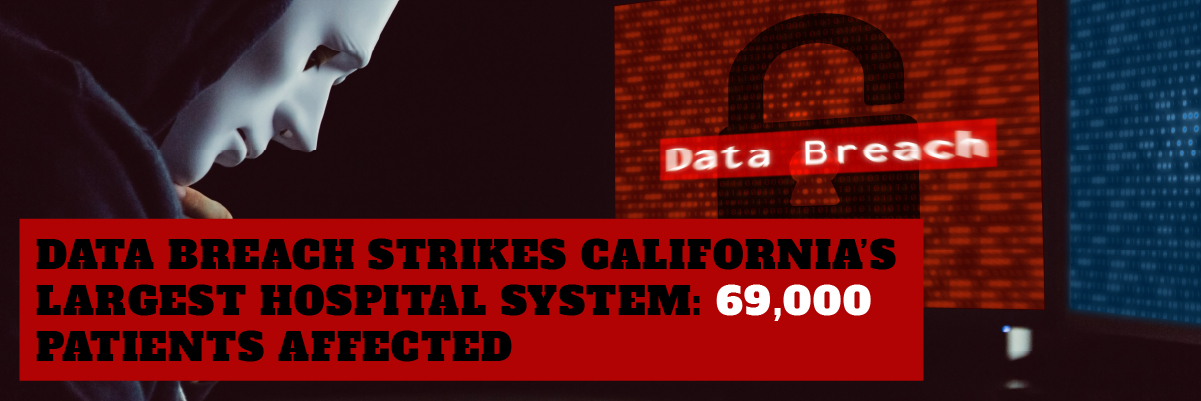
Data Breach Strikes California’s Largest Hospital System: 69,000 Patients Affected


data breach strikes Californias largest hospital system 69000 patients affected


Hackers gained access to the test results of tens of thousands of patients at California’s leading hospital system.


What Happened

Kaiser Permanente, the nation’s largest nonprofit health plan provider, has announced a data breach that exposed almost 70,000 individuals’ sensitive health information.

According to TechCrunch, the breach of Kaiser Permanente’s systems was first disclosed to patients in a June 3 letter. According to the letter, the breach was first discovered on April 5, when officials learned that an “unauthorized entity” had accessed a Kaiser employee’s emails. The emails contained “protected health information” about tens of thousands of Kaiser customers. According to a second filing with the Department of Health and Human Services, the total number of people affected by the breach is 69,589.

The exposed data includes first and last names, medical record numbers, dates of service, and laboratory test result information according to the disclosure letter. Still, no social security or credit card details were involved.

According to Kaiser’s email to customers, which was published, “we terminated the unauthorized access within hours of it occurring and promptly initiated an investigation to identify the magnitude of the event.” “We found that the emails contained protected health information, and while we have no evidence that an unauthorized party accessed the material, we cannot rule out the possibility.”

Though the HHS document classifies the incident as a “Hacking/IT Incident,” it’s unclear how the “unauthorized person” got access to the emails.


What It Means

Over the last few years, the healthcare business has seen an influx of unwanted attention from cybercriminals. A data breach at a Massachusetts healthcare company exposed information on the treatments that up to two million people had received, as well as their names, birthdays, and Social Security numbers, only last week. We recently saw a data breach at Eye Care Leaders, so it’s becoming common for healthcare organizations every day. During the pandemic, hospitals and healthcare providers were popular targets, and it’s easy to see why. Medical facilities are attractive targets for cybercriminals because they store massive databases of personal information that can be ransomed, stolen, or sold on the dark web. The cybersecurity defenses provided by hospitals’ antiquated digital infrastructure aren’t the finest in the world.

Human Error is Still a Threat to Security

The event also highlights what has always been and continues to be the most significant security risk businesses face in human error.

According to Verizon’s 2022 Data Breach Investigations Report (DBIR), which takes a complete look at data breaches from the previous year, 82 percent of the intrusions studied last year featured “the human element,” which can mean a variety of things.

“Whether it’s the use of stolen credentials, phishing, misuse, or simply an error,” researchers wrote in the report, “humans continue to play an eminent part in incidents and breaches alike.”

69000-Healthcare-Records-Exposed-By-Kaiser-Permanente-Breach-small

Protected Harbor’s Take on The Matter

“The threat of Business Email Compromise (BEC), which appears to have occurred in the Kaiser incident, is particularly serious.”- said Richard Luna, CEO of Protected Harbor. Socially designed phishing and other malicious email campaigns trick unwary employees into giving up credentials to their business email accounts have become increasingly sophisticated.

Once a threat actor has secured early access to a firm network, this might lead to more malicious operations, such as ransomware or other financially driven cybercrimes.

In fact, BEC has become a big financial drain for businesses, with the FBI recently reporting that companies spent $43 billion on this type of attack between June 2016 and December 2021. In fact, there was a 65 percent increase in BEC schemes between July 2019 and December 2021, which the FBI ascribed to the epidemic forcing most business activity to take place online.

Tips to stop BEC & Common Attacks

Upstream Spam Filter- Spam filters detect unsolicited, unwanted, and virus-infested emails (also known as spam) and prevent them from reaching inboxes. Spam filters are used by Internet Service Providers (ISPs) to ensure that they are not transmitting spam. Spam filters are also used by small and medium-sized organizations (SMBs) to protect their employees and networks.

Inbound email (email that enters the network) and outbound email (email that leaves the network) are both subject to spam filtering (email leaving the network). ISPs use both strategies to protect their clients. Inbound filters are usually the focus of SMBs.

2FA– 2FA is an additional layer of protection that verifies that anyone is attempting to access an online account are who they claim to be. The user must first provide their username and password. They will then be requested to submit another piece of information before they can receive access. This provides an additional layer of security to the process of gaining access.

Applying Recent Security Updates– Updating your software is very important, and it’s something that you should never overlook. Frequently updating your devices and installing the latest security updates can help to protect you from cyber threats and keep your devices secure.

Restricting User Access to Core Files (Access Control)– Access control is a security approach regulating who or what can view or utilize resources in a computing environment. It is an essential security concept that reduces the risk to the company or organization. Access control is a critical component of security compliance programs because it guarantees that security technology and access control policies are in place to secure sensitive data, such as customer information.

Network Monitoring for Malicious Activity– Network security monitoring is an automated procedure that looks for security flaws, threats, and suspicious activity in network devices and traffic. It can be used by businesses to detect and respond to cybersecurity breaches quickly. Network monitoring identifies and analyzes weaknesses, notifying you of potential security threats. Cybersecurity alerts enable you to swiftly safeguard your company from network attacks and the resulting calamities.

User Activity Monitoring- User activity monitoring (UAM) solutions are software tools that track and monitor end-user behavior on company-owned IT resources such as devices, networks, and other IT resources. Enterprises can more easily spot suspicious behavior and manage risks before they occur in data breaches, or at least in time to minimize damages, by deploying user activity monitoring.


Final Thoughts

In a world where cyber-attacks are common and more sophisticated than ever before, businesses must take steps to protect themselves and their customers from data breaches and other cyber threats. One way to do this is by partnering with a trusted company that offers unparalleled cybersecurity solutions.

Thanks to our innovative cloud-based approach to security, you can be sure that your company will be well protected against the ever-evolving threats to data security. By thoroughly examining your company’s network security and other aspects of its IT infrastructure, we can identify areas of weakness and suggest ways to correct them.

Visit Protectedharbor.com today to get a risk-free review of your current IT security solution. You’ll receive a detailed assessment of your current security setup and recommendations for improving your security posture.[/vc_column_text][/vc_column][/vc_row]