Category: Protected Harbor

Advantages of Partnering with Managed Services Providers
Advantages of Partnering with an MSP banner

Advantages of Partnering with
Managed Services Providers

In today’s digital world, it is almost impossible for big enterprises to small and medium-sized businesses to function without technology. With so many different products and service offerings available, most companies struggle to meet the demand. As a result, many business owners are partnering with managed services providers to take some of the load off their shoulders.

These professionals will handle all technology-related administrative tasks and help you avoid costly IT repairs or system failures.

The Protected Harbor Managed Service Provider (MSP) Partner Advantage program is now available. It is designed to assist your company’s growth by accelerating the time to market, expanding your clientele, and increasing profitability.

This blog post will share some advice on partnering with MSPs for your company and what to watch out for when signing contracts or service-level agreements.


What is a Managed Service Provider?

A managed service provider (MSP) is a company that offers a wide range of IT services. There are many different types of managed services. Still, they all have a few things in common: – Service Level Agreement (SLA): This contract outlines the services provided, response times, and any penalties if the company fails to meet those goals.

Customized Plans: Some MSPs will have standardized plans, but most will work with you to create a customized plan that fits your needs and budget.

24/7 Support: All MSPs will provide 24/7 support for their clients. This means you can call them whenever you have a problem, even at 2 AM.

Backup and Disaster Recovery: It’s crucial to have a backup system in place, so you don’t lose any data if your system fails. A managed service provider will have a backup plan with regular tests.

Cybersecurity: With the rise in cyber-attacks, getting day-to-day management services or standard information technology services is not enough. Therefore, you must partner with MSP, which provides all services including cybersecurity.


Why Managed Service Provider?

Choosing a Managed Service Provider (MSP) is essential for businesses looking to enhance their IT operations and security. To define managed IT services, these are comprehensive solutions offered by third-party providers to manage a company’s IT infrastructure and end-user systems. Managed IT support services New York, for instance, offer businesses access to a range of specialized skills and technologies that may be too costly to maintain in-house. By leveraging these services, companies can ensure their systems are continuously monitored, updated, and protected against potential threats, allowing internal teams to focus on core business functions. Additionally, MSPs provide scalable solutions that can grow with the business, ensuring long-term IT efficiency and reliability.


How Can MSPs Help Your Company?

Managed Service Providers (MSPs) can significantly enhance your organization’s efficiency and effectiveness by providing robust data management systems. A well-designed data management strategy is critical for successful business processes and informed decision-making. MSPs can help your organization develop and implement such a strategy by leveraging their expertise in managing data models, storage, and data governance.

MSPs can also provide data integration services that allow businesses to extract meaningful insights from the data collected. These insights can then be used to make informed business decisions and improve overall performance. Additionally, MSPs can assist in the development and management of data warehouses and business intelligence systems, which enable businesses to access critical data and insights easily.

MSPs can also help organizations leverage machine learning and other advanced technologies to analyze vast amounts of data and extract valuable insights. This can help businesses identify opportunities and make informed decisions that drive growth and profitability.

A managed cloud solution provided by an MSP can help businesses optimize their IT infrastructure and ensure they get the right service level. MSPs can provide a range of services, from basic infrastructure support to full-scale managed cloud services, depending on the needs of the business.

Most MSPs will offer various services including networking, infrastructure managementdata security, cloud computing, voice and communications, disaster recovery and business continuity, endpoint management, remote monitoring and management, data management, and application management.


Advantages of Partnering with Managed Services Providers middle

Important Questions to Ask Before Signing Any Contract

Selecting the right Managed Services Provider (MSP) for your company is pivotal to ensuring smooth operations and cost-effective system management. Before finalizing any contract, it’s crucial to pose pertinent questions to assess compatibility and quality of service. Here’s a comprehensive checklist tailored for small and medium businesses seeking world-class service:

1. Is the MSP Aligned with My Company’s Needs?

2. What is the MSP’s Track Record?

3. How Does the MSP Safeguard My Data?

4. What are the Rates and Terms Offered by the MSP?

5. How Will Collaboration Between the MSP and My Team Function?

6. Are There Any Hidden Costs Associated with the MSP?

7. How Does the MSP Prioritize Customer Service?

8. What are the MSP’s Cancellation Procedures?

By asking these key questions, small and medium businesses can make informed decisions when selecting an MSP. Prioritizing compatibility, reputation, data security, transparency, collaboration, cost-effectiveness, customer service, and contractual terms ensures a fruitful partnership for efficient system management and world-class service.


Reasons to Partner With Us

Extending Your Services Portfolio


Multi-tenant, cloud-based solutions that are simple to scale and deploy can be used to improve current services and develop new ones.

A Track Record With Merit


Protected Harbor is recognized by industry analysts like Goodfirms and other top companies for its data resilience and performance.

The Best Collaborations


The tech platforms used by clients and service providers, such as Microsoft, Amazon, Oracle, SAP, and Google, are supported by us.


Simplifying Advanced Data Systems


Our selection of Intelligent Data Services allows you to design data protection procedures for your clients that significantly impact outcomes. You can be confident in delivering services powered by Protected Harbor, from guaranteeing data and application availability to preventing cyber risks and ensuring effective business continuity.

Customize Your Customer Data


You can determine how to manage client data with choices like innovative deployment and contactless capabilities.

Adaptable Consumption Models For A Range Of Business Requirements

The architecture of Protected Harbor Services makes it simple to use and lowers the total cost of ownership (TCO). Options for utility subscription contracts increase flexibility and savings.

Choosing the Right Managed Services Provider

Choosing the right Managed Services Provider (MSP) is crucial, especially for businesses seeking IT support New York. Consider these factors when selecting the best-managed IT service providers:

  1. Defined Service Level Agreements: Ensure the MSP offers flexible options tailored to your needs, including compliance and timely response times.
  2. Experience in Your Industry: Seek an MSP with expertise in your field, equipped to navigate regulatory requirements effectively.
  3. Commitment to Growth: Opt for an MSP with an innovative approach, willing to embrace new challenges and technologies for future success.
  4. Exceptional Customer Service: Prioritize MSPs with a dedicated team providing top-notch customer support, vital for addressing issues promptly and efficiently.

Selecting a managed Service Provider in NYC requires careful consideration to ensure seamless IT support services tailored to your business needs.

As you can see, partnering with a managed services provider can save your company a lot of money and headaches. The best MSPs, like Protected Harbor, will help you manage your technology infrastructure, reduce your costs, and improve the uptime of your systems. At the same time, you will have the flexibility to handle projects outside the managed services scope.

Protected Harbor engineers are highly skilled specialists capable of application migration, development, and continuing maintenance services. If you’d like to partner with us for your managed services and cybersecurity needs, this is the right time. Contact us today for a free IT Audit and learn how our partner advantage benefits you.

Should I Hire an IT Guy? Should I Hire an MSP?

Should I Hire an IT Guy Should I Hire an MSP banner

Should I Hire an IT Guy? Should I Hire an MSP?

IT guys and MSPs are popping up everywhere these days. From your local hardware store to the big box retailers, there’s no shortage of places you can find a helpful tech or an experienced service provider (or both!). Even so, that doesn’t mean they’re all equally dependable.

The decision to hire an IT guy or an MSP (Managed Service Provider) depends on your organization’s specific needs and resources. Choosing an IT guy and an MSP should be based on carefully assessing your organization’s needs and resources. It may also be worth considering a combination of both, with an IT guy for on-site support and an MSP for broader IT management and support. With that in mind, here are some pros and cons to hiring IT guys and MSPs regarding your company’s IT needs.


Why Hire a Managed IT Service Provider?

Many companies don’t know what they’re doing when it comes to managing their IT needs. They often don’t have a dedicated team working on their technology and flounder in an overwhelmed and unproductive environment.

A managed IT service provider can help you get a handle on your technology and avoid these pitfalls. They may be able to provide solutions that are tailored to your specific needs. With an MSP, you can be sure you’re getting a full-service approach that includes expert advice, total control over all aspects of your technology, and a consistent level of service.

The managed IT service provider can handle more complicated IT tasks like backup and disaster recovery methods, network administration, cybersecurity procedures, data management services, and server management, to mention a few. In other words, think of your internal IT department as your daily IT support provider.


Pros and Cons When Hiring an IT Guy or MSP

Like any other business decision, there are pros and cons to hiring an IT guy or an MSP.

Hiring an IT Guy

Pros:

•       An IT guy can assist you with hardware configuration and setup.

•       An IT guy will be available to your business during peak business hours.

·        A good IT person should be able to assist your business and staff members with desktop repair, virus removal, and software issues.

Cons:

• Hiring a single IT specialist with a salary, health insurance, and other perks may be expensive depending on experience and specialty.

• It can be too much work for one individual to be the network manager, infrastructure planner, and IT support person for your IT department.

• The talents of your in-house IT specialist might only be dependent on the work they perform daily; they might not be as quick to adopt new technology.

Should-I-Hire-an-IT-Guy-Should-I-Hire-an-MSP middle

Hiring an MSP

Pros:

•       Managed service providers have access to cutting-edge equipment. Your MSP should be able to support you with workstations, networks, servers, software, and hardware, regardless of the industry you’re in.

•       The most crucial aspect of any organization, continuity, should be protected by your managed IT service provider. MSPs should be able to guarantee that your system is up and operating as much as possible by reducing the risk of downtime.

•       You have access to a group of committed IT experts who work on what they do for at least eight to nine hours daily.

•       Some remote IT support services are accessible around-the-clock.

•       Managed services are available with various services and expertise to pick from, whether in NYC or any other major city.

•       You should receive an SLA (Service Level Agreement) from your managed service provider that outlines the results you anticipate from your collaboration.

•       Managed service consultants bill firms with set monthly fees to help them better control their spending.

Cons:

•       Location is a crucial factor to consider when picking an MSP. We advise businesses to employ MSPs in the region or, at the very least, in the same city. When anything goes wrong on-site and companies have to wait for the MSP to send an IT specialist to assist fix it, the waiting game is a major drawback of joining a managed IT services provider.

•       Service level agreements (SLAs) allow MSPs to function based on the signed contracts. Expect to pay extra fees if your contract doesn’t cover something.


Why do you Need a Dedicated IT Team?

Establishing a dedicated IT team is crucial for organizations relying on technology for efficient operations. An IT team provides vital support and expertise to ensure smooth, secure, and cost-effective technology infrastructure. Investing in dedicated IT managed services enhances productivity, mitigates downtime and security risks, and fosters organizational growth and success.

To build an effective IT team, consider hiring skilled professionals, such as a Chief Information Officer (CIO) or senior IT executive, especially when engaging with Managed Service Providers (MSPs). Many MSPs typically employ entry-level IT staff, necessitating the inclusion of higher-level executives to manage and lead the team effectively.

As your IT department takes shape, contemplate bringing on experienced IT executives to oversee specific technology aspects. For instance, if your organization heavily relies on technology for a substantial revenue stream, hiring a dedicated professional to manage that revenue stream becomes imperative. Utilizing Managed IT Services for small businesses can further streamline operations, providing tailored solutions and support to meet the unique needs of your organization.


Conclusion

Managed IT services are here to stay. But remember that while they are cost-effective and can help your business, they are not a silver bullet. In other words, they’re a great choice to supplement your in-house IT team if you have one.

The best course of action is to understand your business thoroughly. How invested you are in your money’s capabilities, demands, and functions will determine how much you can get out of it. Whether it’s a single IT professional or a team of managed service providers, what counts is that your needs are appropriately handled.

While most MSPs focus on outsourcing technical tasks, Protected Harbor is different. It provides managed security services (MSS) to businesses, offering proactive monitoring of physical and cyber assets. Protected Harbor is the right choice if you are looking for a managed service provider that can grow with your company as it scales.

We are the top-rated manage service providers in Rockland county, NY. We work with businesses at all stages, from startups to enterprises. If you need ongoing assistance with managing your IT infrastructure or if you want to outsource a specific task like software development, we can help. We pride ourselves on being a one-stop shop for all your technology needs.

Contact us today for a more hands-off approach to your IT and security needs. Get a free IT Audit here.

Protected Harbor Customer Appreciation Night!

customer appreciation

Protected Harbor Customer Appreciation Night!

Last night, Protected Harbor hosted our first-ever Customer Appreciation Night at Armoni Inn & Suites, Orangeburg, NY. 15 different companies and over 40 people joined us throughout the evening. We are grateful for the opportunity to meet with everyone and show how much we appreciate and value their trust.

The reason why our team feels so proud to work for your company? It’s because of you! Protected Harbor is committed to ensuring every customer has an outstanding experience from start to finish – no matter what vessel they choose. We always strive to exceed our client’s expectations daily while also making working at Protected Harbor one of the best places to work. We wanted to recognize those who helped make that possible.


This was also another excellent opportunity for us to meet potential clients, hear about their businesses, and learn how we can help them grow. We discussed the things that matter to us as people and chose to discuss topics like business, cybersecurity, and the economy. Our team had a blast during the event! We started with a networking hour, finished the day with happy hour drinks, and ended with some light dinner discussions. It was a great day; we met many new clients while celebrating our old ones.

“It’s not just about our partners succeeding; it’s about their employees being safe and growing. That’s why we’ve invested heavily in building an employee-integrated cybersecurity program. The goal is to give businesses the tools and guidance they need to stay secure in this online world.” – Richard Luna, CEO of Protected Harbor.

What’s Next?

Our strategic plan focuses on accelerating growth for small businesses by empowering them with enhanced modern-day infrastructure and cybersecurity tools. We’re making great strides, but there’s still much work to be done. We have big plans for 2023, including expanding our security and monitoring capabilities with new AI-powered bots, launching an AI-powered Recommendations engine, and extending our services for our partners.

We’re also focused on growing our business in new ways, like expanding our downloadable products feature beyond E-commerce and partnering with new companies to serve our customers better. We are excited about what the future holds.

Protected Harbor launched a cybersecurity awareness month this October to update you on the latest threats and how to stay safe. Also, with our series Uptime with Richard Luna every Thursday, we discuss trending business topics and reassure your doubts regarding technology.

We want to extend a very special thank you to our customers for your loyalty and for choosing us as your trusted software vendor for the past two decades! Contact us to know how our experts can help you.

The Importance of IT Service Provider: Truth to Power

The Importance of IT Service Provider: Truth to Power

Today’s business landscape is highly competitive, and a company must adopt a strategy to give them an edge over its competitors. Technology has become a primary source of differentiation for companies in all sectors.

You’ve probably heard about the importance of the service-provider relationship. After all, it’s a topic that discussion boards, blogs, and articles have been tackling for years. But how much of this information is theory vs. practice? If you had to implement these strategies tomorrow, would you know what action steps to take?

Welcome to another video in the series Uptime with Richard Luna discussing the importance of service-provider relations and transparency. What’s the truth to power between the promised services and the actual delivery by the IT service providers and MSPs?


The Importance of a Service-Provider Relationship

When people in the business world talk about service-provider relationships, they refer to the partnerships businesses build with their partners. These could include vendors, suppliers, distributors, IT service providers, managed service providers, or system integrators. A service-provider relationship is designed to help both parties thrive and succeed.

When you partner with a company to provide essential technology services, like hosting, IT infrastructure, security, or managed services, you’re entering into a partnership that will benefit both of you in different ways. For example, let’s say you run a chain of car dealerships that need an IT infrastructure to process credit card payments and keep your staff connected. If you work with a managed services provider (MSP) to help you with these tasks, you’re entering into a partnership that will benefit you in different ways.

Truth in Transparency: Know What You’re Buying

IT service providers are critical to any business’s success, but they are not all created equally. Many service providers offer various technology-related services, each with unique value propositions, business models, and strengths and weaknesses. That’s why it’s important to partner with an IT service provider that is a good fit for your company.

Partnering with a service provider that is a good fit for your company can help you avoid common pitfalls that can disrupt your business and negatively impact your bottom line, such as paying too much for services you don’t need or are overpriced, or not receiving the level of support and maintenance your company needs to thrive.

Before signing up with an IT service provider, ensure you understand exactly what you’re buying to ensure the relationship is a good fit for your business. You don’t want to sign up with a service provider that is overpriced or doesn’t offer a solution that lines up with your business needs.


The Importance of a Good SLA

The service-level agreement (SLA) is critical to any managed services agreement. The SLA outlines the service provider’s obligations, such as the level of customer support, the amount of downtime, and the uptime of critical systems. It also includes the customer’s obligations.

It is essential to make sure the SLA is in your favor. If you are a customer working with an MSP, the SLA is your opportunity to hold the service provider accountable for their promises by clearly laying out what you expect from them. It is also an opportunity for you to establish a baseline for performance.

If you are an MSP, the SLA is your opportunity to outline the commitments you make to your customers. It is also an opportunity for you to set a baseline for performance. For example, if your SLA states that you will have a technician respond to an issue within four hours, that is the expectation you need to live up to every single time.


Takeaways

It is a strategic technology partner offering more than just a product or service. It is a partner that provides expertise, guidance, and support to help you grow your business through IT services.

Protected Harbor is not your typical MSP. It’s a managed service provider with a twist. The company specializes in cloud-based software solutions, including data backup, recovery, ransomware, and other cybersecurity services. Our team of MSP experts works with you every step of the way.

We conduct a thorough assessment of your business and technology landscape. We then customize a solution that meets your exact needs. Contact one of our experts today for a free IT Audit and discover why we are different.

Welcome to Cybersecurity Month

Welcome to Cybersecurity Month Banner

WELCOME TO CYBERSECURITY MONTH!

Cybercrimes & Everything You Need to Protect Your Business

October marks the start of Cybersecurity Awareness Month. It started with President George W. Bush in 2004, to help individuals protect themselves online as threats to technology and confidential data become more commonplace. Now it is an annual event held globally every October.


The Cybersecurity and Infrastructure Security Agency (CISA) and the National Cybersecurity Alliance (NCA), working with several partner organizations have put together an extensive program of events for citizens, businesses, and public sector organizations.


The cybercrime business has become one of the most lucrative illegal ventures out there, showing no signs of slowing down. Over the past ten years, hackers have developed new and sophisticated ways of getting their hands on your most important data.


The unfortunate odds are that these cybercriminals will not be caught; meanwhile, consumers continue to face far more significant risks than ever before.

Why Is Cybercrime So Dangerous and Can You Be Safer? 

If you are a small business using an off-the-shelf software, I’m sorry to inform you that you are at a higher risk of becoming a victim of cybercrime. We have all, at some point, received phishing emails or have been asked for personal information via our work email from people asking for something out of the ordinary. Most employees have work and personal information on either their company websites or social media. It’s one thing for your business to get scammed, but these bad actors will also go after your clients putting your reputation and business at risk. Fortunately, there are some things that you can do to keep yourself safer.

Social Media Risks

A criminal hacker can target any employee who uses social media. It’s fairly dangerous, but we at Protected Harbor have some tips. We harden our clients’ networks and run employee training all the time. The best thing to tell your employees is to not post anything online that you would not say to your competitors or your manager.

Several social networking sites, such as LinkedIn, allow users to post their resumes. Information concerning one’s work can reveal too much about one’s personal life, giving criminals such as hackers information that may enable them to hack into one’s account. Identity theft can also be committed using resume information.

The privacy settings on most social networking sites are either pre-set or default. Suggest your staff make an effort to alter their privacy settings to block strangers and people who are not friends with them from viewing their private information.


Protecting Yourself from Spyware and Viruses 

Think about utilizing safe search online browsing software, frequently included in antivirus software complete editions. This software often uses a red, yellow, or green dot next to the links on the search engine. This aids in warning employees of potentially harmful websites.

Never download a torrent file or a software crack, and never download any file that doesn’t come from a reliable website. These frequently include malware. Also, do not click on any pop-up windows that you are not expecting. Instead, either close the window or get out of your browser completely.

Most importantly, make sure that you are updating your OS’s security patches and always have the latest version of your web browser installed. It sounds simple, but companies like Windows Defender push patches and updates daily to fix vulnerabilities. If you are not fast enough in updating the software, a hacker will use it as an entry point into your system.


Understanding Social Engineering

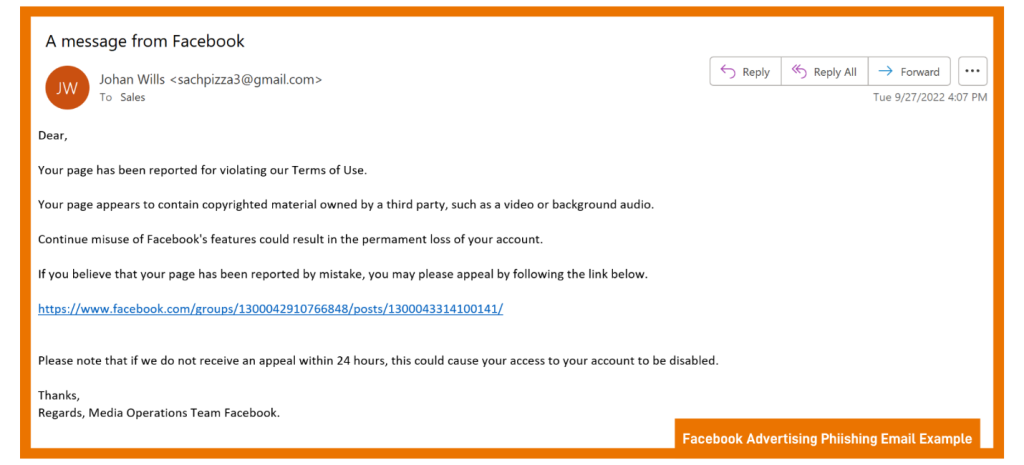
Generally, social engineering involves some type of deception to gather information to commit fraud or gain access to a computer. For instance, our google account uses Meta for Business to run our Facebook Page. Often, we will get a general email to our work email claiming our ads were blocked or taken down due to a violation. It would be tempting to open the email and click on such a link if we actually ran ads there.

Do you know what typosquatting is? Pay attention to the spelling of website addresses. They may resemble a real website, but instead, they are misspelled, for example, GOOGLE.com vs. G00GLE.com.

Any email including an offer of any kind should raise suspicions, especially if it seems too good to be true. The same applies to receiving offers from social media or reputable internet businesses, like Facebook and Google.


Caller ID Spoofing; What You Need to Know

“ID spoofing,” is another cybercrime you must be aware of. These days, a random phone call is more likely than ever to be a scammer. Criminals can fool people by hiding their information using “spoofing.” Spoofing disguises, the telephone number from which a text is sent by creating a new one. Phony numbers with the same area code are often used to persuade recipients to answer. The scary thing for businesses is that they can make it look like your number, and call clients.

All of your business numbers and extensions represent assets that you need to protect. Software like IntelePeer and Hiya Connect Secure Call can stop scammers from mimicking your phone numbers, regardless of how many lines and extensions you have in your internal network.


Is Public Wi-Fi Safe?

Unfortunately, public Wi-Fi is not secure. Several security risks are associated with using a public Wi-Fi. These networks broadcast signals through radio frequencies, which means that anyone who has the right tools, and these tools are fairly easy to find, can intercept the data that is sent through it.

To protect yourself when using public Wi-Fi, you should use either a remote desktop or virtual desktop. DO NOT USE A VPN!

A VPN (Virtual Private Network) helps you establish a private network while using any public networks. While beneficial to provide access to employees and third parties, this access is open-ended and unsecure. All security capabilities are lost when granting third parties’ remote access via VPN. VPNs lack access controls and session monitoring, both effective means of security for network access. VPNs don’t manage, vault, or verify credentials, so password protection depends on your third parties keeping them safe.

Remote desktop solutions are becoming increasingly familiar with the increased prevalence of distributed workforces and more employees regularly working from home. It’s perfect for people who are either frequently on the go, work out of a home office, or are often out in the field and need access to their local desktop computer. RDP is encrypted by default with a higher level of encryption than VPN and requires no additional connection time.

Even if you have a virtual desktop, don’t store any type of critical data on a device, and then use it outside of a network that is not secure. That means downloading documents to your cellphone, then connecting to Starbucks’ free Wi-Fi to watch TikTok. Turn off the Bluetooth and Wi-Fi on your cell phone or laptop when you aren’t using them, a device that can still send wireless signals appeals to a hacker.


What Is a Credit Freeze?

If you don’t have a credit freeze on your business bank account, you are putting your business at further risk. A credit freeze, sometimes called a security freeze, locks down a credit file so that a lender cannot check your credit. This is a good thing, as criminals cannot open any new accounts using your name or your EIN…and if a lender can’t check your credit, they are unlikely to extend a line of credit.

Remember that you must request a credit freeze from each credit bureau, including Equifax, Experian, Innovis, and TransUnion. Remember you can always un-freeze your accounts whenever needed.


Welcome-to-Cybersecurity-Month MiddleKeeping Your Passwords Safe and Protected

The most important thing you need to know about passwords is that there is no secure password. Some passwords are more secure than others, of course, but they can always be found. Passwords are extremely convenient for people who want to access your accounts.

Is a Password Manager a Good Idea?

It’s hard to keep track of all your passwords, so it’s tempting to reuse the same one across the board. However, if a hacker gets possession of your password, they’ll have free access to everything you have. Password managers, on the other hand, can simplify your life.

It’s unsurprising for us to be asked, “are password managers safe to use?” The answer is, the use of password managers is considered to be one of the most secure ways to protect your passwords. Password managers offer strong protection against cybercrime because of their encryptions. AES, the industry-standard protection used by the U.S. government to safeguard its sensitive data, is just one example.


Set Up Two Factor Authentication on All Accounts

Password authentication is when a user enters a unique ID and key compared to previously stored credentials. It is one of the quickest forms of security; you can set up your device to require some identification before letting someone access your phone. It can be in a passcode, PIN, password, fingerprint, or two-factor authentication (2FA) can be adopted as well.

An additional layer of protection is provided by 2FA, which ensures that the user is whom they say they are. Before gaining access to the account, the user must first provide their username and password. The second piece of information is then requested. Almost every major company and organization website utilizes some kind of two-step, or two-factor, identification.


Protecting Your Credit Cards

Many of us, especially in today’s world, use credit cards for not only our jobs but even our daily lives, and there are several things you can do to protect yourself from credit card fraud.

First, make sure to examine your business credit card statements often to see whether they include any unfamiliar or strange expenses. Check your credit card accounts weekly if you can. Check for both large and small charges. If the hackers want to make a large purchase, they might make a small purchase to ensure it goes through.

You can also set up “push” alerts on your company accounts to receive notifications via email or text when purchases are made. For example, you may receive a text any time purchase over $100 is made, or an email anytime there is an online credit card transaction.

Also, store your credit card numbers online at your peril. It’s safer to manually enter the digits every time you want to purchase than to auto-input via Google or Apple.


Final Words

Many businesses have already installed firewalls, spam filters, and anti-virus software in order to prevent any cybercriminals from breaking in, yet they are still concerned – and we don’t blame them. These preventions are worthless without a dedicated IT team to respond to malicious attacks and fix compromised devices. If you are worried about ransomware or cyber-attacks, bringing in an experienced team to help with the rise in threats can provide a level of service beyond what firms currently have and at a lower cost.

Outside teams like Protected Harbor bring years of actionable experience to strengthen an organization.

We will ensure that your organization is protected from outside threats with well-tested, proven, and integrated technology. Protected Harbor concentrates on six elements throughout the stack, uplink, firewall, switches, hosts, VMs configuration, and storage to safeguard our customers’ operations.


We are offering free cybersecurity assessments and IT audits to all companies that may be interested. You can sign up here:  Free Cybersecurity Assessment


GoodFirm.co Recognizes Protected Harbor as a Top Cloud Computing Company

GoodFirm.co Recognizes Protected Harbor banner


GoodFirms.co Recognizes Protected Harbor as a Top Cloud Computing Company


goodfirms logo

Today, Protected Harbor was recognized by GoodFirms, a leading review platform for software and service providers, as one of the Top Cloud Computing Companies in the United States.

GoodFirms is a revolutionary research and review platform with a worldwide database of software service providers. To link service providers and their relevant customers, GoodFirms analyses the company on three crucial parameters: Quality, Reliability, and Ability. Customer reviews and published interview articles are also considered for the evaluation process.

Here is what GoodFirms’ Anna Stark had to say about Protected Harbor’s IT Support and Cloud Computing Solutions:

Started in 2009, Protected Harbor delivers technology stability and durability for organizations, resulting in flawless operations of desktops, data centers, and applications. The company implements a Technology Improvement Plan (TIP) that involves industry best practices to resolve issues. The TIP offers protection with the help of unique Application Outage Avoidance (AOA) technology and support from the Support Resolution Team.

Interestingly, Protected Harbor works with organizations to solve more complex problems and be more responsive. The company focuses on direct end-user support while assuring that the company’s back-end operations like web servers and computer networking run effortlessly.

The team strives hard to resolve issues before they become problems, enabling organizations not to be worried about the technology. The company aims to turn technology back into a benefit and not a cost center. The team finds long-term solutions that help clients focus on their business processes. The clients can have reliable, durable, and secure business technology solutions with Protected Harbor.

Indeed, the Protected Harbor guard businesses and their IT operations from attacks, whether known or unknown, that include Ransomware, Malware, Viruses, and Phishing. The customers can efficiently make their business IT strong and keep their business protected and safe from ransomware attacks, viruses, useless subscriptions, phishing attacks, and end-user problems with Protected Harbour.


Protected Harbor aims to ensure clients achieve optimal technological productivity. The company treats clients as partners and thoughtfully listens to the client’s business and technology issues, and delivers technology solutions tailored to the client’s business requirements.

Protected Harbor offers a wide range of secure colocation solutions for healthcare organizations to handle healthcare challenges. Team Protected Harbor enables clients to protect their desktop issues such as ransomware, malware, and virus protection. Clients have complete remote access and 24 hour, 365-day support.

The unified VoIP solution and VoIP software phone system, video conferencing, and mobile app are easy to use and effortlessly protect clients’ phones. Plus, the clients can have the power of desktop QuickBooks and the security and convenience of a remote desktop connection with Protected Books. The protected data center and hosting solution virtually eliminate crashes, failures, and outages.

This one-stop technology company offers solutions that involve software, hardware infrastructure, cloud migration, disaster recovery, security, and cloud back-up. The company offers customers remote cloud access, 99.99% uptime, proactive monitoring, and private cloud backup.

The team of experts enables clients to get value from the virtual office-hosted solutions and efficiently work with businesses of all sizes to carry out business operations faster. The clients can migrate their systems to the cloud to reduce and control IT costs, enhance security and disaster preparedness, minimize maintenance, and increase the workforce’s productivity.

Consequently, the excellent cloud computing services enable Protected Harbor to gain a prestigious position amongst the renowned cloud computing companies in the United States at GoodFirms.

Apart from the services mentioned above, Protected Harbor delivers specialized IT services for small and medium-sized businesses. The certified IT engineers focus on keeping clients’ businesses going. The team builds reliable IT infrastructure with a strategic approach that drives clients’ business growth.


About the Author

goodfirm authorWorking as a Content Writer at GoodFirms, Anna Stark bridges the gap between service seekers and service providers. Anna’s dominant role is to figure out company achievements and critical attributes and put them into words. She strongly believes in the charm of words and leverages new approaches that work, including new concepts that enhance the firm’s identity.

Why Are Information Silos Important and What Do They Mean?

What Are Information Silos and Why Are They Important?


Information Silos are an organizational phenomenon. They are not always positive but they can definitely become negative when they result in the fragmentation of information and data that is isolated from other sources. When this happens, it can make it more challenging to find the right information at the needed time. But, what exactly are Information Silos and why are they important?

In our third episode of Uptime with Richard, we’ll understand in detail everything about Information Silos and why they are important for your organization. We’ll also provide you with examples of Information Silos, explain how to identify them within your company, and show you how to break them down.

Quick Fact: Workers spend 36% of their workdays seeking and compiling information, according to CMS Wire. However, 44% of the time, they cannot locate the data. Information Silos are the root cause of this lost time and effort.


What Are Information Silos?

The term “silo” has been used in management for many years. It often refers to a lack of cohesiveness within an organization. In the vast majority of businesses, this problem has emerged repeatedly.

Information Silos are specific information assets within your company that isn’t being shared with the rest of your organization. They are defined by the fact that they aren’t connected with other data sources within your business. Silos usually form because of a cultural or organizational preference for keeping data separate rather than bringing it together. Silos might exist for a variety of reasons. This can depend on the types of information assets that are being isolated, the organizational culture, and the different preferences of multiple employees. Silos can be caused by several factors, including cultural norms and organizational structures, aligned incentives across siloed departments, and restrictive laws


Information SilosExamples of Information Silos

  • Missing, outdated, or unorganized data in a CRM.
  • A flawed integration of a tool or set of tools.
  • Forgetting to include essential email conversations with decision-makers.
  • Using too many tools at once makes information scattered and difficult to find.
  • Quote-to-cash operations that move more slowly due to process complexity.

Key Takeaway

Silos are created when different teams, departments, or areas of a company start to become isolated and don’t share information with each other. Information Silos are important because they can lead to inefficient use of resources and poor decision-making. They can be caused by cultural norms, organizational structures, aligned incentives, and restrictive laws. The most common type of Information Silos are those that exist in marketing, where marketing owns its budgets, KPIs, and content.

A business owner must create clear plans for their staff members of what they are trying to accomplish; they can take the help of a third-party service provider who will take care of the data strategy and handling. They must also create a setting where workers can cooperate and speak with one another. Through cutting-edge features that encourage productivity and always keeping everyone on the same page, Protected Harbor is here to help.

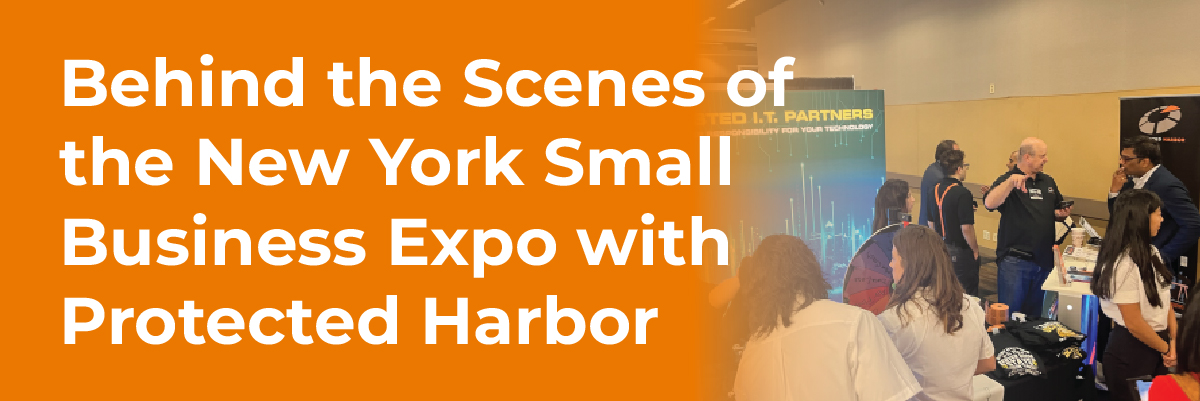
Behind the Scenes of the New York Small Business Expo with Protected Harbor

Behind the Scenes of the New York Small Business Expo with Protected Harbor

Behind the Scenes of the New York Small Business Expo with Protected Harbor

SUMMARY

Protected Harbor recently attended the New York Small Business Expo which was held on Friday, June 24th, 2022 at the New York Hilton Midtown. This was an incredible opportunity to showcase our products to a diverse crowd of small business owners and entrepreneurs that left our booth buzzing with interest.

As one of the top expo exhibitors, Protected Harbor was featured in a prominent position and given significant exposure. Our top-notch security system and remote monitoring capabilities were on full display for prospective clients to review.

The entire Protected Harbor team was there to support the New York small business community, which in all, had one common goal–to help small businesses in New York grow and succeed.

Though we assist clients with their technology issues, engineers at Protected Harbor also focus on prevention and protection, which helps to keep small businesses safe. By providing small business owners with the information they need to succeed, Protected Harbor helps to ensure a stronger economy for the entire region.


Attendee Survey

The small business owners attending the expo were allowed to complete a quick survey about their current IT problems and future business goals which also gave them the opportunity to receive a free IT assessment. The assessment was designed to identify any weaknesses within their business’s current technology and for us to create a customized roadmap to upgrade and improve the company’s current technological situation. The IT assessment was performed by Protected Harbor’s team of certified engineers and consultants, who were available to answer any questions during the expo.

With this survey making its way around the expo, we found that their most significant technology pain point was their inadequate IT and managed services;


New-York-Small-Business-Expo smallWorkshop with CEO Richard Luna

CEO Richard Luna hosted the workshop, “Does Your IT Suck? 2022 Small Business IT Trends.” In his presentation, he spoke about how small businesses can stay ahead of the curve and avoid the pitfalls of technology failing them. He discussed the do’s and don’ts of small business IT, and how to choose the right technology for your business. By the end of the workshop, attendees understood how to choose the right IT vendors for them, how to plan for future technology, how to nail down the best practices for vendor selection, and how to keep their data safe.


Does your IT suck?

Are you frustrated, pissed off, and fed up with bad IT support and MSPs? If your answer is yes, then you are not alone.

There are many businesses that have received poor support from their current IT vendor and are searching for new ones. Pick a partner like Protected Harbor that has a team of certified and experienced engineers who are passionate about helping businesses.

We’re a US-based company that specializes in cloud hosting, VPS hosting, dedicated servers, network solutions, and everything in between. Whether you’re an enterprise-level company or a start-up, we’ve got you covered. Thanks to our hands-on approach and an emphasis on customer service, we’ve earned a reputation as one of the most reliable hosting providers in the industry.

Missed the New York Small Business Expo for 2022? You can still get a free IT audit, contact us today!

Success for Protected Harbor at the 2022 Small Business Expo

Protected harbor excels at small business expo 2022


Protected Harbor excels at Small Business Expo 2022

Small businesses know that the road to success can be a tough one. Finding reliable, affordable services and resources can be challenging too.

Winfree tshirts AirPods and apple watches small

To help them get through the rough spots and reach the business expansion goal, businesses of all sizes should participate in a Small Business Expo like this. This free event is held at New York Hilton Midtown, Americas Hall, packed with helpful resources for business owners. Protected Harbor at Booth 3524 is giving away all the industry secrets IT companies don’t want you to know. Learn how to pick the right provider for your company, the best questions to ask, and what tech trends are helping businesses grow in 2022.

Booth 3524 is a one-stop-shop for all your IT needs. Our experts can help you select the right cloud, virtual, data center, security, and network technologies to meet your company’s needs. The best way to choose the right technology for your company is to speak with an expert and narrow down your choices. Ask about the benefits and drawbacks of each technology and which one best fits your needs.

Also, we are giving away free t-shirts, Apple AirPod Pro’s, Apple MagSafe Wireless Portable Battery Pack, and Apple Watches. So what are you waiting for? Come win!

Top 5 Questions every CEO must ask their IT team

Top 5 questions every CEO must ask their IT team


Top 5 Questions every CEO must ask their IT team

Board-of-DirectorsCEOs and company executives are ultimately accountable for safeguarding their organization’s long-term security, which helps mitigate cyber risks. As executives become more aware of risk and security management, they ask increasingly nuanced and complicated leaders questions. At the board level, interest in security and risk management (SRM) is at an all-time high. In Gartner’s security and risk survey in 2019, four out of five respondents stated that security risk influences board decisions.
The Gartner research assists security and risk management leaders analyze five types of questions that they should be prepared to answer at any executive or board-level meeting. Here are those questions.

  • The Trade-Off Question
  • The Landscape Question
  • The Risk Question
  • The Performance Question
  • The Incident Question
  • Decipher Complex Board Questions

Let’s discuss each of these in detail.

1. The Trade-Off Question_ Are we 100% secure? 

The trade-off question is that the security and management risk leaders struggle greatly. The question “Are we secure?” needs improvising and is generally asked by the executives who are uneducated and unaware of the impact of security risks on the business. It is impossible to prohibit 100% of the incidents in this scenario. The CISO’s responsibility is to help identify and evaluate the potential risks for an organization and allocate resources to manage them.

According to Gartner’s report, a security and risk management leader, in response to this question, might say, “It is impossible to remove all resources of the information risk considering the evolving nature of the cyber threat landscape. My responsibility is to work with other aspects of the business to execute controls for managing security risks that can prevent us from improving operational efficiency and brand image. There is no such thing as ‘perfect protection’ in security. We have to reassess continually how much risk is appropriate as the business grows. We aim to develop a sustainable program to balance the requirements to protect against the needs to run a business”.

2. The Landscape Question_ How bad is it out there?

Most executives want to know their security compared to peer organizations. They read threat reports and blogs, listen to the broadcast, and even are forced by the regulation to understand such things. Gartner recognizes the need to discuss this landscape. Leaders need to avoid trying to quantify risks and attach specific budget figures to the mitigation cost depending on something external. Moreover, when benchmarks give some material for conversation, they must be a negligible factor in the decision-making process.

Here are some responses that security and risk management leaders can give while discussing the broader security landscape.

External Events Responses
Our primary competitor experienced a public, successful attack.
  • We have a similar vulnerability that can facilitate the attack, addressing that weakness.
  • Enhanced monitoring abilities have been implemented.
There are more attacks against the electricity grids in three national presence points.
  • We don’t expect to become a direct target.
  • Business continuity plans are being tested and updated to overcome the prolonged outage.
We fall under the scope of the new EU General Data Protection requirements.
  • We have conservative and cautious privacy practices in place.

3. The Risk Question_ Do we know what our risks are?

Board-of-Directors 1A risk outside the tolerance needs an antidote to bring it within tolerance. It does not require dramatic changes in a short time, so beware of overreacting. The Gartner report presents a way to defend the risk management decision, and you can change it according to your organization’s risk tolerance.

One of the most common issues encountered in the report is that the evaluations are subjective and depend on flawed methodology. Security leaders must have evidence to support the evaluation, even when they are not called to present it. Another aspect that needs to be considered is whether to depict the typical outcome or the worst. For instance, most incidents in favorable outcomes are within the ability of most companies to absorb. However, there is an infrequent incident that can result in a catastrophic effect.

4. The Performance Question_ Are we appropriately allocating resources?

Security is always a moving target. The security team must demonstrate their behavior to ensure the organization stays safe. It is essential to figure out if the resources are allocated appropriately and where the money is spent. The original strategy proposal should have margins for errors concerning the deadline and the budget. As far as there are overruns within these margins, they must be noncontroversial.

There may be valid reasons even if the overruns are outside the margins. The balanced scorecard approach is a way to understand how security contributes to business performance. In this approach, the top layer defines the business aspiration, and organization performance against those aspirations is expressed using a traffic light mechanism. However, it’s not the only way. Some organizations have different types of dashboards to discuss business performance.

5. The Incident Question_ How did this happen?

An incident is unavoidable, and treatment is a blessing in disguise. Security and risk management leaders should be aware that incident details may have been tightly controlled (such as sensitivities associated with the incident). Using the fact-based approach and explaining your knowledge will eliminate the mystery and give confidence that you have control over the incident. Acknowledging the incident provides details on the business impact, outlines the flaws or gaps needed to work out, and offers a mitigation plan.

Decipher Complex Board Question

There are usually no deterministic answers to the board question, and responses are generally more about showing options for sponsorship instead of a definitive course of action. The options can vary based on the context of the discussion, the board’s maturity, the SRM leader’s communication skills, and reporting frequency. However, understanding and answering board questions require everyone to understand their roles. Therefore, the SRM leader should know that the board is interested in facilitating the business goal.  Any query that may seem immature, ignorant, or complicated has a purpose. Here’s why every executive should understand the basics of cybersecurity.

As we move further into this Digital Age, it’s important for security and risk management leaders to be at the forefront of protection. Unfortunately, there will always be new threats that emerge and risks to manage. However, there are a variety of technologies and strategies that can help reduce the number of incidents and their severity. These include: reviewing third-party vendors, dual-authorization systems, unstructured data protectors, and big data analytics. As long as companies take a proactive approach to their cybersecurity efforts, they will be prepared when potential threats arise, making the job of SRMs much easier.

Ultimately, the complexity of risk management systems makes it impractical for organizations of every size to create their own. Instead, a renowned solution like Protected Harbor is needed. One that can provide the solutions necessary to resolve your company’s unique needs, with a broad suite of capabilities and an intuitive platform that provides users with the tools needed to respond effectively when crises strike. Because we understand your business and what executives desire, we’ve been assisting several executives with their day-to-day operations. Contact us today for a free IT and cybersecurity audit, take charge of your future, and be cybersecured.